Job site photo documentation, built into the report
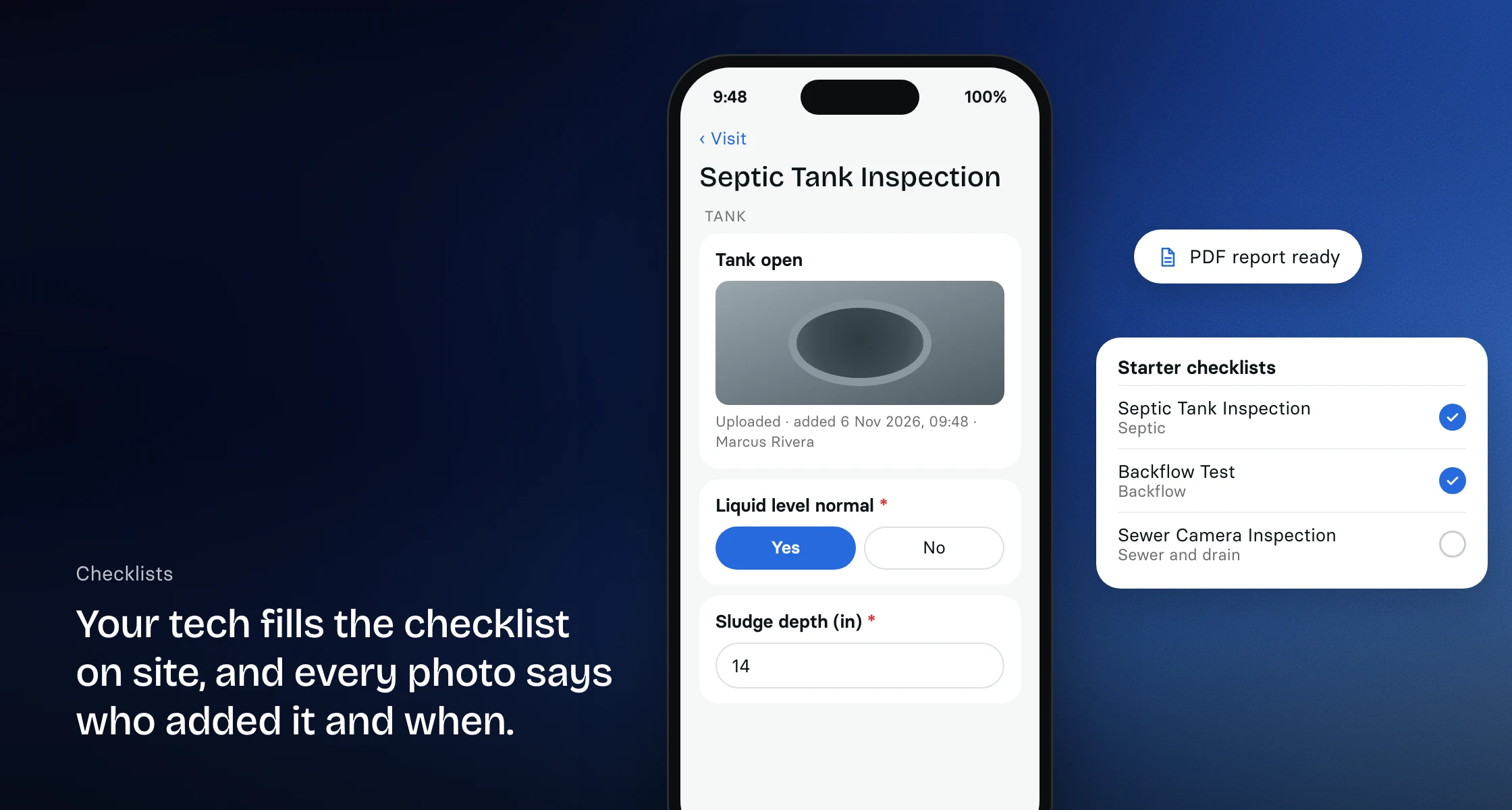
Your techs take photos right in the visit checklist. Each one is stamped with who added it and when, and up to 150 print in a numbered PDF report your client keeps.
What is construction photo documentation?
Construction photo documentation is the set of photos taken on a job site to show what was there before, during and after the work. In Clevra, techs take those photos inside the visit checklist, each one is stamped with who added it and when, and the photos print in a numbered PDF report for the client.
Photos taken where the work is recorded
Add a photo question to any checklist and your tech takes pictures with the phone's camera or picks them from the photo library, right on the visit. A photo question takes up to 30 photos, and techs can add a caption to each one. There is no separate photo app and no camera roll to sort through at the end of the day.
Tell the tech what to photograph
Each photo question says what to shoot: the data plate, the cleanout, the marked-out slab or the water line on the drywall. Mark questions required and set a photo minimum, and the report cannot go out until the photos are in. Clevra's starter checklists for restoration, concrete scanning, sewer and drain, septic and backflow work already include photo questions.
Stamped with who added it and when
Every photo added to a checklist carries a stamp under it with who added it and when, on the web and in the PDF. The image itself is never changed. A photo removed by mistake waits in Recently deleted for 30 days.
Numbered photo reports for your client
Switch on Client report and the checklist becomes a numbered inspection report with your logo, a cover photo, a number on every photo and a sign-off that shows who signed and when. Up to 150 photos print in one report. Your client gets it by email or a secure link that opens without signing in.
Photos from the client before you arrive
Clients can add up to five photos on your online request form, so you see the leak, the crack or the unit before you book the visit. Enquiries forwarded to your Clevra email address arrive with their attachments as photos.
Photos on estimates and receipts
Attach photos or documents to an estimate so the client sees what you are pricing. Log job expenses with a photo or PDF of the receipt, and they count toward the job's profit in job costing.
On the phone today, offline soon
Techs fill in checklists and take photos in Clevra in their phone's browser, with nothing to install. The Technician app for iPhone, coming soon, saves checklist answers and photos without signal and sends them when the phone reconnects. There is no Android app yet, and Clevra does not record GPS locations.
Need a before and after shot?
For a client update or a social post, our free before and after photo maker puts two job photos side by side in your browser and downloads one JPG. Nothing is uploaded.
Using CompanyCam today?
CompanyCam is a dedicated photo app: crews take timestamped photos and videos, the app files them by project, and it adds markup tools on top. Clevra works differently. Photos live inside the job's checklist and report, next to the estimate, schedule and invoice, so it is one app and one bill. If your crew mostly needs a photo feed, CompanyCam fits. If your photos end up in a report your client pays for, Clevra keeps them with the job. Read our CompanyCam review or compare CompanyCam alternatives, or book a call and we will show you.
[
{
"@context": "https://schema.org",
"@type": "SoftwareApplication",
"name": "Clevra",
"description": "Job site photos taken inside the checklist, stamped with who added them and when, and printed in a numbered PDF report for your client. Pro and up.",
"applicationCategory": "BusinessApplication",
"applicationSubCategory": "Photo documentation",
"operatingSystem": "Web",
"offers": {
"@type": "Offer",
"price": "0",
"priceCurrency": "USD",
"description": "Free plan, 1 user, unlimited customers"
},
"url": "https://clevra.ai/features/photo-documentation"
},
{
"@context": "https://schema.org",
"@type": "FAQPage",
"mainEntity": [
{
"@type": "Question",
"name": "Is Clevra a job camera app?",
"acceptedAnswer": {
"@type": "Answer",
"text": "Not a standalone one. Clevra is field service software, and photos are taken inside the visit checklist, stamped with who added them and when, and printed in the client's report. If you only need a camera app with a photo feed, a dedicated app such as CompanyCam fits better."
}
},
{
"@type": "Question",
"name": "How many photos can I add?",
"acceptedAnswer": {
"@type": "Answer",
"text": "A photo question takes up to 30 photos, and up to 150 photos print in one inspection report, each with its own number."
}
},
{
"@type": "Question",
"name": "Are photos time-stamped?",
"acceptedAnswer": {
"@type": "Answer",
"text": "Yes. Each photo added to a checklist carries a stamp with who added it and when, on the web and in the PDF. The image itself is never changed."
}
},
{
"@type": "Question",
"name": "Does Clevra add GPS locations to photos?",
"acceptedAnswer": {
"@type": "Answer",
"text": "No. Each photo is stamped with who added it and when, and the Technician app does not record GPS locations."
}
},
{
"@type": "Question",
"name": "Can my techs take photos without signal?",
"acceptedAnswer": {
"@type": "Answer",
"text": "The Technician app for iPhone, coming soon, saves checklist answers and photos without signal and sends them once the phone is back online. Until then, techs use Clevra in their phone's browser."
}
},
{
"@type": "Question",
"name": "Can clients send me photos?",
"acceptedAnswer": {
"@type": "Answer",
"text": "Yes. Clients can add up to five photos when they fill in your online request form, and the photos arrive with the request."
}
},
{
"@type": "Question",
"name": "Which plans include photo documentation?",
"acceptedAnswer": {
"@type": "Answer",
"text": "Photo questions in checklists and inspection reports come with Pro and Business. The online request form, where clients add photos, is on every plan."
}
}
]
},
{
"@context": "https://schema.org",
"@type": "BreadcrumbList",
"itemListElement": [
{
"@type": "ListItem",
"position": 1,
"name": "Home",
"item": "https://clevra.ai/"
},
{
"@type": "ListItem",
"position": 2,
"name": "Features",
"item": "https://clevra.ai/features"
},
{
"@type": "ListItem",
"position": 3,
"name": "Photo Documentation",
"item": "https://clevra.ai/features/photo-documentation"
}
]
}
]
Is Clevra a job camera app?
Not a standalone one. Clevra is field service software, and photos are taken inside the visit checklist, stamped with who added them and when, and printed in the client's report. If you only need a camera app with a photo feed, a dedicated app such as CompanyCam fits better.
How many photos can I add?
A photo question takes up to 30 photos, and up to 150 photos print in one inspection report, each with its own number.
Are photos time-stamped?
Yes. Each photo added to a checklist carries a stamp with who added it and when, on the web and in the PDF. The image itself is never changed.
Does Clevra add GPS locations to photos?
No. Each photo is stamped with who added it and when, and the Technician app does not record GPS locations.
Can my techs take photos without signal?
The Technician app for iPhone, coming soon, saves checklist answers and photos without signal and sends them once the phone is back online. Until then, techs use Clevra in their phone's browser.
Can clients send me photos?
Yes. Clients can add up to five photos when they fill in your online request form, and the photos arrive with the request.
Which plans include photo documentation?
Photo questions in checklists and inspection reports come with Pro and Business. The online request form, where clients add photos, is on every plan.
All-in-one operations platform for trades.
You run a crew, not a tech company. Clevra handles the office stuff so you can stay on the tools.