Invite your team, decide what each person can see, and track every hour against the job it belongs to. Approve timesheets and confirm payroll in one place.
Crew management software keeps track of who is on your team, what each person can access and where their hours go. In Clevra, you invite technicians with the right role, they track time against jobs and visits, and managers approve timesheets and confirm payroll, so labor lands on the right job.
Invite your crew in a minute
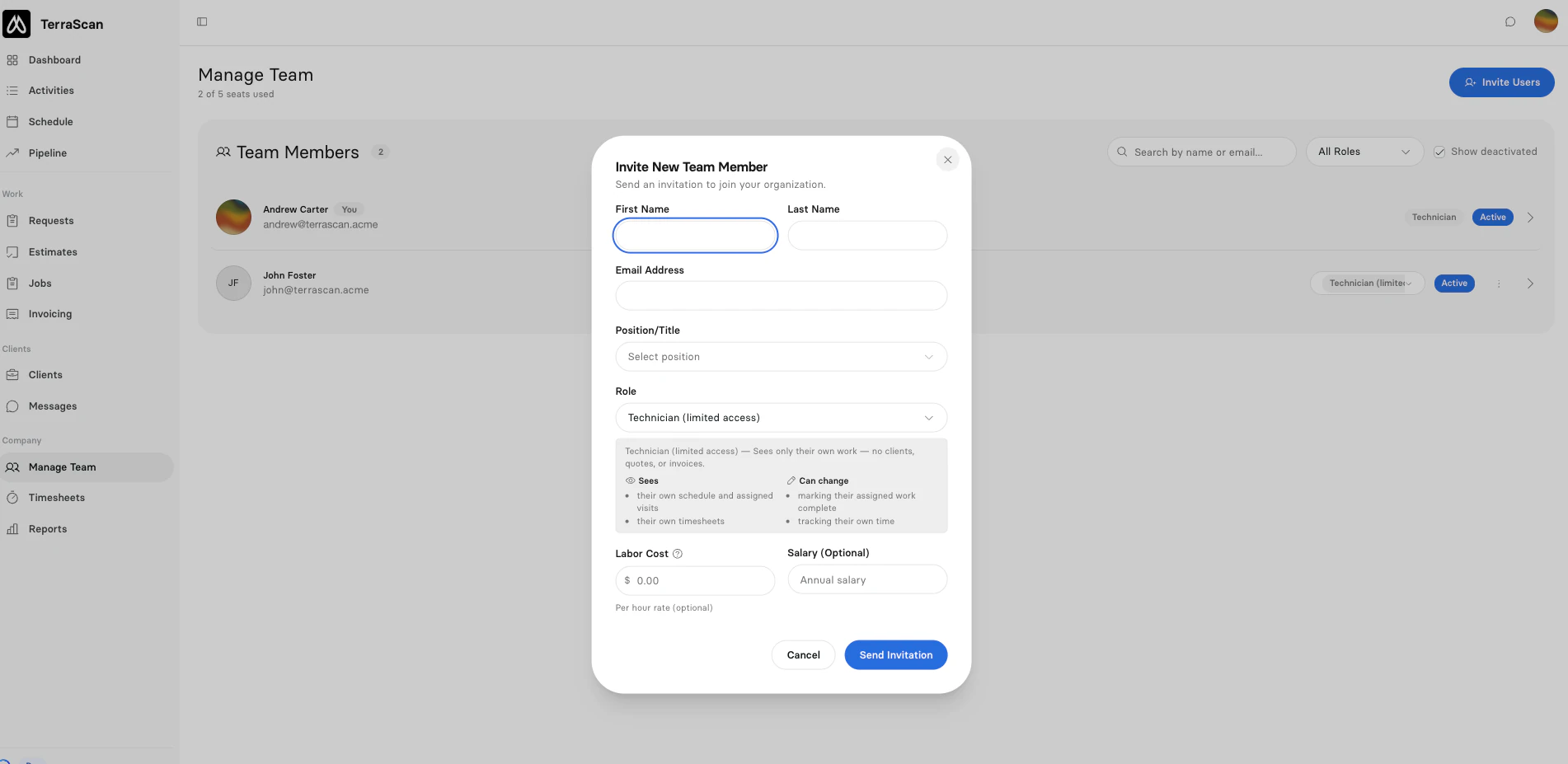
Open Manage Team, click Invite Users and add a name, email, position and role. Set a labor cost per hour and an optional salary, so time spent on a job shows up in its costing. Invitations expire after 14 days, and you can resend or revoke them any time.
The right access for every role
Clevra has seven roles, from Technician (limited access) up to Org Admin. A limited technician sees only their own schedule, visits and timesheets, with no clients, quotes or invoices. Technicians, dispatchers and managers see more, a Payroll Admin confirms pay, and Org Admins run the account. Pay rates stay hidden from anyone who is not allowed to see them.
Change a role any time and it takes effect straight away. When someone leaves, deactivate them: they lose access, come off unfinished jobs, and their history stays in place.
Time tracked against the job
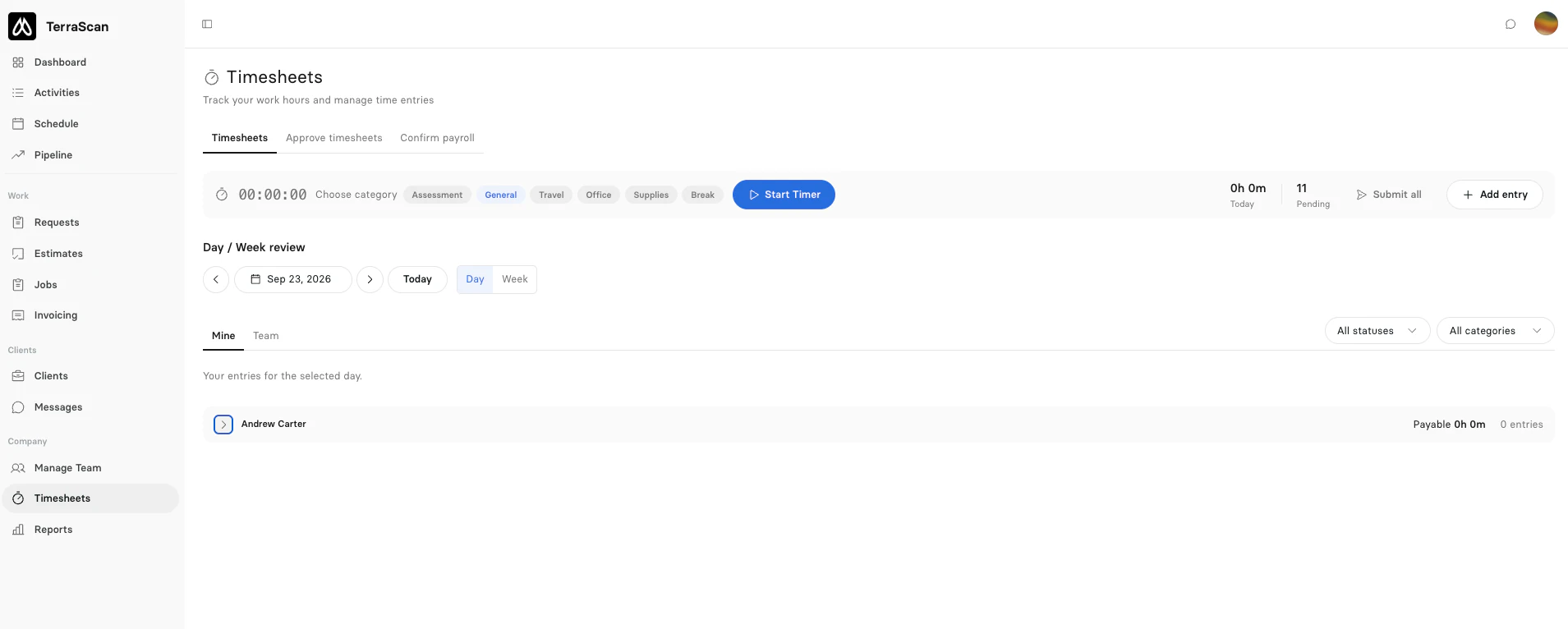
Techs start a timer against a job, visit or request and pick what they are doing, such as travel, an assessment or office work. Switching tasks switches the category, and a forgotten entry can be added by hand as long as it does not overlap another. When a timer stops, the job's labor cost updates on its own.
Timers by category, a day and week review, and timesheet approval and payroll in the same place.
Approve timesheets, then confirm payroll
Workers submit their time, and managers approve it or send it back with a reason. Nobody approves their own hours, and a manager can approve everything up to a date in one click. A Payroll Admin then confirms each person's pay period, which locks those hours for good. Mistakes are voided with a reason, never quietly deleted.
Everyone sees their own day
Assign crew when you book a job and tick a box to email them about it. Each tech sees their own schedule and visits and marks work complete from there. See how scheduling works.
Pricing that does not punish growth
Pro covers up to 5 users and Business up to 15 at a flat price, and Custom plans have no user limit, so a seasonal hire never adds a per-tech fee. See pricing.
Clevra is building a Voice-first AI Field Copilot that will let techs talk through the job and take photos hands-free, turn what they capture into the job record, and flag missing details before they leave the site. It is not available yet. Everything on this page works today without it.
Switching from Jobber or Housecall Pro?
Invite your crew by email and they are set up the same day. Paid plans are flat team prices for up to 5 or 15 users, not a fee per technician, and a solo operator can start on the free plan. Want a hand moving over? Talk to us and we will help.
[{"@context": "https://schema.org", "@type": "SoftwareApplication", "name": "Clevra", "description": "Crew management software for field teams: team invitations, role-based access, job time tracking by category, timesheet approval and payroll confirmation. Flat team pricing.", "applicationCategory": "BusinessApplication", "applicationSubCategory": "Crew Management Software", "operatingSystem": "Web", "offers": {"@type": "Offer", "price": "0", "priceCurrency": "USD", "description": "Free plan, 1 user, unlimited customers"}, "url": "https://clevra.ai/features/crew-management"}, {"@context": "https://schema.org", "@type": "FAQPage", "mainEntity": [{"@type": "Question", "name": "How many people can I add?", "acceptedAnswer": {"@type": "Answer", "text": "The Free plan has 1 user, Pro up to 5, Business up to 15, and Custom has no limit. Pending invitations count toward your seats."}}, {"@type": "Question", "name": "Can I limit what technicians see?", "acceptedAnswer": {"@type": "Answer", "text": "Yes. The Technician (limited access) role sees only their own schedule, visits and timesheets, with no clients, quotes or invoices."}}, {"@type": "Question", "name": "Can techs track time against a job?", "acceptedAnswer": {"@type": "Answer", "text": "Yes. Techs run a timer against a job, visit or request by category, and the job's labor cost updates when the timer stops."}}, {"@type": "Question", "name": "Can I approve timesheets before payroll?", "acceptedAnswer": {"@type": "Answer", "text": "Yes. Managers approve or reject submitted time, and a Payroll Admin confirms each pay period, which locks the hours."}}, {"@type": "Question", "name": "Can I hide pay rates?", "acceptedAnswer": {"@type": "Answer", "text": "Yes. Pay rates only show to roles allowed to see pay. Everyone can always see their own."}}, {"@type": "Question", "name": "What happens when someone leaves?", "acceptedAnswer": {"@type": "Answer", "text": "Deactivate them. They lose access right away, come off unfinished jobs, and their records stay. You can reactivate them within 90 days."}}]}, {"@context": "https://schema.org", "@type": "BreadcrumbList", "itemListElement": [{"@type": "ListItem", "position": 1, "name": "Home", "item": "https://clevra.ai"}, {"@type": "ListItem", "position": 2, "name": "Features", "item": "https://clevra.ai/features"}, {"@type": "ListItem", "position": 3, "name": "Crew management", "item": "https://clevra.ai/features/crew-management"}]}]
FAQ
How many people can I add?
The Free plan has 1 user, Pro up to 5, Business up to 15, and Custom has no limit. Pending invitations count toward your seats.
Can I limit what technicians see?
Yes. The Technician (limited access) role sees only their own schedule, visits and timesheets, with no clients, quotes or invoices.
Can techs track time against a job?
Yes. Techs run a timer against a job, visit or request by category, and the job's labor cost updates when the timer stops.
Can I approve timesheets before payroll?
Yes. Managers approve or reject submitted time, and a Payroll Admin confirms each pay period, which locks the hours.
Can I hide pay rates?
Yes. Pay rates only show to roles allowed to see pay. Everyone can always see their own.
What happens when someone leaves?
Deactivate them. They lose access right away, come off unfinished jobs, and their records stay. You can reactivate them within 90 days.
All-in-one operations platform for subsurface scanning and utility locating.
You run a crew, not a tech company. Clevra handles the office stuff so you can stay on the tools.