Checklists your crew fills on every visit
Build a checklist once, attach it to jobs, and your techs fill it in on site. Completed checklists become a PDF your client can see in their portal.
What is a field service checklist?
A field service checklist is a form your technician fills in during a visit, such as an inspection or a test report. In Clevra you build checklists from question types like numbers, yes or no, photos and signatures, attach them to jobs, and share the completed checklist as a PDF.
Build forms that match your work
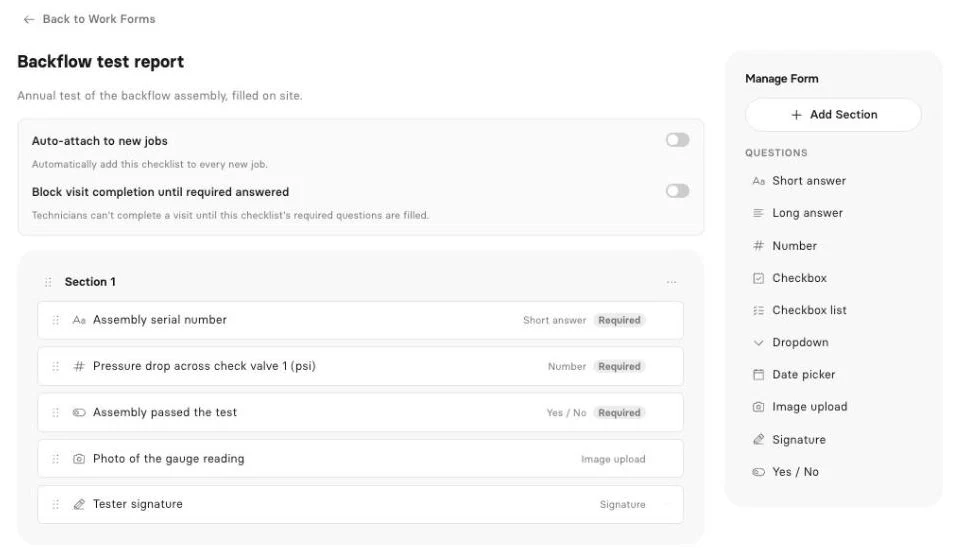
Add sections and questions: short and long answers, numbers, checkboxes, dropdowns, dates, image uploads, signatures and yes or no. Mark questions as required so nothing gets skipped.
Attach them where they belong
Attach a checklist to a job and its visits pick it up. Set a checklist to attach itself to every new job, or set default checklists for a client.
Required before the visit closes
Turn on blocking and a visit cannot be completed until the checklist's required questions are answered. Non-blocking checklists ask the tech to confirm before closing.
A PDF for your client
A completed checklist becomes a PDF you can download or email, and your client can see it in their client portal. The PDF carries your company name.
Plans and the Technician app
Checklists come with Pro and Business. In the Technician app (iOS beta), techs can fill checklists, while photo and signature questions are answered in the web app for now.
More on how Clevra works: Scheduling, Estimates, Invoicing, Payments, CRM.
Switching from Jobber or Housecall Pro?
Rebuild your forms in Clevra in minutes, attach them to jobs, and every completed checklist turns into a PDF for your client. Want a hand moving over? Book a call with our team and we will help.
[{"@context": "https://schema.org", "@type": "SoftwareApplication", "name": "Clevra", "description": "Build checklists with text, numbers, yes/no, photos and signatures. Attach them to jobs, require them before a visit closes, and share the PDF. Pro and up.", "applicationCategory": "BusinessApplication", "applicationSubCategory": "Checklists", "operatingSystem": "Web", "offers": {"@type": "Offer", "price": "0", "priceCurrency": "USD", "description": "Free plan, 1 user, unlimited customers"}, "url": "https://clevra.ai/features/checklists"}, {"@context": "https://schema.org", "@type": "FAQPage", "mainEntity": [{"@type": "Question", "name": "What question types can I use?", "acceptedAnswer": {"@type": "Answer", "text": "Short and long answers, numbers, checkboxes, checkbox lists, dropdowns, dates, image uploads, signatures and yes or no."}}, {"@type": "Question", "name": "Can a checklist stop a visit from closing?", "acceptedAnswer": {"@type": "Answer", "text": "Yes. Turn on blocking and the visit cannot be completed until the required questions are answered."}}, {"@type": "Question", "name": "Can checklists attach to jobs automatically?", "acceptedAnswer": {"@type": "Answer", "text": "Yes. A checklist can attach itself to every new job, or you can set default checklists for a client."}}, {"@type": "Question", "name": "Can my client see the completed checklist?", "acceptedAnswer": {"@type": "Answer", "text": "Yes. Completed checklists are visible in the client portal, and you can email or download the PDF."}}, {"@type": "Question", "name": "Which plans include checklists?", "acceptedAnswer": {"@type": "Answer", "text": "Pro and Business. Checklists are not on the Free plan."}}]}, {"@context": "https://schema.org", "@type": "BreadcrumbList", "itemListElement": [{"@type": "ListItem", "position": 1, "name": "Home", "item": "https://clevra.ai"}, {"@type": "ListItem", "position": 2, "name": "Features", "item": "https://clevra.ai/features"}, {"@type": "ListItem", "position": 3, "name": "Checklists", "item": "https://clevra.ai/features/checklists"}]}]
What question types can I use?
Short and long answers, numbers, checkboxes, checkbox lists, dropdowns, dates, image uploads, signatures and yes or no.
Can a checklist stop a visit from closing?
Yes. Turn on blocking and the visit cannot be completed until the required questions are answered.
Can checklists attach to jobs automatically?
Yes. A checklist can attach itself to every new job, or you can set default checklists for a client.
Can my client see the completed checklist?
Yes. Completed checklists are visible in the client portal, and you can email or download the PDF.
Which plans include checklists?
Pro and Business. Checklists are not on the Free plan.
All-in-one operations platform for trades.
You run a crew, not a tech company. Clevra handles the office stuff so you can stay on the tools.