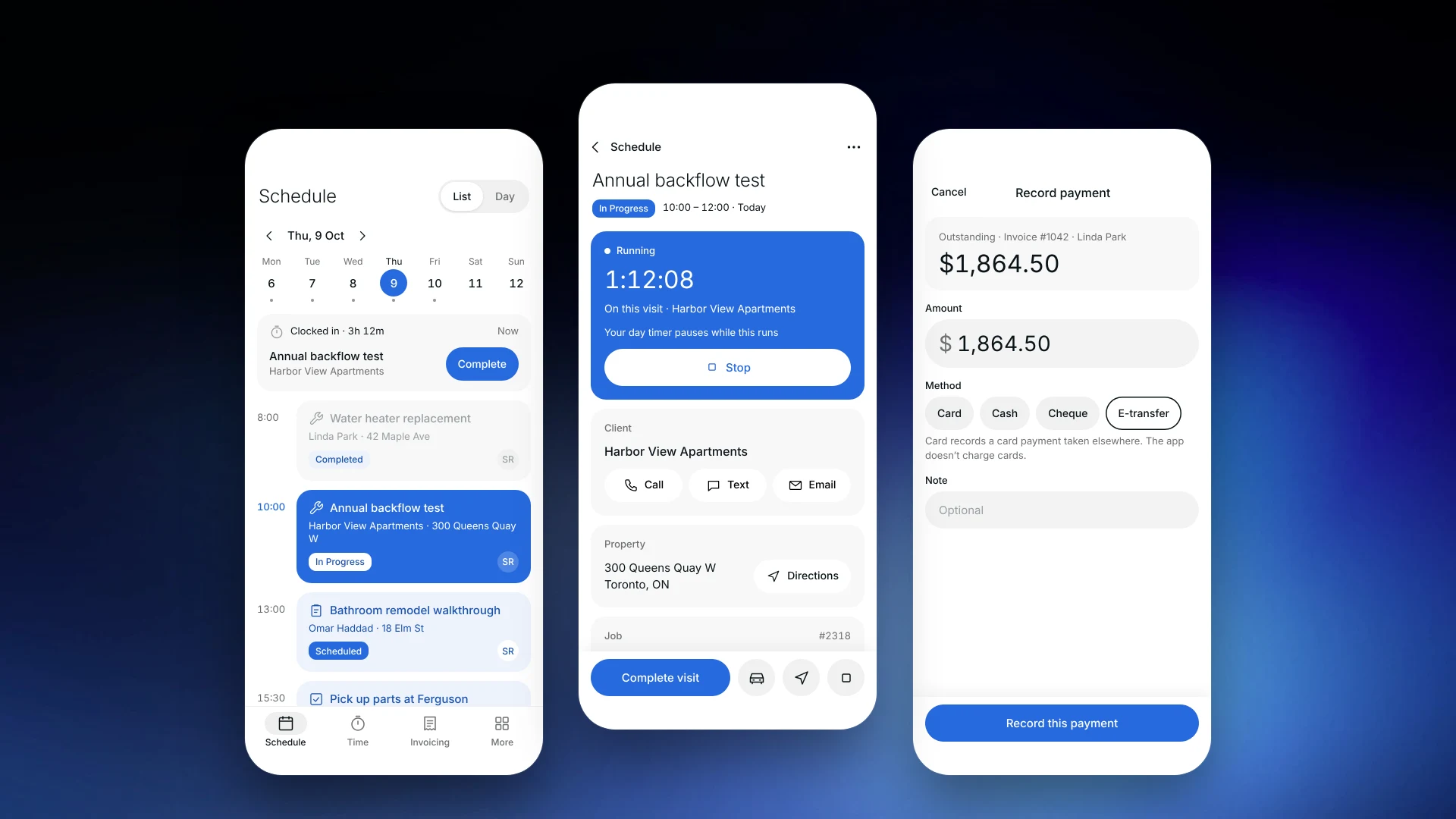
The Technician app puts the day in your crew's pocket
Your techs see their schedule, open each visit, tap On My Way and Complete, track time and fill checklists. The Technician app is in beta on iOS through TestFlight.
What is a technician app?
A technician app is the mobile side of field service software: it shows each tech their own visits and lets them update the job from the site. Clevra's Technician app, in beta on iOS, covers the day's schedule, visit details, timers and timesheets, checklists, invoices and recorded payments.
Their day, their visits
Techs see their own schedule and open each visit for the client, property, job notes, line items and team. One tap opens directions in their maps app.
On My Way, Start, Complete
Tap On My Way to let the client know you are coming, start the visit and complete it from the site. The office sees the status change in Clevra.
Time tracked, even offline
Run a timer on a visit, and the day's timesheet keeps working without a signal and syncs later. See crew management.
Checklists and invoices on site
Fill in visit checklists, create an invoice and record a cash, cheque, card or e-transfer payment taken on site. The app records payments; it does not charge cards.
Beta today
The Technician app is in beta on iOS through TestFlight. It is not in the App Store yet, and Android is not available. Photos, signatures and GPS are not in the app yet; the full web app works on any phone browser.
More on how Clevra works: Scheduling, Estimates, Invoicing, Payments, CRM.
Switching from Jobber or Housecall Pro?
Invite your crew and they get the Technician app beta on their iPhones, with the full web app on any phone browser in the meantime. Want a hand moving over? Book a call with our team and we will help.
[{"@context": "https://schema.org", "@type": "SoftwareApplication", "name": "Clevra", "description": "The Clevra Technician app (iOS beta) gives your crew their day, visit details, timers, checklists and invoices. Timesheets work offline.", "applicationCategory": "BusinessApplication", "applicationSubCategory": "Technician app", "operatingSystem": "Web", "offers": {"@type": "Offer", "price": "0", "priceCurrency": "USD", "description": "Free plan, 1 user, unlimited customers"}, "url": "https://clevra.ai/features/technician-app"}, {"@context": "https://schema.org", "@type": "FAQPage", "mainEntity": [{"@type": "Question", "name": "Is the Technician app in the App Store?", "acceptedAnswer": {"@type": "Answer", "text": "Not yet. It is in beta on iOS through TestFlight."}}, {"@type": "Question", "name": "Is there an Android app?", "acceptedAnswer": {"@type": "Answer", "text": "Not yet. Android techs can use the Clevra web app in their phone's browser."}}, {"@type": "Question", "name": "Does it work offline?", "acceptedAnswer": {"@type": "Answer", "text": "Visit timers and timesheets work offline and sync when the phone is back online."}}, {"@type": "Question", "name": "Can techs take payments in the app?", "acceptedAnswer": {"@type": "Answer", "text": "They can record cash, cheque, card or e-transfer payments taken on site. The app does not process card payments."}}, {"@type": "Question", "name": "Can techs add photos or signatures in the app?", "acceptedAnswer": {"@type": "Answer", "text": "Not yet. Photo and signature checklist questions are answered in the web app for now."}}]}, {"@context": "https://schema.org", "@type": "BreadcrumbList", "itemListElement": [{"@type": "ListItem", "position": 1, "name": "Home", "item": "https://clevra.ai"}, {"@type": "ListItem", "position": 2, "name": "Features", "item": "https://clevra.ai/features"}, {"@type": "ListItem", "position": 3, "name": "Technician app", "item": "https://clevra.ai/features/technician-app"}]}]
Is the Technician app in the App Store?
Not yet. It is in beta on iOS through TestFlight.
Is there an Android app?
Not yet. Android techs can use the Clevra web app in their phone's browser.
Does it work offline?
Visit timers and timesheets work offline and sync when the phone is back online.
Can techs take payments in the app?
They can record cash, cheque, card or e-transfer payments taken on site. The app does not process card payments.
Can techs add photos or signatures in the app?
Not yet. Photo and signature checklist questions are answered in the web app for now.
All-in-one operations platform for trades.
You run a crew, not a tech company. Clevra handles the office stuff so you can stay on the tools.