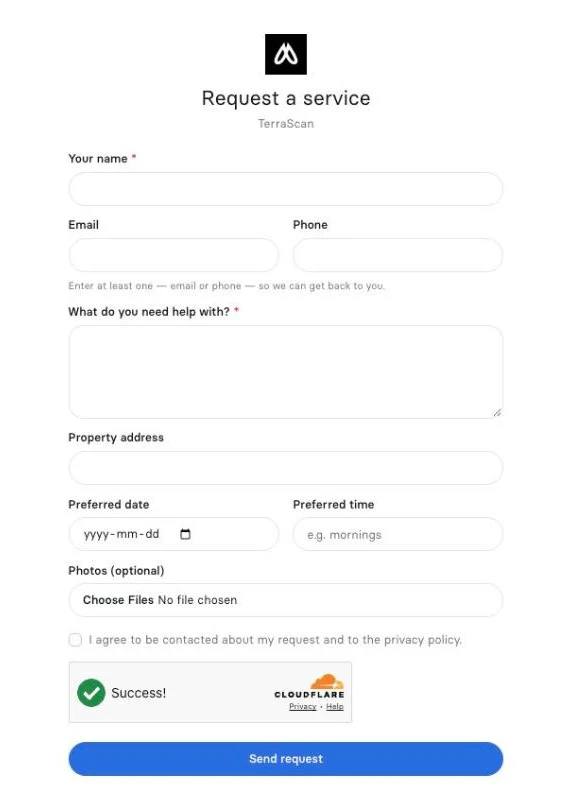
Turn website visitors into requests with a hosted form
Share your Clevra request form link or embed it on your site. Clients describe the job, add photos and a preferred time, and the request lands in Clevra with the client saved.
What is an online request form for contractors?
An online request form lets a client ask for work from your website without calling. Clevra hosts the form for you: the client enters what they need, the address, a preferred date and photos, and the request arrives in your Requests list with the client saved as a lead.
A form that is ready on day one
Every company gets a hosted form at its own link. Turn it on under Settings, then share the link or copy the embed code onto your website. Clients enter their name, email or phone, what they need help with, the property address, a preferred date and time, and optional photos.
Requests land in one place
New requests show up in Requests with the client attached, ready to assess, estimate or turn into a job. Choose which team members get an email the moment a request arrives. See how clients and the sales pipeline work.
More ways in
Requests can also come from an inbound email address, a webhook or the public API, and existing clients can request work from the client portal.
Less spam, fewer duplicates
The form has spam protection, and Clevra matches requests to existing clients so you do not end up with the same person twice.
From request to paid
Assess the job, send an estimate, book the visit on the schedule and invoice when the work is done.
More on how Clevra works: Scheduling, Estimates, Invoicing, Payments, CRM.
Switching from Jobber or Housecall Pro?
Your request form is ready as soon as you sign up, on every plan including Free. Paste the embed code on your site and new requests start landing in Clevra. Want a hand moving over? Book a call with our team and we will help.
[{"@context": "https://schema.org", "@type": "SoftwareApplication", "name": "Clevra", "description": "A hosted request form for your website: clients send the job, address, preferred date and photos, and it lands in your Requests list. Free plan included.", "applicationCategory": "BusinessApplication", "applicationSubCategory": "Request forms", "operatingSystem": "Web", "offers": {"@type": "Offer", "price": "0", "priceCurrency": "USD", "description": "Free plan, 1 user, unlimited customers"}, "url": "https://clevra.ai/features/request-forms"}, {"@context": "https://schema.org", "@type": "FAQPage", "mainEntity": [{"@type": "Question", "name": "Do I need a website to use the request form?", "acceptedAnswer": {"@type": "Answer", "text": "No. Every company gets a hosted form at its own link that you can share anywhere. If you have a website, you can embed it there too."}}, {"@type": "Question", "name": "What do clients fill in?", "acceptedAnswer": {"@type": "Answer", "text": "Name, email or phone, what they need, the property address, a preferred date and time, and optional photos."}}, {"@type": "Question", "name": "Where do new requests go?", "acceptedAnswer": {"@type": "Answer", "text": "Into your Requests list in Clevra, with the client saved. The team members you choose get an email when one arrives."}}, {"@type": "Question", "name": "Is the request form on the Free plan?", "acceptedAnswer": {"@type": "Answer", "text": "Yes. The hosted form is included on every plan."}}, {"@type": "Question", "name": "Can clients pick an exact appointment slot?", "acceptedAnswer": {"@type": "Answer", "text": "No. Clients suggest a preferred date and time, and your office books the visit."}}]}, {"@context": "https://schema.org", "@type": "BreadcrumbList", "itemListElement": [{"@type": "ListItem", "position": 1, "name": "Home", "item": "https://clevra.ai"}, {"@type": "ListItem", "position": 2, "name": "Features", "item": "https://clevra.ai/features"}, {"@type": "ListItem", "position": 3, "name": "Request forms", "item": "https://clevra.ai/features/request-forms"}]}]
Do I need a website to use the request form?
No. Every company gets a hosted form at its own link that you can share anywhere. If you have a website, you can embed it there too.
What do clients fill in?
Name, email or phone, what they need, the property address, a preferred date and time, and optional photos.
Where do new requests go?
Into your Requests list in Clevra, with the client saved. The team members you choose get an email when one arrives.
Is the request form on the Free plan?
Yes. The hosted form is included on every plan.
Can clients pick an exact appointment slot?
No. Clients suggest a preferred date and time, and your office books the visit.
All-in-one operations platform for trades.
You run a crew, not a tech company. Clevra handles the office stuff so you can stay on the tools.