Record cash, check, card and bank transfer payments against any invoice in seconds, and every balance updates itself. Online card payments through Stripe are coming soon.
How do field service businesses take payments online?
Field service businesses take payments online by sending invoices with a secure pay link connected to a card processor. In Clevra, online card payments through Stripe are coming soon. Today you record cash, check, card and bank transfer payments against each invoice, from the office or on site, and every balance stays right.
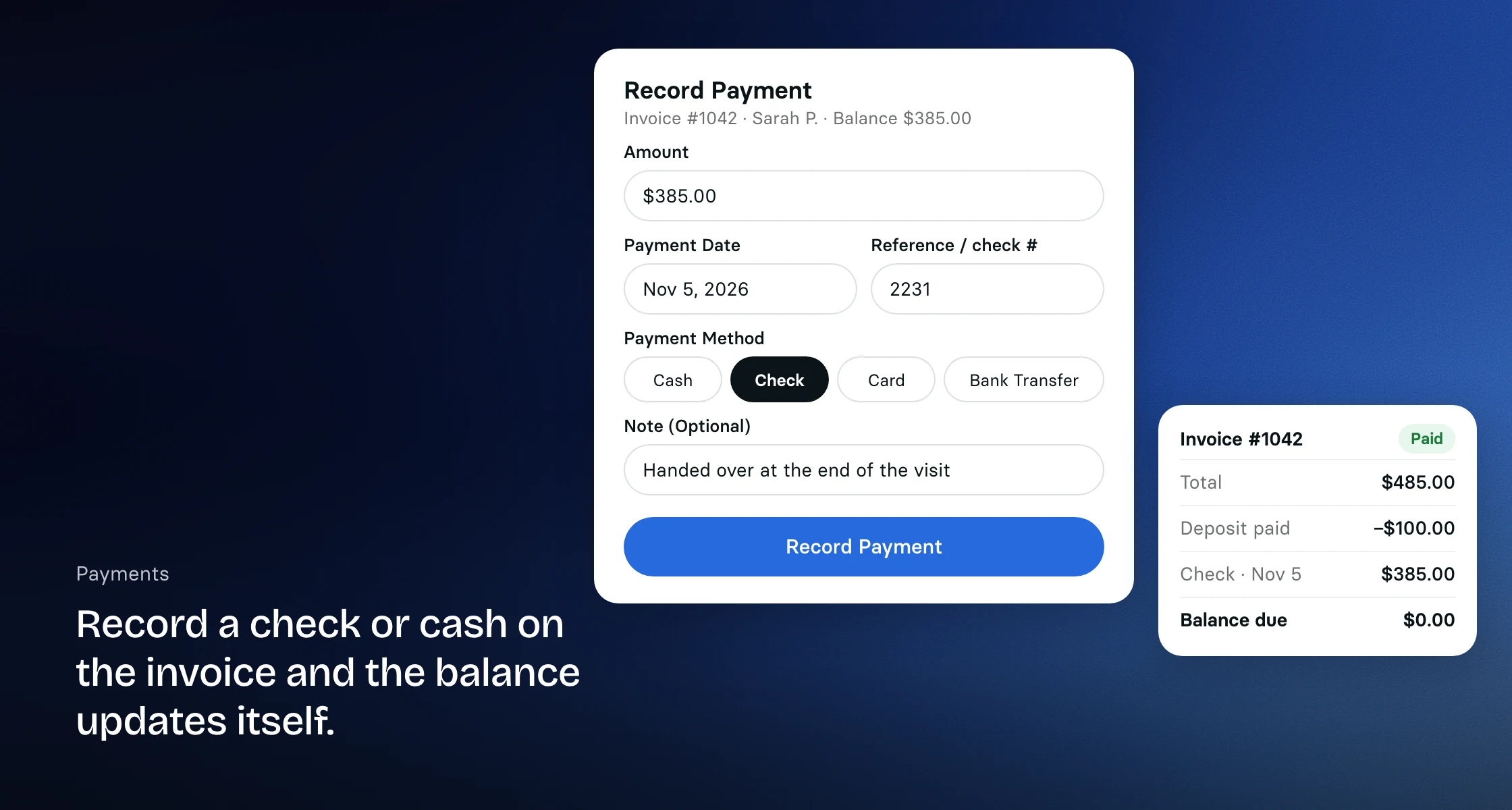
Record cash, checks and transfers
Paid in cash on the driveway, or by check at the end of the month? Once the invoice is sent, record the payment against it with its method, date and check number, and Clevra does the math. A partial payment leaves the invoice partially paid with the right balance, and Clevra emails the client that their payment arrived.
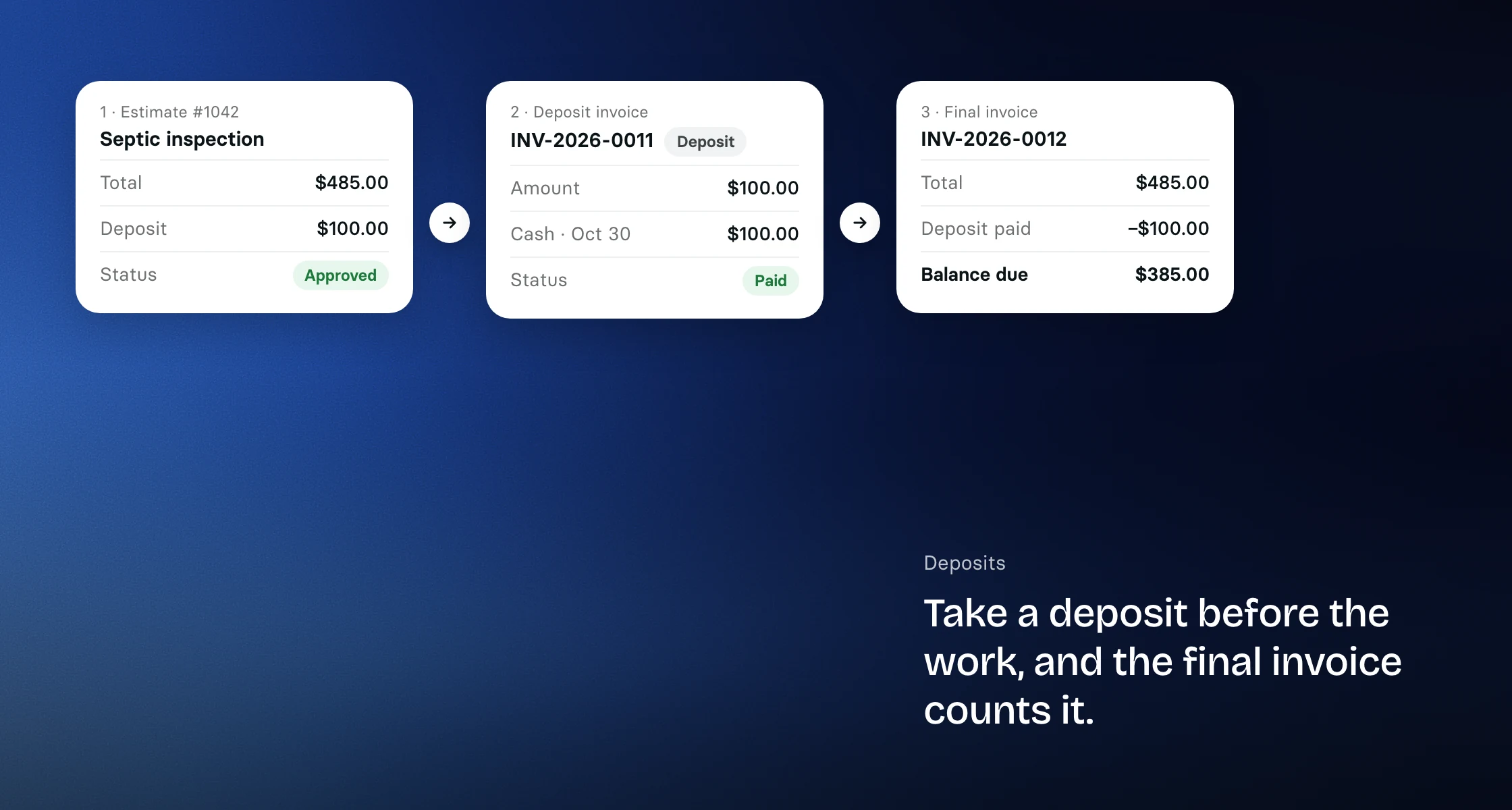
A deposit on the estimate, paid on its own invoice, and counted on the final invoice.
Deposits up front
Ask for a deposit on the estimate or the job, and Clevra creates a deposit invoice for it. Record the deposit when the client pays. The job's final invoice then shows it as Deposit paid with the balance due. Deposits are not available while QuickBooks is connected.
Your techs can collect on site
Technicians can record a payment on the invoices of jobs they work, from Clevra on their phone: cash, check, card or bank transfer. A check handed over at the end of a visit is on the books before the truck leaves. They cannot record payments on anyone else's jobs, and recording a payment does not charge a card. The Technician app for iPhone is coming soon.
Mistakes are hard to make
Clevra refuses a payment larger than what is still owed, and an ordinary draft invoice takes no payment until it is sent. Payments are never edited or erased, and each one is written to the invoice's history.
Online card payments, coming soon
Online payments show as coming soon in Clevra's Payments settings. When they open, you will connect your Stripe account once, clients will pay invoices by card from the link you send, and Stripe will pay out to your bank. Clevra adds no platform fee of its own. Until then, record card payments you take another way like any other payment.
Books that match the bank
On Pro, Business and Custom plans, payments sync to QuickBooks Online along with the invoices they settle, and a payment you record in QuickBooks against a Clevra invoice marks it paid in Clevra, so your accountant sees the same numbers you do. See how invoicing works and our integrations.
Log a check after an appliance repair call, record a bank transfer from a general contractor, or take the deposit on a renovation before work starts. Recording payments is included on every plan, including the free plan.
Clevra is building an AI Office Manager that will keep the day running in the background, including preparing end-of-day invoices for your review so they go out on time. It is not available yet. Everything on this page works today without it.
Switching from Jobber or Housecall Pro?
Record every payment against its invoice in Clevra from day one, on every plan, including the free plan for solo operators. Online card payments through Stripe are coming soon. Want a hand moving over? Book a call with our team and we will help.
[
{
"@context": "https://schema.org",
"@type": "SoftwareApplication",
"name": "Clevra",
"description": "Record cash, check, card and transfer payments in seconds, and every invoice balance updates itself. Online card payments through Stripe are coming soon.",
"applicationCategory": "BusinessApplication",
"applicationSubCategory": "Field Service Payments",
"operatingSystem": "Web",
"offers": {
"@type": "Offer",
"price": "0",
"priceCurrency": "USD",
"description": "Free plan, 1 user, unlimited customers"
},
"url": "https://clevra.ai/features/payments"
},
{
"@context": "https://schema.org",
"@type": "FAQPage",
"mainEntity": [
{
"@type": "Question",
"name": "What does it cost to take card payments?",
"acceptedAnswer": {
"@type": "Answer",
"text": "Online card payments through Stripe are coming soon, and Clevra adds no platform fee of its own. Recording a card payment you take another way is included in every plan."
}
},
{
"@type": "Question",
"name": "Can I take online payments on the free plan?",
"acceptedAnswer": {
"@type": "Answer",
"text": "Online card payments are coming soon. Recording cash, check, card and bank transfer payments is on every plan, including Free."
}
},
{
"@type": "Question",
"name": "How do customers pay?",
"acceptedAnswer": {
"@type": "Answer",
"text": "Today they pay you the way they always have, by cash, check, card or bank transfer, and you record it against the invoice. Paying by card from the invoice link, through Stripe's checkout, is coming soon."
}
},
{
"@type": "Question",
"name": "Can I record cash and check payments?",
"acceptedAnswer": {
"@type": "Answer",
"text": "Yes. Record cash, check, card or bank transfer payments against any sent invoice, with the date and a reference. Partial payments keep the balance up to date."
}
},
{
"@type": "Question",
"name": "Can my technicians take payments in the field?",
"acceptedAnswer": {
"@type": "Answer",
"text": "Yes. Technicians record cash, check, card or bank transfer payments on the invoices of jobs they work, from Clevra in their phone's browser."
}
},
{
"@type": "Question",
"name": "Do payments sync to QuickBooks?",
"acceptedAnswer": {
"@type": "Answer",
"text": "Yes. On Pro, Business and Custom plans, payments sync to QuickBooks Online along with their invoices, and payments recorded in QuickBooks against a Clevra invoice come back to Clevra."
}
},
{
"@type": "Question",
"name": "Can I take a deposit before the work starts?",
"acceptedAnswer": {
"@type": "Answer",
"text": "Yes. Add a deposit to the estimate or the job, and Clevra creates a deposit invoice for it. Once the deposit is paid, the job's final invoice counts it. Deposits are not available while QuickBooks is connected."
}
}
]
},
{
"@context": "https://schema.org",
"@type": "BreadcrumbList",
"itemListElement": [
{
"@type": "ListItem",
"position": 1,
"name": "Home",
"item": "https://clevra.ai"
},
{
"@type": "ListItem",
"position": 2,
"name": "Features",
"item": "https://clevra.ai/features"
},
{
"@type": "ListItem",
"position": 3,
"name": "Payments",
"item": "https://clevra.ai/features/payments"
}
]
}
]
FAQ
What does it cost to take card payments?
Online card payments through Stripe are coming soon, and Clevra adds no platform fee of its own. Recording a card payment you take another way is included in every plan.
Can I take online payments on the free plan?
Online card payments are coming soon. Recording cash, check, card and bank transfer payments is on every plan, including Free.
How do customers pay?
Today they pay you the way they always have, by cash, check, card or bank transfer, and you record it against the invoice. Paying by card from the invoice link, through Stripe's checkout, is coming soon.
Can I record cash and check payments?
Yes. Record cash, check, card or bank transfer payments against any sent invoice, with the date and a reference. Partial payments keep the balance up to date.
Can my technicians take payments in the field?
Yes. Technicians record cash, check, card or bank transfer payments on the invoices of jobs they work, from Clevra in their phone's browser.
Do payments sync to QuickBooks?
Yes. On Pro, Business and Custom plans, payments sync to QuickBooks Online along with their invoices, and payments recorded in QuickBooks against a Clevra invoice come back to Clevra.
Can I take a deposit before the work starts?
Yes. Add a deposit to the estimate or the job, and Clevra creates a deposit invoice for it. Once the deposit is paid, the job's final invoice counts it. Deposits are not available while QuickBooks is connected.
All-in-one operations platform for trades.
You run a crew, not a tech company. Clevra handles the office stuff so you can stay on the tools.