Table of Contents
CompanyCam Alternatives and Competitors (2026)


CompanyCam is the app a lot of roofers, restoration crews and GCs open fifty times a day. It's good at its job: snap the photo, tag it, mark it up, share it. So why do crews go looking for a CompanyCam alternative?
Usually for one of three reasons. The bill grows with every person you add. You're paying for CompanyCam on top of a separate app for estimates, scheduling and invoices. Or your client doesn't want a photo timeline at all. They want a signed report with findings in it, like a GPR scan report before the GC cores a slab, or a septic inspection for a house that's closing next week.
We make Clevra, so it's listed first. We'll also say where CompanyCam and the others do better, because on photos they often do.
Prices were checked on each company's own site on October 27, 2026.
CompanyCam alternatives in one minute
- Clevra: crews of 1 to 15 whose client pays for the report (concrete scanning, utility locating, sewer camera, septic) and who want the estimate, the schedule, the report and the invoice in one app. Free plan; report checklists on Pro.
- BlitzzCam: the closest photo-for-photo swap at a lower price, with AI voice notes.
- Timemark: the cheapest way to give a whole crew time- and GPS-stamped job photos.
- Fieldwire: GCs and specialty contractors who work off plans and punch lists.
- SiteCapture: solar and property teams that need every tech to shoot the same shot list.
- Housecall Pro: home service shops that want photos inside their field service app, not in a second app.
Why crews look for a CompanyCam alternative
Two bills for one job. CompanyCam started as a photo app. It has added proposals, invoices and payments, but plenty of crews still run Jobber, Housecall Pro or ServiceTitan for the office and CompanyCam on top. CompanyCam's own integrations list leans on exactly those apps.
The per-user math. Core is $63 a month billed yearly for 1 user, with a 2-user limit. Crew ($129) and Scale ($199) include 3 users, and every extra person is $29 a month. A 6-person crew on Crew pays about $216 a month billed yearly, before the field service app.
A report that has to stand up later. When we tested CompanyCam in October 2026, a report was an editable document. It had no lock, number or version. Its share link didn't expire and couldn't be revoked, and CompanyCam couldn't email the report itself, only copy the link. Signatures went through Dropbox Sign on an exported PDF, on the Scale plan. That's fine for a progress update to a homeowner. It's thin for a scan report a GC files, or a pass/fail septic report a lender reads.
AI starts on Crew. AI features are included on Crew, Scale and Enterprise. On Core you're on manual reports.
CompanyCam alternatives at a glance
- CompanyCam: Core $63/mo (1 user, 2-user limit), Crew $129 (3 users), Scale $199 (3 users), all billed yearly; extra users $29 each; Enterprise for 50+ users on request. Free trial.
- Clevra: Free $0 for 1 user; Pro $49/mo or $39 billed yearly for up to 5 users; Business $99/mo or $79 yearly for up to 15; Custom on request. Pro or Business free for 14 days, no card.
- BlitzzCam: $39.99/mo billed yearly or $49.99 monthly for 3 users; extra users $11.99 (yearly) or $14.99 (monthly). 14-day trial.
- Timemark: Free for 100 shared photos and 3 projects; Plus $5 per user/mo; Business $7 per user/mo. Prices vary by country.
- Fieldwire: Basic free for 5 users and 3 projects; Pro $39, Business $64, Business Plus $89 per user/mo billed yearly.
- SiteCapture: Professional $320/mo billed yearly ($375 monthly) for 10 users; Premium $720/mo yearly ($850 monthly) for 20 users. 14-day trial.
- Housecall Pro: Basic $59/mo billed yearly for 1 user; Essentials $149 for 5 users adds photo reports and annotations; MAX $299 for 8 users.
The six best CompanyCam alternatives, compared
1. Clevra: for crews whose client pays for the report
Clevra is one web app that takes a job from the first phone call to the paid invoice, with a Technician app for the field (iOS, in beta on TestFlight). It's built for 1 to 15 people: a solo locator with a truck full of paint and flags, or a scanning company running three crews across downtown pours.
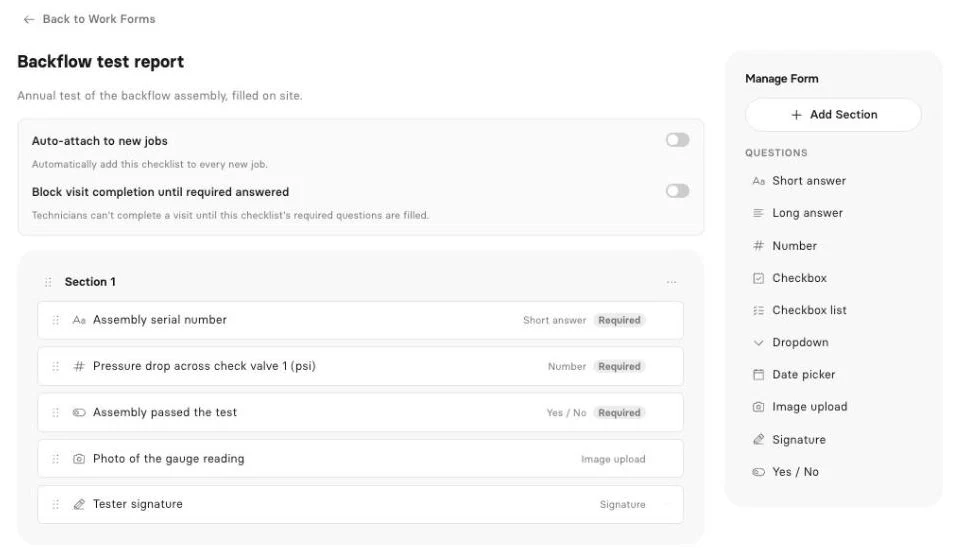
The report. Build the form once with Clevra's checklists: text, number, checkbox, dropdown, date, yes/no, photo upload and signature fields, with required fields so nobody skips the limitations line. A GPR tech records the scan area by grid line, the depths, the targets marked and the paint color key, adds photos of the layout on the slab, and the GC's super signs. Clevra turns it into a PDF the client gets by email and sees in their portal. Checklists are on Pro and up.
The rest of the job. This is the part CompanyCam leaves to another app. The GC's request comes in through your request form, drawings attached. You send the estimate, they approve it online, and it becomes the job. You book it on the calendar or the map, the tech fills the report on site, and Generate Invoice bills it. The client pays by card from the link, and Clevra takes no platform fee on those payments. QuickBooks Online syncs on Pro.
AI. The AI Receptionist answers when you're under a slab or down a manhole and drops the request in your inbox. AI-written inspection reports draft the report from your readings and photos, ready to read over and send. On Pro and up, the AI Business Assistant answers questions from your own data, like "Which GCs haven't paid for October scans?", and the Clevra MCP server connects your account to Claude or ChatGPT.
Pricing. Flat per company, not per user (compare plans):
- Free: $0 for 1 user, no time limit (report checklists start on Pro)
- Pro: $49 a month, or $39 billed yearly, up to 5 users
- Business: $99 a month, or $79 billed yearly, up to 15 users
- Custom: unlimited users, pricing on request
Where Clevra falls short. Clevra isn't a photo app, and CompanyCam is better at photos. There's no photo markup yet, no video, and no company-wide photo feed, tags, galleries, before-and-after shots or timeline links. The Technician app can't take photos yet, so photo questions are filled from the web app. Numbered, versioned inspection reports with revocable client links are in pilot with a small group of companies. Card payments are in US dollars only, and there's no Android app.
See how Clevra is set up for concrete scanning, utility locating, sewer camera inspection and septic crews.
2. BlitzzCam
BlitzzCam is the closest match to CompanyCam's core at a lower sticker price. It does GPS- and time-stamped photos, tags, markup, checklists, branded PDF reports and share links. Its AI Walkthrough turns a voice note into written notes, which helps when your hands are full of shingles. It's pitched at roofing, solar, HVAC, electrical and restoration crews.
It costs $39.99 a month billed yearly for 3 users ($49.99 monthly), and each extra user is $11.99 a month yearly or $14.99 monthly. There's a 14-day trial and no free plan. Like CompanyCam, it documents the job; you'll still need a separate app for estimates, scheduling and invoices.
3. Timemark
Timemark is a timestamp and GPS camera with a shared team workspace. Every photo carries when and where it was taken, which settles a lot of "you were never here" arguments. The free plan covers 100 shared photos and 3 projects, Plus is $5 per user a month, and Business is $7 per user a month with 300,000 photos and unlimited projects. Prices vary by country.
It's the cheapest way to get proof photos from a big crew. It doesn't do proposals, invoices or a report builder you'd hand to a client.
4. Fieldwire
Fieldwire, part of Hilti, is built around plans, tasks and punch lists for GCs and specialty contractors. You pin a photo to the sheet where the problem is, assign the fix and track it to done. Photos are on every plan, reports and exports start on Pro, and custom forms start on Business.
Basic is free for up to 5 users and 3 projects. Pro is $39 per user a month billed yearly, Business $64 and Business Plus $89. It's the pick when your work lives on drawings. For service calls billed job by job, it doesn't send estimates or invoices.
5. SiteCapture
SiteCapture is guided photo capture. You set the shot list (meter, main panel, roof plane, inverter serial), the tech follows it, and every job comes back complete with a branded PDF report. Solar installers, property inspection firms and roofers use it.
Professional is $320 a month billed yearly ($375 monthly) for 10 users, plus $38 per extra user, up to 300 jobs a month. Premium is $720 yearly ($850 monthly) for 20 users and 600 jobs. Its pricing page also shows lower figures in a comparison table, so get the number in writing. The 10-user floor makes it a stretch for a 3-person crew.
6. Housecall Pro
If you'd rather have photos in the same app as your schedule and invoices, Housecall Pro is the bigger-name option. Basic is $59 a month billed yearly for 1 user. Essentials, at $149 for 5 users, adds photo reports and annotations, and MAX is $299 for 8 users plus $35 per extra user. Its help center says photo annotations and video uploads come with an add-on called HCP Cam, and that price isn't published.
It has polished iOS and Android apps and a 14-day trial. Reports are photos and notes rather than structured findings. See our Housecall Pro alternatives guide and Clevra vs Housecall Pro.
What a 5-person crew pays for photos plus the office
These aren't like-for-like, but they show where the money goes. All prices are billed yearly.
- CompanyCam Crew plus Jobber Connect: $187 a month for CompanyCam (3 users plus 2 at $29), plus $149 a month for Jobber Connect for 5 users after its first-year intro price. About $336 a month for two apps.
- BlitzzCam plus a field service app: about $64 a month for BlitzzCam (3 users plus 2 at $11.99), plus whatever runs your estimates and invoices.
- Clevra Pro: $39 a month for up to 5 users, with estimates, scheduling, report checklists, invoicing and payments in one app, and far fewer photo tools than CompanyCam.
How to pick
- Photos are the product (roof sales, restoration claims, progress updates to homeowners): stay on CompanyCam or try BlitzzCam.
- You need cheap proof photos from a big crew: Timemark.
- You build from plans with a GC: Fieldwire.
- Every job needs the same shot list: SiteCapture.
- You want photos inside your field service app: Housecall Pro.
- The client pays for the report (GPR scan, private locate, sewer scope, septic inspection) and you want the estimate and invoice in the same place: Clevra.
How to move from CompanyCam to Clevra
- Download the photos you need to keep. CompanyCam lets you download all photos from a project.
- Import your clients into Clevra from a CSV or XLSX file, up to 5,000 rows.
- Build one checklist per job type: scan report, locate report, sewer scope, septic inspection.
- Add your price book and send your next estimate from Clevra.
- Connect Stripe and QuickBooks Online (QuickBooks is on Pro).
- Run both for two weeks. Keep CompanyCam on photo-heavy jobs until you're sure.
CompanyCam alternatives FAQ
What is the best CompanyCam alternative?
It depends on what you use CompanyCam for. For photo documentation at a lower price, BlitzzCam is the closest match. For crews whose client pays for a signed findings report and who want estimates, scheduling and invoices in the same app, Clevra. For plan-based construction work, Fieldwire.
Is there a free CompanyCam alternative?
Timemark and Fieldwire have free plans with limits: 100 shared photos and 3 projects on Timemark, 5 users and 3 projects on Fieldwire. Clevra's free plan covers 1 user for estimates, jobs, invoices and payments; report checklists start on Pro.
How much does CompanyCam cost?
On October 27, 2026, CompanyCam listed Core at $63 a month, Crew at $129 and Scale at $199, billed yearly, with $29 per extra user and Enterprise pricing on request. Monthly billing costs more.
What are CompanyCam's main competitors?
Photo apps like BlitzzCam and Timemark, construction apps like Fieldwire and Raken, guided capture like SiteCapture, field service apps with photo tools like Housecall Pro, and Clevra for report-driven trades.
Can Clevra replace CompanyCam?
For some crews. If your client pays for a findings report and you want the estimate and invoice in one app, Clevra can replace CompanyCam and your field service app together. If photos are the product, keep CompanyCam: Clevra has no photo markup, video or photo timeline yet.
Does Clevra's phone app take photos?
Not yet. Photo questions in a checklist are filled from the web app. The Technician app (iOS beta) runs the tech's day, checklists without photos, the visit timer and payments recorded on site.
Try Clevra on your next job
Run one job start to finish: take the request, send the estimate, fill the report on site, send the PDF and the invoice. The Free plan has no end date, and Pro or Business are free for 14 days, no card.
Get Started for Free or Book a Demo to see the AI Receptionist and AI-written reports on your own work.




All-in-one operations platform for trades.
You run a crew, not a tech company. Clevra handles the office stuff so you can stay on the tools.