What happens when a customer calls at 9 p.m.
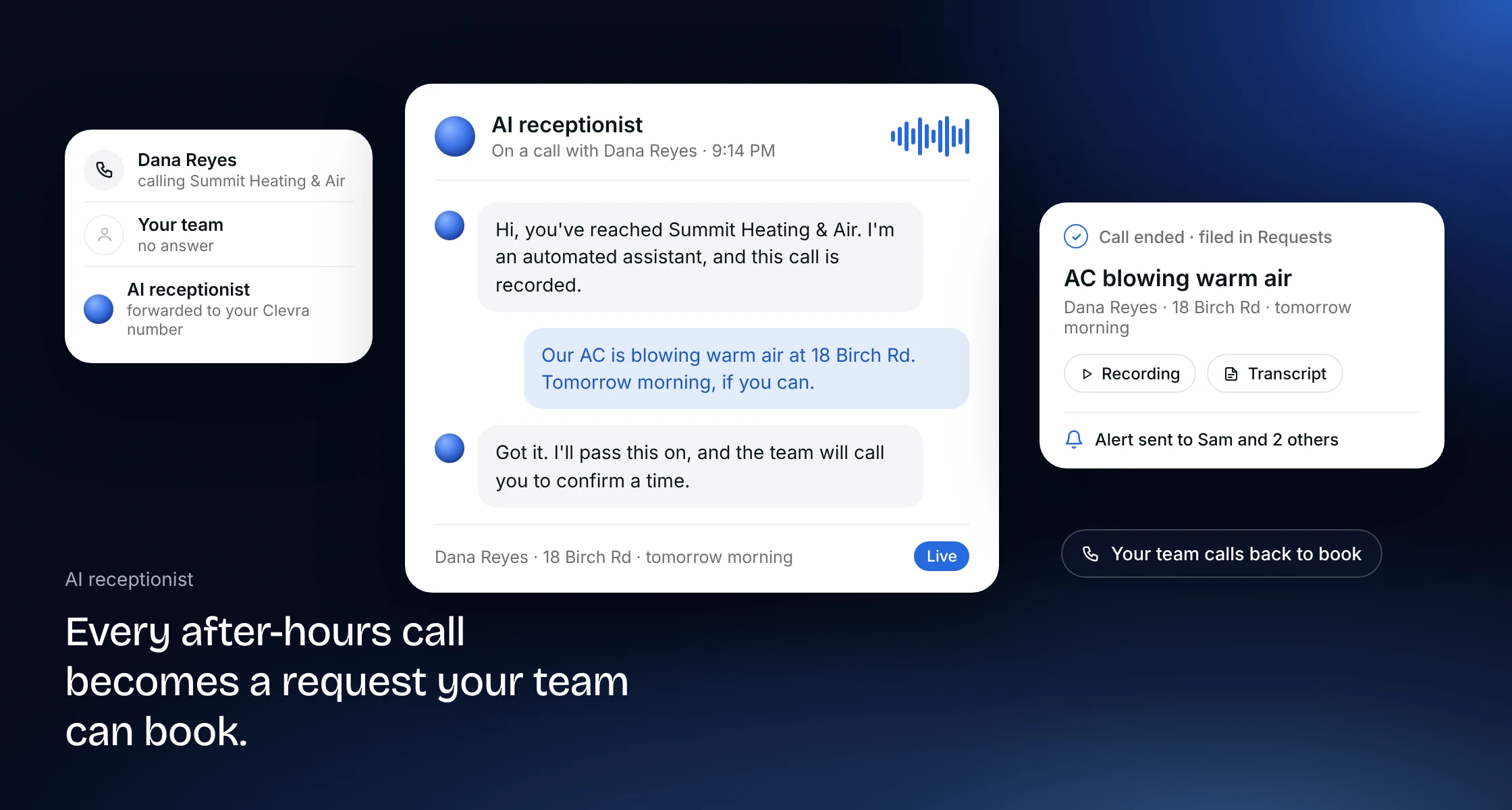
A homeowner calls after hours: the AC is blowing warm air. Your business line forwards the call to your Clevra number, and the AI receptionist answers in your company's name. It asks what your office would ask: who they are, how to reach them, what is wrong, the address and a good time, then reads the details back. Callers always hear that they are speaking with an automated assistant and that the call is recorded.
When the call ends, it files the call as a request on the right client, or holds it for your review, with a summary and the transcript on the client's activity. The people you choose get an email. In the morning your dispatcher calls back, confirms the time and books the visit.
If it's an emergency, like no heat in January, it puts the caller through to your emergency number instead. If the caller only wants to leave a message, it takes one.
An after-hours answering service for the calls you miss on a roof
HVAC calls bunch up when your team is busiest: the first heat wave, the first cold snap, and every evening after the trucks are parked. Forward your business line to your Clevra number for every call, or only for the calls nobody answers, and the AI receptionist covers those hours.
It answers calls only, not texts or web chat, and there is no live person backing it up. If you need a human on every call, a live answering service is the better fit; our guide to answering services for contractors compares the options and their prices.
Your dispatcher still books the job
The AI receptionist quotes no prices and books nothing on its own. Your office calls or texts the caller back, confirms the time and books the visit on the schedule, or sends an estimate for a changeout first. A person stays in charge of the board, so a phone call never double-books a tech. Automatic booking and tech assignment are part of AI dispatch, which is in early access.
Set it up to sound like your shop
- Welcome line: it answers in your business name.
- What it knows: your services, your service area and your hours, such as tune-ups, repairs, installs and maintenance agreements.
- Six voices: Elliot, Clara, Emma, Savannah, Godfrey and Kai, from calm and professional to warm and friendly.
- Alerts: choose who gets an email when a new request comes in.
Setup is four steps in Clevra: get your Clevra number, choose who gets alerts, subscribe and turn it on. Tap Hear it on your phone to hear how it sounds before you turn it on.
From the call to the invoice in one place
The call becomes a request, the request becomes an estimate or a job, and the job becomes an invoice, all on one record. The caller is saved in your client list, so nobody retypes a name or an address. See how Clevra works for HVAC companies.
Pricing
The AI receptionist is a $25 a month add-on for Pro and Business, billed monthly, with 30 conversations included and $0.75 for each one after that. Pro is $49 a month for up to 5 seats, or $39 a month billed annually. Business is $99 a month for up to 15 seats, or $79 a month billed annually. You can try Pro or Business free for 14 days, no card needed. See pricing.
More on how Clevra works: AI receptionist, Request forms, Scheduling, Text messaging, CRM.