Table of Contents
ServiceM8 Alternatives for Trade Crews (2026)


ServiceM8 is one of the most polished job management apps for trades, and it was built around the iPhone. It started in Australia in 2009, came to the US in 2016, and does estimates, scheduling, invoicing, Tap to Pay and forms from the tech's phone. Its prices are on the website, which is more than most of the field can say.
The thing that makes people look for a ServiceM8 alternative is how it prices: by jobs per month, not by users. A crew that runs lots of small jobs, like drain clears, filter changes or service calls, climbs tiers fast in a busy month. And crews with Android phones have waited years for a full app; the rebuilt one only reached beta in August 2026.
This guide compares six options. We make Clevra, so it's listed first. We'll also say where ServiceM8 does better, because on the phone app, Tap to Pay and routing it does.
Prices were checked on each company's own site on October 28, 2026.
ServiceM8 alternatives in one minute
- Clevra: trade and inspection crews of 1 to 15 people that want flat per-company pricing, inspection reports, estimates, scheduling and invoicing. Free plan for one user.
- Jobber: the best-known small-business option, with apps for iPhone and Android and an AI receptionist add-on.
- Housecall Pro: home service software with online booking, financing and mobile apps in English and Spanish.
- Tradify: job management for small trades, priced per user, now owned by The Access Group.
- Fergus: job management for trade contractors, with iPhone and Android apps and month-to-month plans.
- Workiz: field service software with a built-in phone system and AI answering; prices on request.
How ServiceM8 pricing works
Every paid plan has unlimited users. What you pay for is jobs:
- Free: 1 user, 30 jobs a month, texts at 10¢ each.
- Starter: $29 a month for 50 jobs.
- Growing: $79 for 150 jobs.
- Premium: $149 for 500 jobs.
- Premium Plus: $349 for 1,500 jobs, then 20¢ per extra job.
- Phone: ServiceM8 Phone starts at $19 a month, and its AI Phone Agent needs one of the higher phone plans.
That's a great deal for a crew of eight doing 40 big jobs a month. It's a worse one for a crew of three doing 200 small ones: they're past Growing and into Premium at $149.
Why trade crews look past ServiceM8
ServiceM8 reviews well overall. The complaints on G2, Capterra and Software Advice are consistent:
- Apple first. Photo markup, PDF fill-in and sketching are iPhone-only, and Android users have had a Lite app.
- Chat-only support that can be slow.
- Bugs after updates and some lag.
- Integrations, with QuickBooks Online sync named most often.
- Costs that creep: payment fees, paid add-ons, and busy months that push you up a job tier.
Prices at a glance
- Clevra: Free $0 for 1 user; Pro $49/mo or $39 billed yearly for up to 5 users; Business $99/mo or $79 yearly for up to 15; Custom on request. Priced by users, not jobs.
- ServiceM8: Free for 30 jobs; $29, $79, $149 or $349 a month by job volume; unlimited users.
- Jobber: Core $49 a month for 1 user billed monthly ($29 billed yearly after a first-year intro price); Connect for 5 users $199 monthly ($149 yearly); extra users $29.
- Housecall Pro: Basic $79 monthly or $59 billed yearly for 1 user; Essentials $189 or $149 for 5; Max $329 or $299 for 8.
- Tradify: $47, $51 or $61 per user a month.
- Fergus: from $31 or $44 per user a month, month to month.
- Workiz: not published; 7-day trial.
Six options, in detail
1. Clevra: flat pricing for crews that run a lot of jobs
Clevra is one web app that takes a job from the first call to the paid invoice, with a Technician app for the field (iOS, in beta on TestFlight). It's built for 1 to 15 people: a drain cleaner working alone, or an electrical company with six techs and an office manager.
Priced by people, not jobs. Pro covers up to 5 users and Business up to 15, whether you run 40 jobs this month or 400. A busy spring doesn't change the bill.
The office side. Requests from your request form land in one inbox and move through a sales pipeline. Estimates get approved online and become jobs on the calendar, with a map, reminders to the customer and recurring visits.
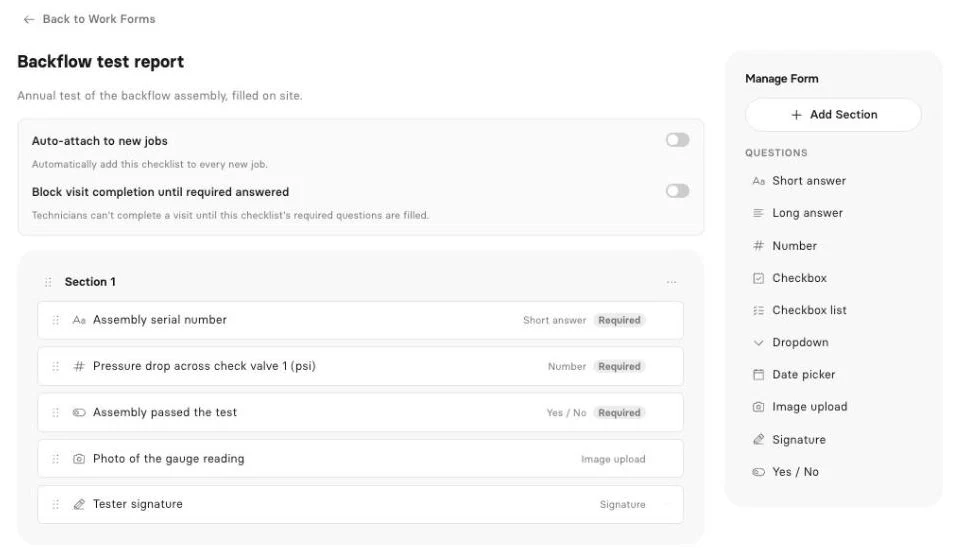
The report. Job checklists with readings, photos and a signature turn into a numbered inspection report with your logo, sent to the customer by email or a secure link. That matters if you test backflow preventers, scan concrete or inspect septic systems. Checklists and reports are on Pro and up.
Money and AI. Generate Invoice on the job, and the customer pays by card from the link with no Clevra platform fee. QuickBooks Online syncs on Pro and up. The AI Receptionist answers your Clevra business number, takes down the request, reads it back and files it on the right customer; it's an add-on for Pro and Business, switched on after a demo.
Pricing (compare plans):
- Free: $0 for 1 user, no time limit
- Pro: $49 a month, or $39 billed yearly, up to 5 users
- Business: $99 a month, or $79 billed yearly, up to 15 users
- Custom: unlimited users, pricing on request
Where Clevra falls short. ServiceM8's phone app is far ahead: Clevra's Technician app is an iOS beta that can't take photos, write estimates or take card payments yet, and there's no Android app at all. Clevra has no Tap to Pay, route optimization, asset management or offline mode beyond the visit timer. Self-serve plans stop at 15 users, and payments are in US dollars only. If you do few, large jobs with a big crew, ServiceM8's Starter plan at $29 is cheaper.
See the full Clevra vs ServiceM8 comparison.
2. Jobber
Jobber, from Edmonton, is the default for a lot of small service businesses, with apps for iPhone and Android. Core covers online booking, estimates, invoices and payments; Connect adds reminders, QuickBooks sync and time tracking; Grow adds job costing and two-way texting. Its AI Receptionist is a $29 a month add-on that answers calls and texts and books into the schedule.
Core is $49 a month for one user billed monthly. Connect for 5 users is $199 monthly or $149 billed yearly, and each extra user is $29. See our Jobber alternatives guide.
3. Housecall Pro
Housecall Pro covers online booking, dispatch, estimates, invoices and financing on every plan, with mobile apps in English and Spanish. Its CSR AI call answering is sold separately.
Basic is $79 a month or $59 billed yearly for one user; Essentials is $189 or $149 for 5 users; Max is $329 or $299 for 8, plus $35 per extra user. QuickBooks Online starts on Essentials. See our Housecall Pro alternatives guide.
4. Tradify
Tradify started in Auckland in 2013 and became part of The Access Group in 2024. It covers estimates, scheduling, job photos, invoicing and Xero or QuickBooks sync; Pro adds recurring jobs and timesheets, and Plus adds purchase orders and its SmartTools AI.
It's priced per user: $47, $51 or $61 a month. That's simple for a crew of two and adds up for a crew of eight. There's a 14-day trial and no free plan.
5. Fergus
Fergus, also from Auckland, is built for trade contractors from sole traders to 30-plus staff. It has estimates, scheduling, job costing, timesheets, certificates, and apps for both iPhone and Android, plus a voice assistant for techs on site.
US plans start from $31 or $44 per user a month, month to month, with no yearly plans. Timesheet-only users and texts are extra. There's a 14-day trial.
6. Workiz
Workiz is a San Diego company with a built-in business phone. Its Genius Answering handles calls, texts and email with AI, though it needs the Genius Phone plan. It has dispatch, good-better-best estimates, payments, financing, inventory and QuickBooks.
Prices are on request now, with a 7-day trial. See our Workiz alternatives guide.
Job pricing vs user pricing
Before you switch, count two numbers from last year: your busiest month's jobs and the people who need a login.
- Few people, lots of jobs: per-company or per-user pricing wins. Three people doing 200 jobs pay $149 on ServiceM8 Premium and $49 on Clevra Pro.
- Many people, few jobs: job pricing wins. Eight people doing 40 jobs pay $29 on ServiceM8 Starter.
- Growing headcount: per-user tools like Tradify and Fergus get more expensive with every hire.
How to pick
- Your crew lives in a phone app and needs Tap to Pay: stay on ServiceM8, or try Jobber.
- Your crew uses Android phones: Jobber, Housecall Pro or Fergus.
- You want a built-in phone system with AI answering: Workiz.
- You want per-user pricing and Xero: Tradify.
- You run lots of jobs with up to 15 people and want inspection reports: Clevra.
ServiceM8 alternatives FAQ
What is the best ServiceM8 alternative in the US?
Jobber and Housecall Pro are the most common switches, especially for Android crews. If you run lots of jobs with a small team and need inspection reports, Clevra's flat per-company price is cheaper than ServiceM8's job tiers.
How much does ServiceM8 cost?
ServiceM8 is free for 1 user and 30 jobs a month. Paid plans are $29 for 50 jobs, $79 for 150, $149 for 500 and $349 for 1,500, with unlimited users.
Does ServiceM8 work on Android?
Partly. ServiceM8 has a Lite app for Android techs, and a rebuilt Android app went into beta in August 2026. Some features, like photo markup and sketching, are still iPhone-only.
Is there a free alternative to ServiceM8?
Clevra has a free plan for one user with customers, estimates, scheduling, invoices, card payments and a client portal. Jobber, Housecall Pro, Tradify and Fergus offer trials, not free plans.
Does Clevra have a mobile app?
Yes, the Technician app for iPhone, in beta on TestFlight. Techs see their day, fill checklists and track time, even offline for the timer. There's no Android app yet.
Can I move from ServiceM8 to Clevra?
Yes. Export your clients to a CSV or Excel file and import them into Clevra, up to 5,000 rows at a time. Most crews are booking jobs the same day.
Run your busiest week in Clevra
Book a week of jobs, send the estimates and invoices, and see the bill stay the same no matter how many jobs you run. The Free plan has no end date, and Pro or Business are free for 14 days, no card.



All-in-one operations platform for trades.
You run a crew, not a tech company. Clevra handles the office stuff so you can stay on the tools.