Table of Contents
Workiz Alternatives and Competitors (2026)


Workiz is built like a phone company that also schedules jobs, and we mean that as a compliment. Genius Phone puts a business phone system inside the app, Genius AI Answering picks up when nobody else can, and online booking catches the rest. For a shop where the next job is always the next ring, that’s exactly the right design.
Some crews don’t work that way. A hood cleaning company books most of its year off a recurring list of restaurants. A backflow tester’s calendar is set by annual compliance dates. A private locator’s job isn’t done when the truck leaves; it’s done when the GC has the marks documented. For them, the phone matters less than what happens after the visit.
This guide covers seven Workiz alternatives and Workiz competitors, with published prices where they exist. We make Clevra, so it’s listed first. Workiz ships AI call answering today and Clevra’s is in Early access, and we’ll say so wherever it matters.
Every price below was checked on the vendor’s own pricing page on October 15, 2026.
Workiz alternatives: the answer up front
- Clevra: crews of 1 to 15 whose visits end in a document: utility locating, backflow testing, grease trap service, hood cleaning. Free plan, flat price per company.
- Housecall Pro: home service shops that want CSR AI that books jobs, plus iOS and Android apps in two languages.
- Jobber: residential crews that want self-booking, Tap to Pay, ACH and an app marketplace.
- Kickserv: small teams that want low published prices and the longest trial here, 30 days.
- FieldPulse: contractors who want an AI dispatcher on the phone plus custom forms and asset tracking.
- RazorSync: teams that want listed tiers, a customer portal and an API.
- Service Fusion: larger outfits that want unlimited users and an AI phone answering service.
Why crews outgrow Workiz
Workiz rarely loses customers on quality. It loses them on shape: the business turns out to need something other than a faster phone. The reasons below are the common ones.
1. Your work starts on a list, not a ring. Kitchen exhaust cleaning runs on quarterly or semi-annual cycles. Backflow assemblies get tested every year. Grease traps are pumped on a set interval. If most visits are recurring, a phone-first system is solving the smaller problem.
2. The visit ends with a record someone else files. A fire marshal wants proof the hood and duct were cleaned to bare metal, with before and after photos. A water purveyor wants valve readings on a test form. A city pretreatment program wants the trap volume and waste hauled. These documents are the actual product.
3. Seven days is a short trial. Workiz gives a 7-day trial with no card. That’s barely one route cycle, and nowhere near enough to see how a recurring schedule behaves over a month.
4. You can’t see the price first. Standard, Pro and Ultimate all say “Request pricing.” Some owners are fine with a sales call. Others want to compare numbers on a Sunday night without talking to anyone.
Workiz competitors at a glance
Here’s what each lists, in USD, on annual billing unless noted. Two of the seven, plus Workiz itself, ask you to request pricing.
- Workiz (for reference): request pricing on Standard, Pro and Ultimate. No free plan. 7-day trial, no card. Best for phone-driven service businesses.
- Clevra: $0 for 1 user; Pro $39/mo for up to 5; Business $79/mo for up to 15. Free plan. 14-day trial of paid plans, no card. Best for compliance and inspection crews.
- Housecall Pro: $59/mo for 1, $149 for 5, $299 for 8, then $35 per extra user. No free plan. 14-day trial. Best for residential home service.
- Jobber: $29/mo for 1 user on Core; Connect for 5 is $149. No free plan. 14-day trial. Best for lawn care and cleaning routes.
- Kickserv: $60/mo for 5 users, billed monthly; 20% off annual. No free plan. 30-day trial. Best for budget-conscious small shops.
- FieldPulse: seat-based, priced through sales. No free plan. Trial not stated. Best for equipment-heavy service.
- RazorSync: $85/mo for up to 2 users, $195 for 7, $439 for 15. No free plan. 14-day trial. Best for teams wanting an API.
- Service Fusion: $208/mo, unlimited users. No free plan. Demo only. Best for 20+ person teams.
The 7 best Workiz alternatives, ranked by fit
1. Clevra: for crews whose job ends in paperwork
Clevra is one web app that runs the whole job, from the first call through the paid invoice, with a mobile app for technicians that’s currently an iOS beta on TestFlight. It’s made for crews of 1 to 15 and it’s at its best in trades where the job leaves a record behind: utility locating, backflow testing, grease trap service, hood cleaning and fire protection.
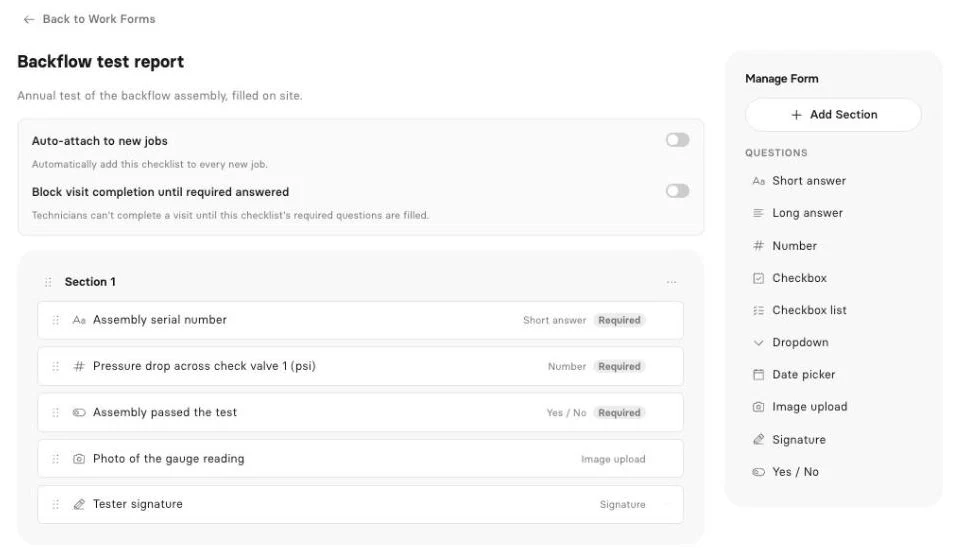
A report on every visit, without the evening typing. Take a private locate. Public utilities get marked through 811, but the lines the owner installed (site lighting, a feed to a detached shop, irrigation) are on you. The client wants each line, its estimated depth, the method used and a photo of the paint. Or take a hood job: before and after photos of the plenum, filters and fan, the duct access points opened and a sign-off from the kitchen manager.
Clevra’s checklist builder handles both on Pro and up. Fields can be text, number, checkbox, dropdown, date, yes/no, photo upload or signature, and any field can be required, so nobody leaves without the trap volume or the gauge reading. The crew fills it on site, Clevra converts it to a PDF, and it shows up in the customer portal. For now, photo and signature questions are filled in the web app rather than the Technician app.
Recurring work, handled. The Clevra schedule has day, week and month calendars, a map view and recurring visits, so quarterly hood cleanings and annual backflow tests come back on their own. Desktop users can drag and drop visits to reshuffle a day.
Early access: inspection reports. Clevra’s inspection report drafts turn what the crew captured into a client-ready report. It’s in Early access. Book a demo and bring one of your current reports.
Early access: AI Receptionist. Here Workiz is ahead. Genius AI Answering is live. Clevra’s AI Receptionist answers the business line, notes the caller and the request, and sends it to your inbox for the office to book; it’s in Early access. Set up a demo if you want to try it early.
Live AI on Pro and up. The AI assistant for your numbers answers plain-English questions from live data, like “Which restaurants are overdue on their hood invoice?” or “How many backflow tests did we bill in August?” And the MCP server connects your account to Claude, ChatGPT or any MCP assistant to look up jobs, find open slots, draft an estimate or book a visit, asking you before every change.
The rest. Estimates approved and signed online with automatic follow-ups on Pro. Invoices generated from the job. Card payments through Stripe in USD with no Clevra platform fee, plus cash, cheque or e-transfer recorded by hand. Two-way texting with clients, automations, timesheets, job costing, 23 reports and QuickBooks Online sync on Pro and up.
Pricing. Flat per company, not per user:
- Free: $0 for 1 user, no time limit
- Pro: $49 a month, or $39 a month billed yearly, up to 5 users
- Business: $99 a month, or $79 a month billed yearly, up to 15 users
- Custom: unlimited users, pricing on request
Every new account can trial Pro or Business for 14 days, twice the length of the Workiz trial, with no card.
Where Workiz is stronger. A built-in phone system, AI call answering that works today, online booking, route planning, inventory and service plans. Clevra has no phone system, no route optimization, no online self-booking and no inventory. If calls drive your business, take that seriously.
For a line-by-line breakdown, see Clevra vs Workiz.
2. Housecall Pro
Housecall Pro covers most of what Workiz does on the phone side with CSR AI, which answers calls and books jobs, plus a call answering service. Annual pricing is $59 a month for 1 user, $149 for 5 and $299 for 8, then $35 per user; monthly is $79, $189 and $329. The trial is 14 days, no card.
It adds offline mode, GPS tracking, Spanish, financing, payroll and review management. A strong pick for residential trades that like Workiz’s phone focus but want deeper apps. See Housecall Pro beside Clevra.
3. Jobber
Jobber prices openly: Core $29 a month for 1 user, Connect $149 for 5, Grow $229 for 5 on annual billing, plus $29 for each extra user. Month to month, Core is $49. There’s a 14-day trial with no card.
Online self-booking, Tap to Pay, ACH and a large app marketplace are its strengths. It doesn’t center the phone the way Workiz does, but customers can book themselves. See Jobber compared with Clevra.
4. Kickserv
Kickserv is the value pick with public prices: Start $60 a month for 5 users, Run $119 for 10, Scale $199 for 20, billed monthly, with 20% off if you pay yearly. You get 30 days to try it.
QuickBooks Online and Desktop, Tap to Pay, onsite card payments, Apple Pay and Google Pay online, and iOS and Android apps with GPS and time tracking. No AI answering, but a lot of tool for $60. See our Kickserv comparison.
5. FieldPulse
FieldPulse is the closest match to Workiz on AI phones. Operator AI acts as an AI dispatcher that answers calls, and the Engage phone system and Maverick AI round it out. It also brings custom forms, asset management, maintenance agreements, a booking portal and fleet tracking.
Pricing is seat-based and you’ll need a sales call; a trial isn’t stated. Worth a look for commercial equipment service. See FieldPulse versus Clevra in detail.
6. RazorSync
RazorSync lists its tiers: Solo $85 a month for up to 2 users, Team $195 for up to 7, Pro $439 for up to 15, billed yearly (or $90, $225 and $499 monthly). Enterprise is on request. The trial runs 14 days.
iOS and Android apps, a customer portal, time cards and payroll, and an API. QuickBooks sync begins on Team; route optimization and inventory need Pro. See the RazorSync breakdown.
7. Service Fusion
Service Fusion charges $208, $325 or $533 a month on annual billing, or $245, $382 and $627 monthly, always with unlimited users. It offers a demo; a trial isn’t mentioned.
It has an AI phone answering service, GPS tracking, service agreements, inventory, eSign, progress billing and a customer portal. For a big team that wants AI calls and no seat count, that’s a reasonable trade. See how Service Fusion compares.
Free Workiz alternatives
Workiz doesn’t list a free plan. Among the tools here, Clevra is the one with a free tier, and trials differ a lot in length.
Clevra Free is $0 for one user with no expiry. You get clients, estimates, jobs, scheduling, invoices, the client portal and online card payments, with Clevra branding on estimates, invoices and the portal. Checklists, texting and the AI assistant start on Pro. For a solo backflow tester building a route, that’s enough to run real jobs while you decide.
Trial lengths: Kickserv 30 days; Clevra paid plans, Housecall Pro, Jobber and RazorSync 14 days; Workiz 7 days. Service Fusion offers a demo, and FieldPulse doesn’t state a trial.
Apps like Workiz: what your techs will notice
Workiz users are used to the phone being central, so look closely at what the mobile app does once the call is over. Hand any candidate to a tech for a full day and check:
- Can they see the day’s stops, get directions and send an On My Way update?
- Can they complete the compliance form on site, with readings and photos?
- Does time tracking survive a restaurant basement or a vault with no signal?
- Can they write an invoice and record payment before leaving?
Clevra’s Technician app today: iOS beta on TestFlight, not on the App Store, no Android yet. It shows the tech’s day, visit details and directions, has Start, On My Way and Complete, fills checklists (photo and signature questions stay in the web app for now), runs a visit timer and timesheets that work offline, creates invoices and records cash, cheque, card or e-transfer payments by hand. No GPS tracking, no Tap to Pay, no wider offline mode.
If you need Android or full offline mode now, Housecall Pro, Jobber and Kickserv have the more complete apps.
How to choose a Workiz alternative
- Phone calls are your main lead source: stay with Workiz, or compare Housecall Pro and FieldPulse, which also ship AI call answering.
- Most work is recurring compliance (hoods, traps, backflow): pick on recurring scheduling and on-site forms. Clevra fits here.
- You price by the job and want consistent estimates: our estimating guide for field service helps whichever tool you pick.
- You want low published prices and a long trial: Kickserv.
- You need route optimization: Workiz or RazorSync Pro.
- You have 20+ people: Service Fusion.
Locating crews may find our private locating guide useful for setting up the paperwork side.
How to move from Workiz in a weekend
- Export your client list. Get clients and service addresses into a spreadsheet.
- Import to Clevra. Upload CSV or XLSX, up to 5,000 rows per file. A restaurant group with eight kitchens can stay one client with eight properties.
- Set up your services. Hood cleaning by fan count, trap pump-out by gallons, backflow test per assembly, private locate per hour.
- Build your checklists. One per service, with required fields for the numbers your clients and regulators ask for.
- Recreate recurring visits. Enter next due dates so the calendar fills itself.
- Connect payments and accounting. Stripe for cards, QuickBooks Online on Pro. See Clevra integrations.
- Sort out your phone line and add the request form. Clevra has no built-in phone system, so keep your business number with your carrier, and put the request form on your website.
Workiz alternatives FAQ
Is Workiz worth it?
For service businesses where nearly every job starts with a phone call, often yes. Genius Phone and Genius AI Answering are built in, along with online booking, route planning and inventory. It fits less well when most work is recurring compliance visits and the real deliverable is a signed report rather than a fast answer on the phone.
Does Workiz have a free trial or a free version?
Workiz offers a 7-day free trial with no credit card. It doesn’t list a free plan, and all three tiers (Standard, Pro and Ultimate) say request pricing, as checked October 15, 2026. Seven days is short, so plan what you want to test before you start the clock.
Is there a free alternative to Workiz?
Yes. Clevra’s Free plan costs $0 for one user with no time limit and includes clients, estimates, jobs, scheduling, invoices, a client portal and online card payments. Paid plans are flat per company, starting at $39 a month billed yearly for up to 5 users, with a 14-day trial.
Who are Workiz’s main competitors?
Workiz competitors usually include Housecall Pro, Jobber, Kickserv, FieldPulse, RazorSync and Service Fusion. Housecall Pro and FieldPulse are closest on AI call handling. Clevra competes for small crews in compliance and inspection trades such as utility locating, backflow testing, grease trap service and hood cleaning.
Does Clevra have an AI receptionist?
Yes, in Early access. Clevra’s AI Receptionist answers your business line, records who is calling and what they need, and puts the request in your inbox for the office to book. Book a demo to join. Unlike Workiz Genius AI Answering, it isn’t generally available yet. The AI Business Assistant is live on Pro.
Can Clevra schedule recurring hood cleaning and backflow tests?
Yes. Clevra’s schedule supports recurring visits with day, week and month calendars and a map view. Set a hood cleaning every 90 days or a backflow test every 365 days and the visits come back automatically. On Pro and up, attach a checklist to each visit so the crew captures readings and sign-off on site.
Put your next compliance visit through Clevra
Pick one hood cleaning, trap pump-out or backflow test this week and run it start to finish in Clevra. The Free plan doesn’t expire, and Pro or Business include a 14-day trial with no card. See all supported trades if yours isn’t listed above.
Get Started for Free or Book a Demo to see inspection reports and the AI Receptionist in Early access.



All-in-one operations platform for trades.
You run a crew, not a tech company. Clevra handles the office stuff so you can stay on the tools.