Table of Contents
Septic Software Alternatives to ServiceCore (2026)


Septic software is a small world. A pumping company needs things a general field service app never thinks about: gallons pumped, where the load was dumped, the waste manifest the county wants, and a reminder to call the customer again in three years. An inspection for a house sale adds its own paperwork, often on the county's form.
ServiceCore is the name most septic owners hear first. Some leave it over the annual contract or the price, and some never sign because they run one or two trucks. This guide compares six septic software options so you can pick the one that fits how your trucks actually run.
We make Clevra, so it's listed first. We'll also say where the septic-only tools do better, because on manifests and disposal records they do.
Prices were checked on each company's own site on October 27, 2026.
Septic software in one minute
- Clevra: septic pumpers and inspectors with 1 to 15 people who want the inspection report, the repair estimate and the invoice in one app, plus AI call answering. Free plan; report checklists on Pro.
- ServiceCore: the established choice for septic plus portable restrooms and roll-off, with manifests and regulatory gallons reports. Priced through a demo, on an annual contract.
- Tank Track: septic-only software priced per truck, with unlimited users, manifests and checklists.
- CRO Software: dispatch and billing for septic, portable restroom and roll-off companies, now part of RapidWorks.
- PumpDocket: a newer option built around trip tickets, with state regulatory profiles and pricing by fleet size.
- Jobber: a general field service app with a septic page, routing and an AI receptionist add-on.
What a septic company needs from software
Before comparing names, list the jobs your software has to do. Septic companies usually need some mix of these:
- Pumping records: tank size, gallons pumped, sludge and scum levels, and the disposal site, for every truck load.
- Waste manifests and county reports: many states and counties want a record of what was pumped and where it went.
- Inspection reports: tank and baffle condition, effluent filter, drain field, pass or fail, photos and a signature. For property sales, often on the county's own form.
- Repair estimates: a cracked baffle, a missing riser, a broken lid. The inspection usually turns into a second job.
- Long-cycle reminders: pumping every three to five years, so the customer hears from you before the backup.
- Dispatch by truck: routes, tank capacity and who's in the vac truck today.
The septic-only tools lead on the first two and the last one. Clevra leads on reports, estimates and AI call answering. Pick by which list hurts most.
Septic software at a glance
- Clevra: Free $0 for 1 user; Pro $49/mo or $39 billed yearly for up to 5 users; Business $99/mo or $79 yearly for up to 15; Custom on request. Pro or Business free for 14 days, no card.
- ServiceCore: Start and Pro plans; prices not published. Demo required; monthly billing on an annual contract.
- Tank Track: $180/mo for the first truck, $150 for each extra truck, unlimited users; 10% off yearly.
- CRO Software (RapidWorks): priced on request.
- PumpDocket: Starter $139/mo for 1 to 3 trucks; Team $329 for 4 to 10; Fleet $649 for 11 or more. Lower intro prices for new accounts.
- Jobber: Core $49/mo monthly for 1 user ($29 billed yearly after a first-year intro price); Connect from $139/mo monthly. AI Receptionist add-on $29/mo.
Six options, in detail
1. Clevra: for septic crews that want the report, the estimate and the invoice in one app
Clevra is one web app that takes a septic job from the first call to the paid invoice, with a Technician app for the field (iOS, in beta on TestFlight). It's built for 1 to 15 people: an owner with one vac truck, or an inspection-and-pumping company with three trucks and an office manager.
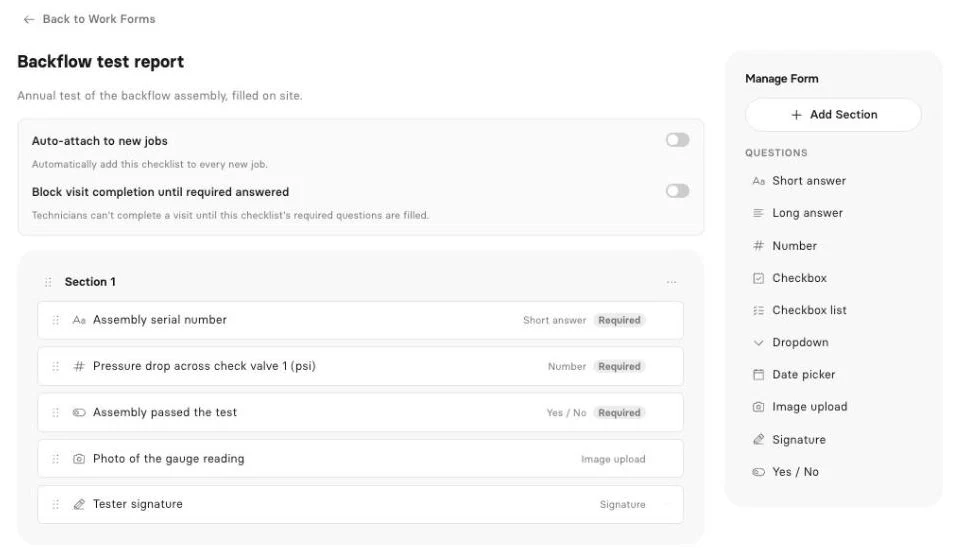
The report. Build your pumping record and your inspection form once with Clevra's checklists: tank size and material, liquid level, sludge and scum in inches, baffle and effluent filter condition, pass or fail, photos and a signature. Fill it at the lid, and Clevra turns it into a PDF the homeowner, buyer or realtor gets by email and sees in their portal. Checklists are on Pro and up.
The repair. The outlet baffle is gone. Price the baffle and a riser, send the estimate, and the seller approves it online. When it's approved, it becomes the job.
The money and the next visit. Generate Invoice on the job and the customer pays by card from the link, with no Clevra platform fee. Cash and cheques get recorded by hand. Before you close a pumping job, book the next pump-out on its due date three years out, and Clevra emails the customer the day before (texts on Pro and up).
AI. The AI Receptionist answers the realtor's call while you're elbow-deep in a pump-out and drops the request in your inbox. AI-written inspection reports draft the report from your readings and photos, ready to read over and send. On Pro and up, the AI Business Assistant answers questions from your own data, like "Which real estate inspections from September haven't been paid?"
Pricing. Flat per company, not per truck or per user (compare plans):
- Free: $0 for 1 user, no time limit (report checklists start on Pro)
- Pro: $49 a month, or $39 billed yearly, up to 5 users
- Business: $99 a month, or $79 billed yearly, up to 15 users
- Custom: unlimited users, pricing on request
Where Clevra falls short. Clevra doesn't do waste manifests, gallons reports or disposal records, so the septic-only tools are ahead for compliance-heavy pumping. There's no route planning, truck tracking or map of lid locations. It doesn't fill the county's own inspection form or file with county portals. Recurring visits can't be set on a three-year cycle, so long-interval pumping is booked on its due date. The Technician app can't take photos yet, so photo questions are filled from the web app. There's no Android app, and card payments are in US dollars only.
See how Clevra is set up for septic companies on the septic page.
2. ServiceCore
ServiceCore is cloud software for liquid waste and roll-off companies, founded in 2015 in Lakewood, Colorado. It covers dispatch, routing, billing, inventory and a driver app, with manifest tracking and regulatory gallons reports. Drivers can email inspection reports from the job site. It says it has more than 2,250 customers across septic, portable restroom and roll-off work.
Pricing isn't published. There are Start and Pro plans, a demo is required, and billing is monthly on an annual contract. A third-party software directory lists a starting point around $200 a month; ask for a written price that includes onboarding. We didn't see an AI receptionist on its site.
If you run portable restrooms or roll-off next to septic, ServiceCore covers all three in one place, which Clevra doesn't.
3. Tank Track
Tank Track is septic-only software from Concord, New Hampshire, built for 1 to 15 trucks. It does scheduling and dispatch, custom checklists for pumping, inspections and repairs, automatic waste manifests, service reminders, invoicing and online payments. Trade press coverage mentions state forms like Ohio's septage pumping report. It says more than 300 operators use it across 45 states and 3 provinces.
It costs $180 a month for the first truck and $150 for each extra truck, with unlimited users and 10% off yearly. There's no contract. Its site doesn't mention photo capture, so check that if photos matter for your inspections.
4. CRO Software
CRO Software started in Calgary in 2013 and became part of RapidWorks, a Boston field service company, in October 2025. It handles dispatch and billing for septic, portable restroom and roll-off companies. The driver app records photos, signatures, the disposal destination and septic lid locations on a map, which helps the next tech find the lid under a foot of snow.
Pricing is on request. Ask how the RapidWorks move changes the roadmap and support before you sign a long contract.
5. PumpDocket
PumpDocket is a newer tool built for pumpers rather than plumbers. It centers on trip tickets with regulatory profiles for all 50 states, works offline in the truck and syncs with QuickBooks.
Starter is $139 a month for 1 to 3 trucks, Team $329 for 4 to 10 trucks and Fleet $649 for 11 or more, with lower intro prices for new accounts. It's young, with few public reviews so far, so ask for a trial on real loads.
6. Jobber
Jobber is the general field service app a lot of small trade crews already know, and it has a septic page. It covers scheduling, routing, recurring jobs, a client hub and an offline mobile app. Jobber Receptionist, its AI call answering, is a $29 a month add-on.
Core is $49 a month for 1 user billed monthly, or $29 billed yearly after a first-year intro price. Connect starts at $139 a month monthly. It doesn't do waste manifests or septic-specific reports. See our Jobber alternatives guide and Clevra vs Jobber.
Inspections and county forms
Real estate septic inspections bring their own rules. Some states and counties have an official inspection form, and some take reports through an online portal. Ask each vendor whether it fills your county's form or files into its portal. Clevra doesn't.
Two ways to keep the double entry small:
- Fill your own report at the tank, so the numbers are right while you're still looking at the baffle.
- Copy it into the county form or portal the same day, from the finished report, not from a wet notepad at night.
If your county requires its own form, check whether the app can match that layout before you buy. A forms tool like GoFormz is built for that; Clevra makes its own PDF.
How to pick
- You pump a lot and your county wants manifests: Tank Track, ServiceCore or PumpDocket.
- You also run portable restrooms or roll-off: ServiceCore or CRO Software.
- You're one or two trucks and want a published price: Tank Track or PumpDocket.
- You already use Jobber for other trades: Jobber's septic setup, with manifests kept elsewhere.
- Inspections, repair estimates and missed calls hurt more than manifests: Clevra.
Septic software FAQ
What is the best software for a septic pumping business?
It depends on the work. For manifests, gallons reports and per-truck pricing, Tank Track and ServiceCore are the septic-only leaders. For inspection reports, repair estimates and AI call answering in one app, Clevra.
How much does ServiceCore cost?
ServiceCore doesn't publish prices. It sells Start and Pro plans after a demo, billed monthly on an annual contract. A third-party directory lists a starting point around $200 a month.
Is there free septic software?
Clevra has a free plan for one user with unlimited clients, estimates, jobs, invoices and card payments. Its report checklists start on Pro at $49 a month. The septic-only tools on this list are paid.
Does septic software handle waste manifests?
ServiceCore, Tank Track and PumpDocket do, and CRO Software records disposal destinations. Clevra doesn't do manifests or gallons reports today.
Can Clevra do septic inspection reports?
Yes. Build the inspection as a checklist with readings, pass or fail, photos and a signature, and Clevra makes a PDF for the client. It doesn't fill a county's own form or file with county portals.
Does Clevra work for septic companies in Canada?
Yes, with one limit: Clevra invoices and takes card payments in US dollars today. Tax settings handle GST, HST and PST.
Try Clevra on your next pump-out
Run one septic job start to finish: take the call, fill the report at the tank, send the PDF and the repair estimate, invoice it, and book the next pump-out. The Free plan has no end date, and Pro or Business are free for 14 days, no card.
Get Started for Free or Book a Demo to see the AI Receptionist and AI-written reports on your own work.



All-in-one operations platform for trades.
You run a crew, not a tech company. Clevra handles the office stuff so you can stay on the tools.