
Table of Contents
mHelpDesk Alternatives for Small Businesses (2026)


mHelpDesk has been running small service businesses since the late 2000s: scheduling, dispatch, estimates, work orders, invoices and texts to customers. HomeAdvisor bought a majority stake in 2014, and it's still part of Angi today. Plenty of long-time users have years of customer history in it.
What sends people looking for an mHelpDesk alternative is mostly what hasn't changed. Prices aren't published. Updates in the last two years have been small, like landscape mode and photo uploads on the customer profile, and there's no AI. Reviewers mention thin reporting, app crashes and support that varies. Meanwhile the rest of the field has added AI call answering, published plans and free tiers.
This guide compares six alternatives for small service businesses. We make Clevra, so it's listed first. We'll also say where the others do better, because some of them do.
Prices were checked on each company's own site on October 28, 2026.
mHelpDesk alternatives in one minute
- Clevra: trade and service crews of 1 to 15 people that want published flat prices, inspection reports, estimates, scheduling and invoicing in one app. Free plan for one user.
- Kickserv: small home service businesses that want a flat monthly price for 5, 10 or 20 users and QuickBooks on every plan.
- Service Fusion: companies that want unlimited users on one flat fee and can spend $200 a month or more.
- Jobber: the best-known small-business option, with an AI receptionist add-on and a 14-day trial.
- Markate: solo operators and small teams that want low base pricing and an AI receptionist billed per call.
- GorillaDesk: pest, lawn and pool companies that think in routes, not users.
Why businesses look past mHelpDesk
mHelpDesk holds 4.3 out of 5 on Capterra, and recent reviews are kinder to its support than older ones. The complaints that do come up:
- No public pricing. You get a price after a call. One third-party site put it at about $169 a month for one user in 2024.
- Reporting. Reviewers want better sales and lead reports.
- The app. Crashes, freezing and slowness show up in reviews from 2025 and 2026, and the iPhone app rates 3.5 stars.
- Missing pieces. No AI, limited integrations, and no multi-factor login as of a 2025 review.
- Old pricing grudges. Older reviews mention a price that doubled and a fee to get data back after leaving.
Prices at a glance
- Clevra: Free $0 for 1 user; Pro $49/mo or $39 billed yearly for up to 5 users; Business $99/mo or $79 yearly for up to 15; Custom on request. Pro or Business free for 14 days, no card.
- mHelpDesk: not published.
- Kickserv: Start $60 a month for 5 users, Run $119 for 10, Scale $199 for 20, billed monthly; about 20% less billed yearly. 30-day trial.
- Service Fusion: Starter $245, Plus $382, Pro $627 a month billed monthly ($208, $325, $533 billed yearly). Unlimited users. Demo, no free trial.
- Jobber: Core $49 a month for 1 user billed monthly ($29 billed yearly after a first-year intro price); Connect for 5 users $199 monthly ($149 yearly). Extra users $29 a month.
- Markate: $49.95 a month ($45.95 billed yearly), plus $5 per employee and $10 add-ons.
- GorillaDesk: $49, $99 or $149 a month for the first route, then $30 to $100 per extra route. Unlimited office users.
Six options, in detail
1. Clevra: for crews that want the whole job, at a price on the website
Clevra is one web app that takes a job from the first call to the paid invoice, with a Technician app for the field (iOS, in beta on TestFlight). It's built for 1 to 15 people: an appliance repair tech working alone, or a plumbing company with five vans and an office manager.
From request to job. Requests come in from your request form, email or the client portal and land in one inbox. Send an estimate the customer approves online, and it turns into a job on the calendar, with a map view and reminders the day before.
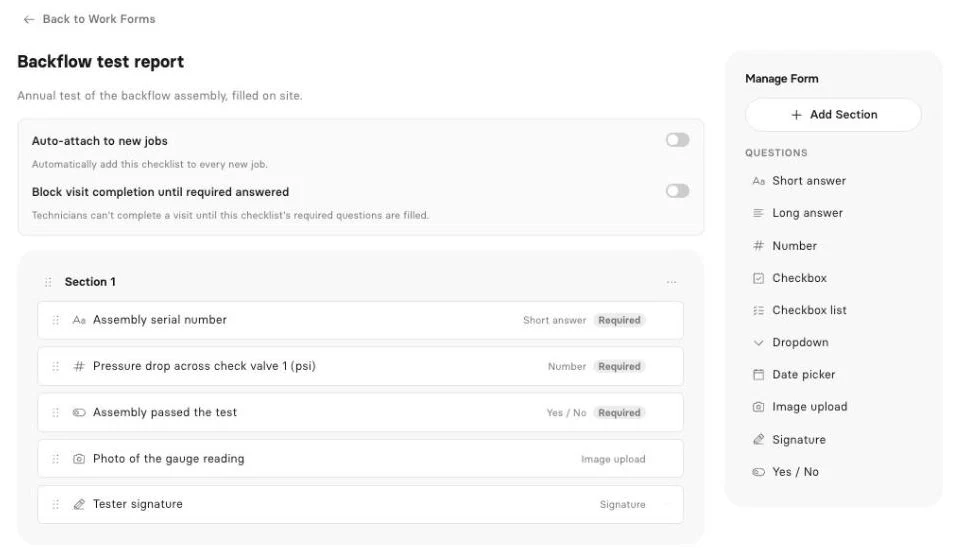
On site. Techs see their day, tap On My Way and Complete, and fill job checklists with photos and a signature. Report checklists become a numbered inspection report with your logo, sent to the customer by email or link. Checklists and reports are on Pro and up.
Getting paid. Generate Invoice on the job, and the customer pays by card from the link with no Clevra platform fee. Pro adds overdue reminders, QuickBooks Online and 23 reports with export, from aged receivables to lead sources.
AI. The AI Receptionist answers your Clevra business number while you're under a dishwasher, takes down the request, reads it back and files it on the right customer. It's an add-on for Pro and Business; book a demo to switch it on. On Pro and up, the AI Business Assistant answers questions like "Which customers haven't booked since last fall?"
Pricing. Flat per company, published on the site (compare plans):
- Free: $0 for 1 user, no time limit
- Pro: $49 a month, or $39 billed yearly, up to 5 users
- Business: $99 a month, or $79 billed yearly, up to 15 users
- Custom: unlimited users, pricing on request
Where Clevra falls short. Clevra has no customer equipment tracking, route planning or GPS. There's no inventory, batch invoicing or financing. The Technician app is iOS only, in beta, and can't take photos yet. There's no Android app, and card payments are in US dollars only.
2. Kickserv
Kickserv, from Denver, has been around since 2006 and joined EverCommerce in 2023. Every plan is a flat monthly price with a user cap: Start is $60 for 5 users, Run $119 for 10, Scale $199 for 20, and yearly billing takes about 20% off. QuickBooks Online is on every plan, and there's a 30-day trial.
The dispatch map, GPS check-ins and custom fields start on Run. See our Kickserv alternatives guide and Clevra vs Kickserv.
3. Service Fusion
Service Fusion is an Irving, Texas company, also part of EverCommerce. Every plan includes unlimited users: Starter is $245 a month billed monthly or $208 billed yearly, Plus $382 or $325, and Pro $627 or $533. It has estimates, dispatch, payments, QuickBooks and an AI call answering product, though job photos, inventory and GPS cost extra on some plans.
There's no free trial, only a demo. It says more than 7,000 service companies use it. See our Service Fusion alternatives guide.
4. Jobber
Jobber, from Edmonton, is the name most small service businesses already know. It covers online booking, estimates, invoices and payments on Core, and adds QuickBooks, reminders and time tracking on Connect. Its AI Receptionist is a $29 a month add-on that answers calls and texts and books into the schedule.
Core is $49 a month for one user billed monthly. Connect for 5 users is $199 monthly or $149 billed yearly, and each extra user is $29. There's a 14-day trial and no free plan. See our Jobber alternatives guide.
5. Markate
Markate, from Scottsdale, is built for solo operators and growing home service teams. It has a job pipeline, drag-and-drop calendar, estimates with options, checklists and photos, payments with ACH and tips, time and location tracking, and an offline app. Its Kate AI Receptionist costs $1 per call.
The base plan is $49.95 a month, or $45.95 billed yearly, plus $5 per employee. Online booking, the customer portal, review requests and a business phone number are $10 a month each.
6. GorillaDesk
GorillaDesk is built mainly for pest control, lawn, pool and cleaning companies, and it prices by route: one technician's or crew's schedule. Basic is $49 a month for the first route, Pro $99 and Growth $149, with extra routes from $30 to $100 and unlimited office users. Its AI agents charge $1 to $1.75 per conversation.
Routing is capped at 25 stops on Basic, and the portal, QuickBooks and time clock start on Pro.
Moving off mHelpDesk
Years of customer history is the reason most people stay put. Before you switch, do three things:
- Ask mHelpDesk for a full export of customers, jobs and invoices, and ask in writing whether there's a fee.
- Clean the customer list in a spreadsheet: one row per customer, addresses in their own columns.
- Import and run both for two weeks. Clevra takes CSV or Excel files of up to 5,000 rows, so new jobs go into the new system while old invoices finish in the old one.
How to pick
- You want a flat price for up to 20 users with QuickBooks on every plan: Kickserv.
- You have a big office team and want unlimited users: Service Fusion.
- You want the most-used option with an AI receptionist that books: Jobber.
- You're pest, lawn or pool and think in routes: GorillaDesk.
- You want published prices, a free plan and inspection reports for 1 to 15 people: Clevra.
mHelpDesk alternatives FAQ
What is the best mHelpDesk alternative?
For a flat price with QuickBooks on every plan, Kickserv. For the most familiar option, Jobber. For published flat pricing, a free plan, inspection reports and an AI receptionist add-on in one app for 1 to 15 people, Clevra.
How much does mHelpDesk cost?
mHelpDesk doesn't publish prices. One third-party site put it at about $169 a month for one user, based on 2024 information.
Who owns mHelpDesk?
Angi. HomeAdvisor bought a majority stake in 2014, and mHelpDesk is listed as an Angi subsidiary in Angi's 2025 annual report.
Is mHelpDesk still being updated?
Yes, but slowly. Recent app updates added landscape mode and photo uploads on the customer profile. It has no AI features.
Is there free software like mHelpDesk?
Clevra has a free plan for one user with customers, estimates, scheduling, invoices, card payments and a client portal. Kickserv, Service Fusion, Jobber, Markate and GorillaDesk have trials or demos, not free plans.
Can I import my mHelpDesk customers into Clevra?
Yes. Export your customer list to a CSV or Excel file and import it into Clevra, up to 5,000 rows at a time. Most teams are running in a day.
Try Clevra on next week's jobs
Import your customers, book a week of visits, and send the invoices from Clevra. The Free plan has no end date, and Pro or Business are free for 14 days, no card.



All-in-one operations platform for trades.
You run a crew, not a tech company. Clevra handles the office stuff so you can stay on the tools.