Table of Contents
GoCanvas Alternatives for Field Inspections (2026)


GoCanvas is how a lot of crews got rid of the clipboard. The inspection form lives on the phone, the tech fills it at the site, and a PDF lands in someone's inbox before the truck leaves. That part works.
The questions start when the bill comes in, or when the office asks why the form, the schedule, the estimate and the invoice live in four different places. GoCanvas charges per user with a 3-user minimum, and a form app doesn't book the visit or send the invoice.
This guide covers six GoCanvas alternatives for field inspections: forms apps that do the same job differently, and one app that puts the form inside the whole job. We make Clevra, so it's listed first. We'll also say where each of the others does better, because on forms several of them do.
Prices were checked on each company's own site on October 27, 2026.
GoCanvas alternatives in one minute
- Clevra: inspection crews of 1 to 15 that want the form plus the job around it (request, estimate, schedule, report, invoice) in one app. Free plan; report checklists on Pro.
- FastField: the closest forms-for-forms swap, with strong rules, calculations and a report builder. Now part of Quickbase.
- Mitti (formerly SafetyCulture): inspection checklists and audits with a free plan for up to 10 seats.
- Fulcrum: map-first field data collection for teams where the GPS point matters as much as the answer.
- GoFormz: digital versions of the paper or PDF form you already use, at a flat price for up to 10 users.
- Appenate: low per-user forms pricing with a 5-user minimum. Forms On Fire joined it in 2026.
Two kinds of app on this list
Forms apps collect data in the field and turn it into a report. GoCanvas, FastField, Mitti, Fulcrum, GoFormz and Appenate are here. They're very good at the form. The customer record, the estimate, the schedule and the invoice live somewhere else, often QuickBooks plus a spreadsheet.
Field service apps run the job from the first call to the payment, and the inspection form is one step in it. Clevra is here. The form builder is simpler than the best forms apps, but the report lands on the same job as the estimate and the invoice.
If your forms are complex and the rest of the business already runs smoothly, stay with a forms app. If you're retyping the same address in three places, look at the second kind.
Why crews look for a GoCanvas alternative
Per-user pricing with a floor. GoCanvas lists Essentials at $29, Pro at $39 and Max at $49 per user a month, billed yearly, with a 3-user minimum. A 6-tech crew on Pro pays $234 a month for forms.
The form isn't the job. GoCanvas can dispatch a form to a tech and push data to QuickBooks. It doesn't send an estimate the client approves online, book recurring visits or take a card payment on an invoice.
Ownership. Nemetschek, the German construction software group, bought GoCanvas in 2024. It also owns Device Magic and SiteDocs. Nothing wrong with that, but some owners like to know who's behind the tool before a renewal.
GoCanvas alternatives at a glance
- GoCanvas: Essentials $29, Pro $39, Max $49 per user/mo, billed yearly, 3-user minimum.
- Clevra: Free $0 for 1 user; Pro $49/mo or $39 billed yearly for up to 5 users; Business $99/mo or $79 yearly for up to 15; Custom on request. Pro or Business free for 14 days, no card.
- FastField: Core $24 per seat/mo billed yearly ($30 monthly); Pro $36 ($45 monthly). Forms filled by people outside your account cost $1.80 a submission. 14-day trial.
- Mitti: Free for up to 10 seats; Premium $24 per seat/mo billed yearly or $29 monthly. 30-day trial.
- Fulcrum: Professional $43, Elite $55 per user/mo, billed yearly, 5-user minimum.
- GoFormz: Starter $499/mo or $4,999 a year for up to 10 users.
- Appenate: Standard $20, Premium $28, Pro $36 per user/mo billed yearly ($25, $35, $45 monthly), 5-user minimum.
Six GoCanvas alternatives, in detail
1. Clevra: for inspection crews that want one app for the whole job
Clevra is one web app that takes an inspection from the customer's request to the paid invoice, with a Technician app for the field (iOS, in beta on TestFlight). It's built for 1 to 15 people: a solo sewer camera operator, or a concrete scanning company with three crews on different pours.
The form. Build each inspection form once with Clevra's checklists: text, number, checkbox, dropdown, date, yes/no, photo upload and signature fields, with required fields. A septic inspector logs tank size, liquid level, baffle condition and pass or fail, adds the photos and the seller's signature. Clevra turns it into a PDF the client gets by email and sees in their portal. Checklists are on Pro and up.
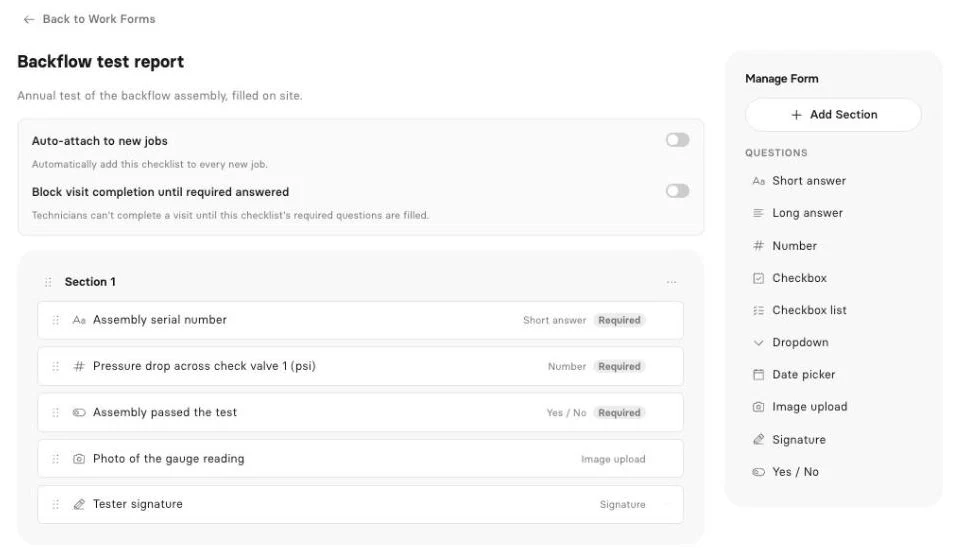
The job around the form. The request comes in from your request form. You send the estimate, the client approves it online, and it becomes the job. You book the visit on the calendar or the map, fill the report on site, and Generate Invoice bills it. For annual work, book next year's visit on its due date before you close this one. The client pays by card from the link, with no Clevra platform fee. QuickBooks Online syncs on Pro.
AI. The AI Receptionist answers the phone while you're in a crawlspace and drops the request in your inbox. AI-written inspection reports draft the report from your answers and photos, ready to read over and send. On Pro and up, the AI Business Assistant answers questions from your own data, and the Clevra MCP server connects your account to Claude or ChatGPT.
Pricing. Flat per company, not per user (compare plans):
- Free: $0 for 1 user, no time limit (report checklists start on Pro)
- Pro: $49 a month, or $39 billed yearly, up to 5 users
- Business: $99 a month, or $79 billed yearly, up to 15 users
- Custom: unlimited users, pricing on request
Where Clevra falls short. As a forms tool, GoCanvas and FastField are ahead. Clevra has no AI form builder or paper-to-form converter, no show-if rules, calculations or scoring, and no barcode, GPS or NFC fields. Checklists can't be filled offline; the Technician app works offline for the visit timer and timesheets only. The Technician app can't take photos or signatures yet, so those questions are filled from the web app. There's no Android app, and card payments are in US dollars only.
See how Clevra is set up for septic, sewer camera, backflow testing and fire protection crews.
2. FastField
FastField is the closest straight swap for GoCanvas. It has 29 field types, repeatable sections (one block per tank or per defect), show-if and require-if rules, calculations and photo markup with GPS and time stamps. Forms work offline. A report builder turns each submission into a branded PDF and can email it to an address typed on the form. The AI form builder, which builds a form from a description or a photo of your paper form, is on every plan.
Core is $24 per seat a month billed yearly ($30 monthly), and Pro is $36 ($45). Pro adds AI photo checks, a label scanner, recurring tasks and more report templates. Forms filled by people outside your account cost $1.80 a submission. Quickbase has owned it since 2023.
Like GoCanvas, it's a forms engine. It has no estimates, invoices, payments or customer records.
3. Mitti (formerly SafetyCulture)
Mitti is the new name, since August 2026, for SafetyCulture, the company behind iAuditor. It runs inspections, checklists, audits, training and maintenance, and says it serves more than 2 million frontline workers. Its public template library includes septic inspection and sewer lateral checklists, which saves you starting from blank.
The free plan covers up to 10 seats, and Premium is $24 per seat a month billed yearly or $29 monthly, with a 30-day trial. It's built for safety and operations teams, so customer billing isn't its job.
4. Fulcrum
Fulcrum is map-first data collection. Every record is a point on the map, which suits private locators, environmental crews and anyone handing a client a GIS export instead of a PDF. It connects well with Esri tools.
Professional is $43 per user a month and Elite $55, billed yearly, with a 5-user minimum. That's $215 a month before your first form, so it fits teams that live in maps more than small service crews.
5. GoFormz
GoFormz turns the form you already have, PDF or paper, into a fillable digital copy that keeps the same layout. That matters when a county, a lender or an insurer wants their exact form back, field for field.
Starter is $499 a month, or $4,999 a year, for up to 10 users. Below 6 or so users that's a lot per head, but it's a flat price as you grow toward 10.
6. Appenate
Appenate is a forms app from Brisbane. Forms On Fire became part of it in January 2026. Standard is $20 per user a month billed yearly ($25 monthly), Premium $28 ($35) and Pro $36 ($45), with a 5-user minimum.
It's a cheaper per-seat option than GoCanvas for crews of five or more. As with the other forms apps, plan on a separate tool for estimates and invoices.
How to pick
- Your forms are complex (repeating sections, scoring, calculations, offline): FastField, or stay on GoCanvas.
- You want a free plan for a mid-size team: Mitti, free up to 10 seats.
- Your client wants map data: Fulcrum.
- Your client wants their own form back: GoFormz.
- You have 5 or more techs and want a lower per-seat price: Appenate.
- You're tired of retyping the address in the form, the estimate and the invoice: Clevra, with one flat price for up to 15 users.
How to move from GoCanvas to Clevra
- Pick your three busiest forms and rebuild them as Clevra checklists first.
- Import your clients from a CSV or XLSX file, up to 5,000 rows.
- Add your price book so estimates and invoices build from the same items.
- Connect Stripe and QuickBooks Online (QuickBooks is on Pro).
- Run both for two weeks on real jobs, then cancel the GoCanvas seats you no longer use.
GoCanvas alternatives FAQ
What is the best GoCanvas alternative?
For a like-for-like forms app, FastField is the closest match on features and costs less per seat. For a free plan, Mitti covers up to 10 seats. For inspection crews that want the form, the estimate, the schedule and the invoice in one app, Clevra.
Is there a free alternative to GoCanvas?
Mitti has a free plan for up to 10 seats. Clevra's free plan covers 1 user for estimates, jobs, invoices and payments; report checklists start on Pro at $49 a month.
How much does GoCanvas cost?
On October 27, 2026, GoCanvas listed Essentials at $29, Pro at $39 and Max at $49 per user a month, billed yearly, with a 3-user minimum.
Who owns GoCanvas now?
Nemetschek Group. It announced the deal in June 2024 and closed it on July 1, 2024. GoCanvas also owns Device Magic and SiteDocs.
What's the difference between a forms app and field service software?
A forms app collects inspection data and makes the report. Field service software runs the whole job: the request, the estimate, the schedule, the report and the invoice. Some crews run both; others pick one app that does enough of each.
Can Clevra replace GoCanvas forms?
For most inspection forms, yes: text, numbers, dropdowns, yes/no, photos and signatures, turned into a PDF for the client. If you rely on show-if rules, calculations, scoring or offline filling, Clevra doesn't do those yet.
Try Clevra on your next inspection
Rebuild one form, then run one job start to finish: book it, fill the report on site, send the PDF and the invoice. The Free plan has no end date, and Pro or Business are free for 14 days, no card.
Get Started for Free or Book a Demo to see the AI Receptionist and AI-written reports on your own work.



All-in-one operations platform for trades.
You run a crew, not a tech company. Clevra handles the office stuff so you can stay on the tools.