Table of Contents
Connecteam Alternatives for Trade Crews (2026)


Connecteam is a good app for crews that work away from a desk. Techs clock in from their phones, see the week's schedule, fill a checklist and message the office, all in one place. More than 80,000 businesses use it, and its reviews on G2 and Capterra are strong.
Trade crews usually go looking for a Connecteam alternative for one reason: the hours are tracked, but the money isn't. Connecteam doesn't send estimates or invoices, so the office still copies a job's hours into another app to bill the customer. Others leave because each hub is priced on its own, and the bill grows as they add the scheduling, chat and HR pieces.
This guide compares six options for trade crews. We make Clevra, so it's listed first. We'll also say where Connecteam and the time-tracking apps do better, because on GPS clock-in and team chat they do.
Prices were checked on each company's own site on October 28, 2026.
Connecteam alternatives in one minute
- Clevra: trade crews of 1 to 15 people that want timesheets tied to jobs, plus estimates, scheduling, invoicing and job costing in one app. Free plan for one user.
- Workyard: contractors that need GPS time tracking and job costing by cost code, billed per user.
- Busybusy: construction crews that want free GPS time tracking for any number of users, with offline mode.
- QuickBooks Time: crews already on QuickBooks Online that want hours flowing straight into payroll.
- Homebase: hourly shift teams that want a free schedule and time clock for one location.
- When I Work: shift scheduling at a low per-user price, with time tracking as an add-on.
How Connecteam pricing works
Connecteam sells three hubs: Operations (time clock, scheduling, forms), Communications (chat, updates) and HR & Skills (documents, training). Each hub is priced separately, in Basic, Advanced and Expert tiers:
- First 30 users, per hub: $29, $49 or $99 a month billed yearly, or $35, $59 or $119 billed monthly.
- Each user above 30: $0.80 to $4.20 a month on the Operations hub, billed yearly.
- Free: the Small Business plan gives teams of up to 10 users every feature for free. Teams of 11 to 30 get a limited free plan per hub.
- Trial: 14 days, no card.
The free plan for 10 users is a real advantage, and nothing else on this list matches it for a crew that only needs a time clock. The cost shows up when you pass 10 people or need two hubs. A 12-person crew on Operations and Communications, both on Advanced, pays $98 a month billed yearly. It still bills its customers from somewhere else.
Why trade crews look past Connecteam
Reviewers on G2, Capterra and Trustpilot rate it highly. The complaints that do come up are these:
- No estimates or invoices. Hours per job help with billing, but the invoice gets built in another app.
- Payroll and QuickBooks exports. Some reviewers describe exports that wouldn't import, or a payroll link that took weeks to sort out.
- Features behind higher tiers. Costs climb with each tier and each hub.
- A lot of menus. The learning curve is the most-tagged complaint on G2.
- Geofence misses. A few reviewers mention clock-ins that didn't register on site, and lag after app updates.
Connecteam alternatives at a glance
- Clevra: Free $0 for 1 user; Pro $49/mo or $39 billed yearly for up to 5 users; Business $99/mo or $79 yearly for up to 15; Custom on request. Flat per company. Pro or Business free for 14 days, no card.
- Connecteam: free for up to 10 users; then $29 to $99 per hub per month billed yearly for the first 30 users.
- Workyard: from $6 per user a month billed yearly; no free plan; 14-day trial.
- Busybusy: Free for unlimited users; Pro $9.99 per user a month billed yearly ($11.99 monthly); Premium $14.99 ($17.99); plus a $40 admin license on paid plans.
- QuickBooks Time: Premium $20 a month plus $10 per user; Elite $40 plus $12 per user. Needs QuickBooks Online.
- Homebase: free for 1 location and up to 10 employees; paid plans $30 to $120 per location a month.
- When I Work: $2.50 to $8 per user a month; time tracking costs extra.
Six options, in detail
1. Clevra: for crews that want the hours, the job and the invoice in one place
Clevra is one web app that takes a job from the first call to the paid invoice, with a Technician app for the field (iOS, in beta on TestFlight). It's built for 1 to 15 people: a plumber with two helpers, or an electrical crew with six techs and an office manager.
Hours tied to the job. Techs clock in and out against the visit they're on, and the visit timer keeps running in the Technician app even with no signal in a basement. The office approves timesheets in one queue, with your overtime rule applied, and exports hours for payroll.
Hours become money. Labour and expenses roll into job costing, so you see the profit on Tuesday's panel upgrade before you invoice it. Then Generate Invoice on the job, and the customer pays by card from the link with no Clevra platform fee.
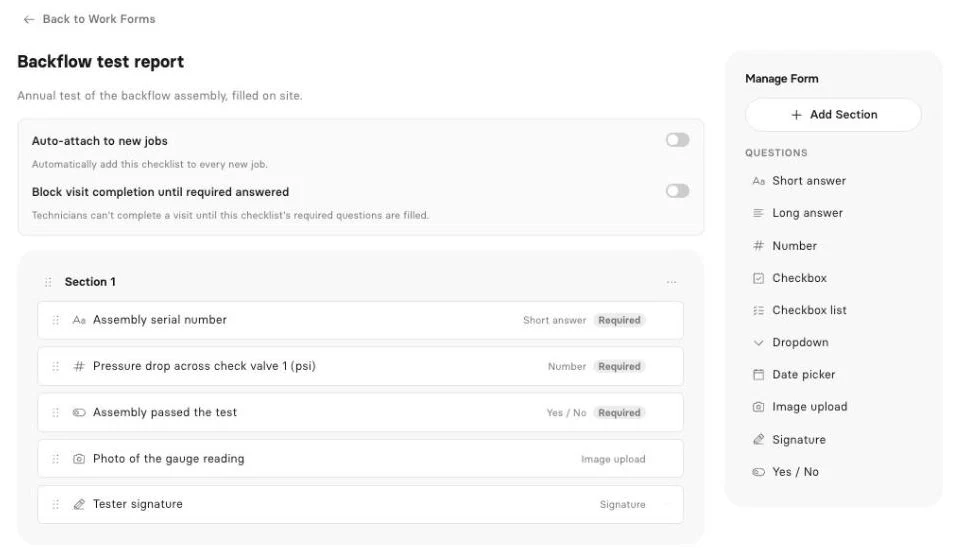
The rest of the job. Send estimates the customer approves online, book and dispatch on the calendar, and fill job checklists with photos and a signature (checklists are on Pro and up).
AI. The AI Receptionist answers your Clevra business number while the crew's on a roof, takes down the caller's request, reads it back and files it in your inbox. It's an add-on for Pro and Business; book a demo to switch it on. On Pro and up, the AI Business Assistant answers questions from your own data, like "How many hours did the crew log on the Miller remodel?"
Pricing. Flat per company, not per user (compare plans):
- Free: $0 for 1 user, no time limit
- Pro: $49 a month, or $39 billed yearly, up to 5 users
- Business: $99 a month, or $79 billed yearly, up to 15 users
- Custom: unlimited users, pricing on request
Where Clevra falls short. There's no GPS clock-in, geofence or location tracking, so Connecteam, Workyard and Busybusy are ahead if you need to prove where someone clocked in. There's no team chat, shift swapping, training or HR documents. Hours export to a file; there's no payroll integration yet. The free plan is one user, where Connecteam's covers ten. The Technician app is iOS only, in beta, and can't take photos yet. Card payments are in US dollars only.
2. Workyard
Workyard is a San Mateo, California company built for contractors. Its GPS time tracking shows where each worker clocked in, and its Pro plan adds scheduling, a kiosk and job costing by project and cost code. It says more than 10,000 contractors use it.
Prices start at $6 per user a month billed yearly; the higher plans aren't priced on the site. There's no free plan, and the Smart Forms add-on costs extra. Invoicing happens in your accounting software, not Workyard.
3. Busybusy
Busybusy, from St. George, Utah, has been part of ToolWatch since December 2023. Its free plan covers unlimited users with GPS time tracking, job costing and equipment tracking, and it works offline, which matters on a site with no cell service. Pro adds scheduling and photos; Premium adds checklists and daily reports.
Pro is $9.99 per user a month billed yearly, Premium $14.99, plus a $40 admin license. There are no estimates or invoices. It says 75,000 contractors use it.
4. QuickBooks Time
QuickBooks Time is Intuit's time tracker, formerly TSheets. Hours go straight into QuickBooks payroll and invoicing, which is why bookkeepers like it. It has GPS while clocked in, scheduling, and on Elite, geofence reminders and project estimates against actual hours.
Premium is $20 a month plus $10 per user; Elite is $40 plus $12 per user, and you need QuickBooks Online. Per-user prices went up $2 in July 2026. There's a 30-day trial.
5. Homebase
Homebase is a San Francisco company built for hourly teams like restaurants and shops. It has a GPS time clock, scheduling, team chat and payroll, and its free plan covers one location with up to 10 employees.
Paid plans run $30 to $120 per location a month with unlimited employees, and payroll is $49 a month plus $6 per employee. It has no job costing, estimates, invoices or forms, so it suits a crew that works out of one shop more than one that moves between job sites.
6. When I Work
When I Work is a Minneapolis scheduling app for shift-based teams. Shift swaps, team chat and clock-in with a geofence are the core. Plans cost $2.50, $5 or $8 per user a month, and time tracking is an add-on.
There's no free plan, no forms and no invoicing. It's a good scheduler for a crew with fixed shifts, and a thin fit for a crew that books jobs by the hour.
Time tracking that turns into an invoice
Most time apps answer "who worked, and how long?" A trade business also needs "which job was it, and did we bill it?" Before you pick, follow one day's hours through each app:
- Clock-in: is the time tied to a specific job, or just to the day?
- Approval: can the office fix a forgotten clock-out before payroll runs?
- Costing: do those hours show up in the job's profit next to materials?
- Billing: does the invoice use the same job record, or does someone retype it?
Time apps like Connecteam, Workyard and Busybusy do steps 1 and 2 well, and Workyard and Busybusy cover step 3. Step 4 is where a field service app like Clevra saves the evening at the kitchen table.
How to pick
- You need GPS proof of where people clocked in: Workyard, Busybusy or Connecteam.
- You have more than 10 people and only need a free time clock: Busybusy.
- Your bookkeeper runs everything through QuickBooks: QuickBooks Time.
- You run fixed shifts from one shop: Homebase or When I Work.
- You want hours, estimates, scheduling and invoices in one app for up to 15 people: Clevra.
Connecteam alternatives FAQ
What is the best Connecteam alternative for contractors?
If you mainly need GPS time tracking, Workyard or Busybusy. If you want the hours tied to jobs you also estimate, schedule and invoice, Clevra.
Is Connecteam free?
Yes, for small teams. Its Small Business plan gives up to 10 users every feature for free, and teams of 11 to 30 get a limited free plan per hub. Larger teams pay per hub.
How much does Connecteam cost?
Each hub costs $29, $49 or $99 a month billed yearly for the first 30 users, or $35, $59 or $119 billed monthly. Users above 30 add $0.80 to $4.20 a month each on the Operations hub. Operations, Communications and HR are priced separately.
What is the best time tracking app for contractors?
For GPS time tracking and cost codes, Workyard and Busybusy are built for contractors, and Busybusy has a free plan with unlimited users. For time tracked against jobs that you also invoice, Clevra.
Does Clevra have GPS time tracking?
No. Clevra tracks time against each job with a timer, approvals and overtime rules, but it doesn't record location. If you need GPS proof of clock-ins, use a time app alongside it.
Can Clevra replace Connecteam?
For a crew of up to 15 that uses Connecteam for its time clock, schedule and job forms, and bills customers from another app, yes. Clevra covers timesheets, scheduling and checklists and adds estimates, invoices and payments. It doesn't replace Connecteam's team chat, training or GPS clock-in.
Try Clevra on next week's jobs
Put one week of jobs into Clevra: schedule the visits, track the hours against each job, and send the invoices from the same record. The Free plan has no end date, and Pro or Business are free for 14 days, no card.
Get Started for Free or Book a Demo to see timesheets, job costing and the AI Receptionist on your own work.




All-in-one operations platform for trades.
You run a crew, not a tech company. Clevra handles the office stuff so you can stay on the tools.