The short answer
XBuild uses AI to scope the claim. Clevra uses AI to run the visit.
XBuild is AI estimating for roofing, restoration and insurance work: it builds scopes, publishes to Xactimate and Symbility, and runs an insurance supplement service. Its ops tools need the Business plan, AI use is metered in tokens, and it doesn't publish prices. Clevra has published prices from $0 and runs the field service side: dispatch, inspection checklists, AI-written inspection reports, invoices and an AI Receptionist on Pro at $49.
Choose Clevra if
- You want to see the price and start today
- You want AI to answer calls and draft inspection reports, included in the plan price
- You run inspections, repairs, maintenance and service visits
- You want dispatch, recurring visits and two-way texting
Choose XBuild if
- Insurance claims are a big part of your work
- You publish scopes to Xactimate or Symbility
- You want AI estimates with live ABC Supply pricing
- You want an insurance supplement service
XBuild does not publish plan prices, and AI work uses tokens that pause when they run out. Clevra Pro is $39 and Business $79 a month billed yearly.
What makes Clevra different
From the first call to the paid invoice, in one app
XBuild is strongest on the estimate and the claim. Clevra covers the rest of the job: the call, the booking, the checklist on site, the report, the invoice and the payment.
- 1CallThe AI Receptionist picks up when you can't, asks what the client needs and drops the request in your inbox.
- 2EstimatePrice the work from your price book and send it. The client approves online with a typed name or a drawn signature.
- 3BookPut the job on the calendar. Clevra sends the confirmation and the day-before reminder for you.
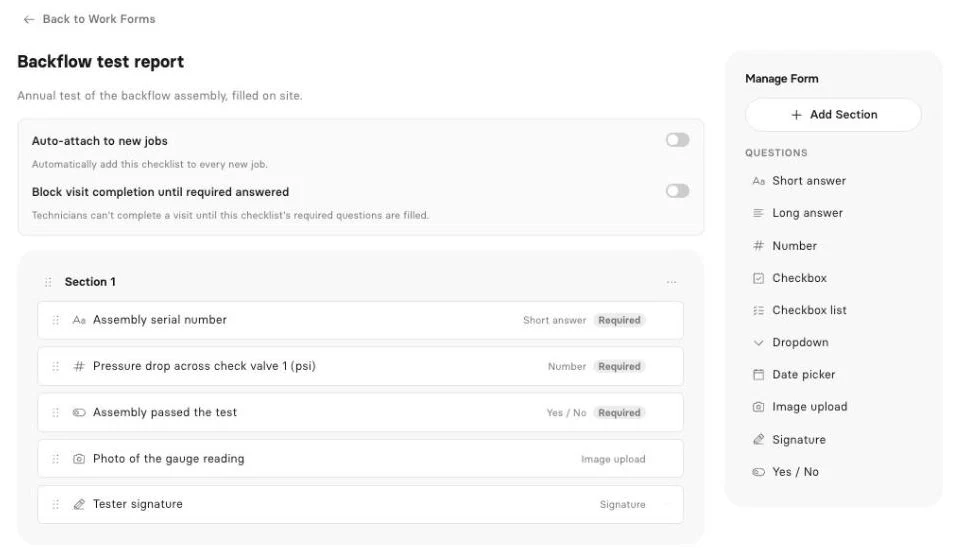
- 4InspectFill your checklist on site: readings, yes/no answers, photos and the client signature.
- 5ReportClevra drafts the inspection report from what you recorded. Read it, adjust it, send the PDF.
- 6Get paidTap Generate Invoice on the job. The client pays by card from the link or the portal.
One price for the whole crew
Clevra charges per company, not per user. Pro is $49 a month for up to 5 people and Business is $99 for up to 15. Adding a tech never changes the bill.
Inspection checklists and PDF reports
Number, dropdown, yes/no, date, photo and signature fields with required answers. The client gets the PDF by email and in their portal. Pro and up.
A free plan you can actually run
One user, unlimited clients, estimates, scheduling, invoices and online card payments. No card, no time limit.
AI that takes the office work off your plate
XBuild's AI builds scopes and proposals, titles photos and runs an assistant called Rex, metered in tokens on every plan. It doesn't list AI call answering. Clevra's AI Receptionist and AI-written inspection reports are part of the Pro plan price.
AI Receptionist
Answers calls while you're on a job, asks what the caller needs and puts the request in your inbox. Pro and up.
AI-written inspection reports
Clevra drafts the report from your checklist answers, readings, photos and notes. Read it over and send the PDF. Pro and up.
AI Business Assistant
Ask "who still owes us from September?" or "what did we make on the Hillside job?" and get the answer from your live Clevra data. Pro and up.
Clevra connector for Claude and ChatGPT
Look up jobs, find an open slot, draft an estimate or book a visit from your AI assistant. It asks before every change. Pro and up.
Clevra vs XBuild pricing
What each one shows before you talk to sales.
| What you get | Clevra | XBuild |
|---|---|---|
| Published prices | ||
| Free plan | Yes, 1 user | Not listed |
| Plans | Free, Pro $49/mo, Business $99/mo, Custom | Operator, Business, Enterprise |
| AI usage | Included in the plan | Tokens per month, top-ups extra |
| Scheduling and invoicing | Every plan | Business plan |
| Insurance supplement service | Yes, fee shown before you submit |
XBuild details from x.build/pricing and docs.x.build on October 24, 2026.
Clevra vs XBuild features
Only features we could confirm on each company's own website.
| Feature | Clevra | XBuild |
|---|---|---|
| Estimating and claims | ||
| AI estimates and scopes | ||
| Xactimate and Symbility publishing | ||
| Good/better/best proposals | ||
| Estimates signed online | Every plan | |
| Inspections and field work | ||
| Inspection checklists with photos and signatures | Pro and up | Checklists in the mobile app |
| PDF inspection report | Photo report PDFs | |
| Dispatch and recurring visits | Work orders on Business | |
| Two-way texting | Pro and up | Through integrations |
| Money | ||
| Invoices and card payments | Every plan | Card deposits on Operator, invoices on Business |
| ACH | Yes, US | |
| QuickBooks Online | Pro and up | |
| AI | ||
| AI Receptionist | Pro and up | Not listed |
| AI-written inspection reports | Pro and up | AI photo titles and reports |
| AI assistant on your data | Pro and up | Rex |
| Mobile | ||
| Native apps | Technician app, iOS beta | iOS and Android |
“Not listed” means we did not find it on x.build on October 24, 2026, not that XBuild can't do it.
Where each one is stronger
Clevra is stronger on
- Published prices, a free plan and a no-card trial
- AI included in the plan price
- An AI Receptionist
- Dispatch, recurring visits, two-way texting and invoices on every plan
- Built for inspection, testing and service trades
XBuild is stronger on
- AI estimates and scopes for roofing and restoration
- Insurance work: Xactimate and Symbility publishing, supplements
- Live supplier pricing and material orders
- Native iOS and Android apps with offline capture
- Working on top of AccuLynx, JobNimbus or Jobber
Switching from XBuild to Clevra
Most crews are set up in an afternoon. Keep XBuild until you no longer need your old job history.
- 1
Export your clients
Download your client list from XBuild as a CSV or spreadsheet.
- 2
Import into Clevra
CSV or XLSX, up to 5,000 rows, with more than one property per client.
- 3
Set up your price book and checklists
Add your services and rates, then build the inspection checklists your crew fills on site.
- 4
Turn on the AI Receptionist
Let it answer the calls you miss while you work, so new requests land in your inbox.
Clevra vs XBuild FAQ
How much does XBuild cost?
XBuild does not publish plan prices, and AI work is metered in tokens with top-ups. Clevra Pro is $49 a month for up to 5 users and Business $99 for up to 15, with AI included.
Does Clevra work with insurance claims?
Clevra does not publish to Xactimate or Symbility. You can document a loss with an inspection checklist, photos and an AI-drafted report, and attach it to the job.
Does Clevra have an AI Receptionist?
Yes, included on Pro and up. It answers calls you miss and puts the request in your inbox.
Can Clevra write inspection reports?
Yes. Fill a checklist on site with condition fields, photos and a signature, and Clevra drafts the report with AI. Pro and up.
Can I use XBuild and Clevra together?
Yes. Some contractors scope claims in an estimating tool and run scheduling, field work, reports and invoices in Clevra.
Can I switch from XBuild to Clevra?
Yes. Export your clients as a CSV and import them into Clevra, then build your inspection checklists.
XBuild details checked on x.build on October 24, 2026. Confirm with XBuild before you buy. See all comparisons.

All-in-one operations platform for trades.
You run a crew, not a tech company. Clevra handles the office stuff so you can stay on the tools.