Table of Contents
ServiceTrade Competitors for Contractors (2026)


ServiceTrade knows commercial service. Fire protection companies, mechanical contractors and kitchen exhaust cleaners pick it because it speaks their language: a building full of equipment, a deficiency found on a Tuesday walk-through, and a repair estimate that has to reach the facility manager before the next inspection is due.
That focus is exactly why some smaller outfits start comparing ServiceTrade competitors. A four-person fire and backflow shop may not want per-technician pricing it can only learn from a sales rep. A hood cleaning crew that works from 11 p.m. to 5 a.m. mostly needs before and after photos attached to the invoice, and a client who pays it.
This post looks at six ServiceTrade alternatives for commercial service and inspection work: what they cost where the price is public, who each one suits, and where each falls short. We make Clevra, so it’s listed first. We also spell out what ServiceTrade does better, including the per-device equipment history that Clevra doesn’t have.
Every price below was checked on the vendor’s own pricing page on October 15, 2026.
Short answer: who fits which shop
- Clevra: commercial inspection and service crews of 1 to 15 (fire protection, backflow, hood cleaning, grease traps) that want on-site checklists, PDF reports and a flat published price. Free plan available.
- BuildOps: commercial mechanical, electrical and plumbing contractors who run service calls and construction projects in one system.
- ServiceTitan: large residential and commercial shops with a dispatch room, memberships and financing.
- FieldPulse: HVAC and electrical contractors who track equipment under maintenance agreements and want AI call answering now.
- FieldEdge: HVAC and plumbing shops that sell from a flat-rate pricebook.
- Service Fusion: growing teams that want unlimited users for one published monthly price.
Five of the seven tools in this post, ServiceTrade included, don’t publish a price. Plan on demos.
Why commercial crews look for a ServiceTrade alternative
The friction is usually about fit and size, not quality. Four reasons come up.
1. You can’t budget before the sales call. ServiceTrade lists three packages (Select, Premium and Enterprise) and every one says “Request pricing.” The price depends on how many technicians you run. A three-tester shop won’t know the number until it has sat through the process.
2. There’s no trial to lean on. ServiceTrade’s pricing page doesn’t mention a trial. So you can’t run one real week of inspections through it before you commit.
3. The AI sits in the upper tiers. ServiceTrade lists its AI features on Premium and above. A small shop that would happily start on the entry package may find the parts it’s curious about are a tier or two up.
4. Your job is mostly the visit and the paperwork. Plenty of small commercial outfits do the same loop all year: test the reduced pressure assembly, fill in the certificate, send it to the client and the water authority, invoice. Deficiency workflows and multi-building asset history are built for large portfolios. If your contracts depend on that history, though, ServiceTrade is probably the right home and you should stay.
ServiceTrade competitors at a glance
Monthly cost in USD as listed on each vendor’s site on October 15, 2026. Where a vendor publishes nothing, we say so.
- ServiceTrade (for reference): Select, Premium, Enterprise, all request pricing, priced by technician count. No free plan. No trial mentioned. Best for commercial fire, mechanical, refrigeration and kitchen exhaust contractors with deep equipment records.
- Clevra: $0 for 1 user; $39/mo for up to 5 users and $79/mo for up to 15 (billed yearly). Free plan. 14-day trial of paid plans, no card. Best for commercial inspection and service crews of 1 to 15.
- BuildOps: no plan names, priced after discovery and a demo. No free plan. No trial mentioned. Best for commercial MEP contractors mixing service and projects.
- ServiceTitan: request pricing, per technician. No free plan. No trial listed. Best for large shops with call centers.
- FieldPulse: seat-based, pricing by sales call. No free plan. Trial not stated. Best for equipment-heavy HVAC and electrical service.
- FieldEdge: request pricing by technicians and add-ons. No free plan. No free trial. Best for HVAC and plumbing shops with a flat-rate pricebook.
- Service Fusion: $208/mo Starter with unlimited users (billed yearly). No free plan. Demo, no trial mentioned. Best for teams of 15 and up.
The 6 ServiceTrade alternatives worth a demo, compared
1. Clevra: for commercial inspection and service crews of 1 to 15
Clevra is a single web app that carries a job from the first call to the paid invoice, plus a Technician app for the crew (iOS, in beta on TestFlight). It’s priced and built for crews of 1 to 15. On the commercial side, it fits shops whose visit ends with a document someone else will file: fire protection inspections, backflow testing, kitchen hood cleaning, grease trap service and commercial HVAC maintenance.
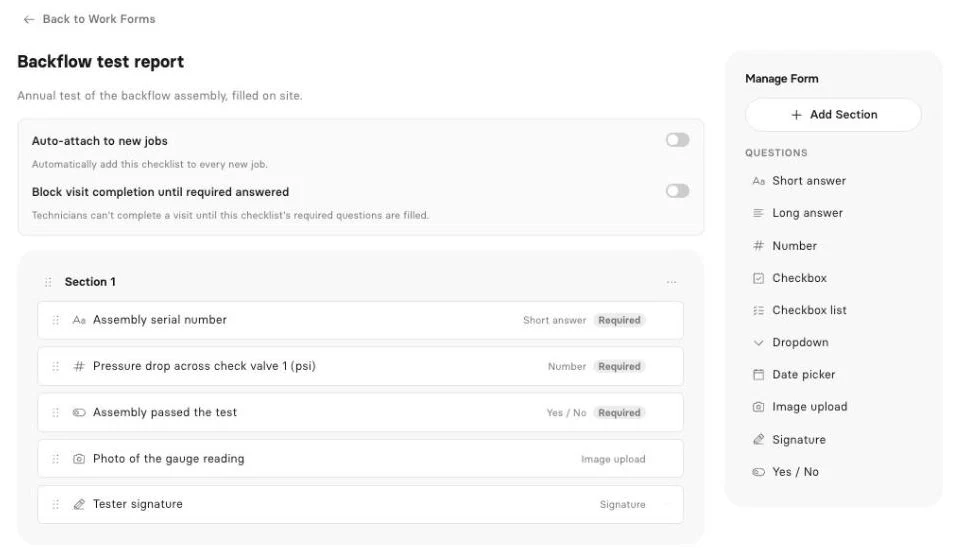
What that looks like on a real visit. A sprinkler inspector on a quarterly round needs the riser gauge readings, the main drain result, a yes/no on each control valve and the building engineer’s signature. A backflow tester needs the assembly serial, both check valve readings and the relief valve opening point. A hood crew needs photos of the hood, plenum and fan before and after, plus the date on the sticker. A grease trap tech needs gallons pumped and the manifest number.
You build each of those as a work form in Clevra’s checklist builder (Pro and up): text, number fields for readings, checkboxes, dropdowns, dates, yes/no, photo upload, signature and required fields. Attach the form to the visit, fill it on site, and Clevra produces a PDF that appears in the client’s portal beside the invoice. The property manager stops emailing you for last quarter’s report because it’s already there. One honest note: photo and signature questions are filled from the web app for now, not the Technician app.
Commercial sites need scanning and locating too. Before a plumber cores a slab for a new floor drain in a tenant fit-out, someone runs GPR over it. Before a parking lot gets trenched for a new light base, someone marks the private lines in paint. Clevra started with concrete scanning crews and private utility locators, so those report formats work the same way.
Early access: inspection reports. Clevra’s AI inspection reports take what your crew captured on site and turn it into a client-ready report draft. It’s in Early access. Book a demo with your own report and we’ll show it on your format.
Early access: AI Receptionist. Restaurant managers call when the hood alarm trips, not when it suits you. Clevra’s AI Receptionist answers the business line, records who’s calling and what they need, and drops the request in your inbox for the office to book. It’s Early access too: book a demo of the receptionist to get on the list.
AI you can use today. On Pro and up, the Business Assistant answers plain-English questions from live data, like “Which restaurants owe us more than 30 days?” or “How much did backflow tests bill in September?” The MCP server connects your account to Claude, ChatGPT or any MCP assistant. It can look up jobs, find open slots, draft an estimate or book a visit, and it asks before every change.
Everything between the call and the cheque. Estimates for deficiency repairs that clients approve and sign online, with automatic follow-ups on Pro. A calendar with recurring visits for quarterly hood cleans and annual tests, plus a map view. A client list that holds multiple properties per client, so one restaurant group with nine locations is one record. Generate Invoice straight from a job, online card payments through Stripe with no Clevra platform fee, two-way text messages, costing per job, timesheets, 23 reports and QuickBooks Online sync.
Pricing. Flat per company, never per seat (full plan details):
- Free: $0 for 1 user, no time limit
- Pro: $49 a month, or $39 a month billed yearly, up to 5 users
- Business: $99 a month, or $79 a month billed yearly, up to 15 users
- Custom: unlimited users, pricing on request
Any new account can try Pro or Business for 14 days without a card.
Where ServiceTrade is stronger. ServiceTrade tracks equipment and asset history per device, captures deficiencies as their own workflow, gives you unlimited office users and is built around fire, mechanical, refrigeration and kitchen exhaust from the ground up. Clevra has no per-device asset history and no service agreement billing module. If your contracts are priced and renewed around a list of devices in each building, that gap matters.
For a line-by-line breakdown, see Clevra vs ServiceTrade.
2. BuildOps
BuildOps targets the same commercial trades (HVAC and mechanical, electrical, plumbing, fire and life safety, refrigeration) but adds project tools: submittals, RFIs and change orders. It integrates with Viewpoint, Sage Intacct, NetSuite and QuickBooks. There are no plan names; pricing comes after a discovery call and demo and depends on users, trades and integrations.
It makes sense for a contractor whose service department and construction department share a back office and an ERP. A small inspection shop won’t use the project half. See how Clevra and BuildOps differ.
3. ServiceTitan
ServiceTitan serves residential and commercial HVAC, plumbing, electrical, roofing and more. Starter, Essentials and The Works are all request pricing, per technician, with no trial listed. You get call booking and recording, a proposal builder, service agreements and memberships, payroll, inventory, project management with progress billing, financing and an AI Virtual Agent.
For a 50-tech operation with CSRs and dispatchers, that’s the point. For a six-person fire shop, the setup and contract are a big step. Read our ServiceTitan comparison.
4. FieldPulse
FieldPulse is seat-based and priced through a sales call; a trial isn’t stated. It brings custom forms, asset management, maintenance agreements, a booking portal, fleet tracking, its own phone system and Operator AI, an AI dispatcher that answers calls today.
Of the tools here, it’s the nearest to ServiceTrade on equipment tracking, and it lists commercial equipment among its trades. If asset history is non-negotiable and you want AI answering already shipped, put it on the shortlist. See Clevra and FieldPulse side by side.
5. FieldEdge
FieldEdge sells Select, Premier and Elite on request, priced by technicians and add-ons, and it doesn’t offer a free trial (it says its onboarding works better). Every plan has scheduling, dispatching, a flat-rate pricebook, payments, QuickBooks Online and Desktop integration and SMS. Premier and Elite add service agreements; Elite adds outbound call recording and warehouse inventory. Mobile licenses are capped at 2, 4 or 6 by plan.
It leans residential HVAC and plumbing. A commercial refrigeration or kitchen exhaust crew should check whether its workflow fits before booking onboarding. Compare in Clevra vs FieldEdge.
6. Service Fusion
Service Fusion publishes its prices: Starter $208, Plus $325 and Pro $533 a month billed yearly ($245, $382 and $627 monthly), always with unlimited users. It offers a demo, not a trial. Features include dispatch, GPS tracking, service agreements, inventory, eSign, a customer portal, progress billing and AI phone answering.
Unlimited users at a flat rate is a real win at 20 people. At 3, $208 a month is a lot of overhead. Details in our Service Fusion breakdown.
Free ServiceTrade alternatives
Here’s an awkward truth about commercial service software: almost nobody lets you try it alone. ServiceTrade and BuildOps don’t mention a trial. ServiceTitan lists none. FieldEdge says no on purpose. Service Fusion offers a demo, and FieldPulse doesn’t state a trial on its pricing page.
Clevra has two ways in. The Free plan costs $0 for one user with no time limit and covers clients, estimates, jobs, scheduling, invoices, the client portal and online card payments (with Clevra branding on estimates, invoices and the portal). Or start any new account on a 14-day trial of Pro or Business, no card, which includes checklists.
For a solo backflow tester, the Free plan is enough to book tests and get paid. Once you want PDF certificates from checklists, move to Pro.
Software like ServiceTrade: test the field side first
Before you sign with any tool, give the app to your best inspector for a full route and check:
- Can they open the day, get directions and tap On My Way without phoning the office?
- Does the inspection form match what the AHJ or water authority expects, field for field?
- Does it keep working in a basement mechanical room with no signal?
- Can they capture photos and the site contact’s signature on the device?
- Can they take payment before they leave?
Clevra’s answer, plainly: the Technician app shows the day, visit details, directions and Start, On My Way and Complete. It fills checklists, though photo and signature questions are filled from the web app for now. The visit timer and timesheets work offline; the rest needs signal. Techs can create invoices and record cash, cheque, card or e-transfer payments by hand. It’s an iOS beta on TestFlight, not yet on the App Store, and there’s no Android app.
If your crew is on Android or works long stretches without signal, weigh that heavily.
How to choose between them
- You bill against a list of devices per building: stay on ServiceTrade or look at FieldPulse. Clevra doesn’t track individual devices.
- Your deliverable is a certificate or inspection report: Clevra’s checklists turn the visit into a PDF the client can find later.
- You’re 2 to 5 people and want a number today: Clevra Pro is $39 a month billed yearly for up to 5 users. Most others need a call.
- You also run construction projects: BuildOps handles submittals, RFIs and change orders.
- You have dispatchers and a call center: ServiceTitan.
- You’re past 20 techs and hate seat math: Service Fusion’s unlimited users.
If recurring inspections are your bread and butter, our piece on maintenance agreements and recurring revenue is worth a read, and using field reports to cost jobs shows how the paperwork feeds your margins.
Moving off ServiceTrade, step by step
- Export customers and locations. Get your customer list and service locations into a spreadsheet.
- Import into Clevra. CSV or XLSX, up to 5,000 rows, with each building set up as a property under its client.
- Save your equipment history somewhere safe. Clevra won’t hold per-device records, so keep that export where your team can find it.
- Build one checklist per inspection type. Sprinkler quarterly, backflow annual, hood clean, grease trap pump-out. Start with the fields the authority asks for.
- Load this year’s recurring visits. Put quarterly and annual work on the calendar so nothing slips during the move.
- Connect Stripe and QuickBooks Online. Card payments and accounting sync are on the integrations page.
- Add your request form. Embed the website request form so new service calls land in one inbox.
- Overlap for one billing cycle. Close out open work in ServiceTrade, book new work in Clevra, then cancel.
ServiceTrade alternatives FAQ
Is ServiceTrade worth it?
For commercial fire protection, mechanical and kitchen exhaust contractors who manage many buildings and bill against equipment lists, it often is. Deficiency capture, per-device asset history and unlimited office users are real strengths. For a small shop that mostly inspects, reports and invoices, the request-only pricing and missing trial can make it hard to justify before you’ve used it.
Does ServiceTrade have a free trial?
ServiceTrade’s pricing page, checked on October 15, 2026, doesn’t mention a free trial or a free plan. All three packages, Select, Premium and Enterprise, are request pricing and priced by number of technicians, so expect a sales conversation and demo before you get a number or log in.
Is there a free alternative to ServiceTrade?
Yes. Clevra’s Free plan is $0 for one user with no time limit, covering clients, estimates, jobs, scheduling, invoices, the client portal and online card payments. Checklists for inspection reports start on Pro, which new accounts can try for 14 days without a card. Clevra doesn’t track per-device equipment history.
Who are ServiceTrade’s main competitors?
For commercial service work, the names that come up most are BuildOps, ServiceTitan, FieldPulse, FieldEdge and Service Fusion. Clevra competes for smaller commercial inspection and service crews, such as fire protection, backflow, hood cleaning and grease trap outfits. Our comparison hub lists each head-to-head page.
Does Clevra track equipment history like ServiceTrade?
No. Clevra has multiple properties per client and keeps every visit, checklist PDF and invoice on the client record, but it doesn’t track individual devices or their history. If your work depends on per-device records across many buildings, ServiceTrade or FieldPulse will fit better today, and we’d rather you know that up front.
Does Clevra have an AI receptionist?
Clevra’s AI Receptionist is in Early access. It answers your business line, takes down who is calling and what they need, and places the request in your inbox for the office to book. Grab a demo slot to join. The AI Business Assistant, which answers questions from your live data, is available now on Pro and Business.
Can Clevra handle backflow test certificates?
Yes. Build a checklist with the assembly type, serial number, check valve readings, relief valve opening point, pass or fail and a signature, mark the key fields required, and attach it to the test visit. Clevra turns the filled form into a PDF the client sees in their portal. Photo and signature questions are filled from the web app for now.
Run your next inspection in Clevra
Put one sprinkler inspection, backflow test or hood clean through Clevra this week and see how the PDF looks to your client. The Free plan doesn’t expire, and Pro or Business come with 14 days free, no card.
Get Started for Free or Book a Demo to see inspection reports and the AI Receptionist in Early access.




All-in-one operations platform for trades.
You run a crew, not a tech company. Clevra handles the office stuff so you can stay on the tools.