Table of Contents
BuildOps Competitors for Contractors (2026)


Picture a GPR scanning sub on a hospital expansion. The general contractor runs submittals, RFIs and change orders in its own system. What the sub needs is simpler: price the scan, get the PM to sign, show up on the right floor, hand over a marked-up layout before the core drill starts, and invoice by Friday.
BuildOps is a serious platform for the other end of that relationship. It joins commercial service with project tools and ERP integrations, and mechanical, electrical, plumbing and fire contractors with both a service and a construction department get a lot from it. That’s also why specialty subs start searching for BuildOps competitors: they’d be paying to configure a project side they never touch.
Below are six BuildOps alternatives, sorted by who they suit, with published prices where they exist and plain notes on gaps. We make Clevra, so it’s listed first. We’ll also say where BuildOps is the better buy, because for some contractors it clearly is.
Every price below was checked on the vendor’s own pricing page on October 15, 2026.
The 30-second version
- Clevra: specialty subs and small crews (concrete scanning, utility locating, electrical inspection, generator maintenance) that estimate, book, report and invoice, with a published flat price and a free plan.
- ServiceTrade: commercial fire, mechanical and kitchen exhaust service with deficiency capture and equipment history.
- ServiceTitan: large contractors with call centers, memberships, progress billing and financing.
- FieldPulse: HVAC and electrical service shops that track assets and want an AI dispatcher answering calls.
- Service Fusion: teams of 15 or more that want unlimited users and progress billing at a public price.
- FieldEdge: HVAC and plumbing service shops built around a flat-rate pricebook.
Why subcontractors look for a BuildOps alternative
We hear the same handful of reasons from subs who’ve taken the BuildOps demo and walked away. None of them mean the software is weak.
1. Half the platform belongs to the GC’s workflow. Submittals, RFIs and change orders are core to BuildOps. On most commercial jobs, a scanning firm or locator responds to those inside the GC’s project system. Running a second copy of the paperwork in your own software is overhead, not help.
2. Price only arrives after discovery. BuildOps has no plan names on its site. You get a number after a discovery call and a demo, and it depends on users, trades and integrations. A five-person sub comparing options in an evening can’t put it in a spreadsheet.
3. The integrations are built for an ERP back office. Viewpoint, Sage Intacct and NetSuite are where mid-size contractors keep their books. BuildOps connects to them (and to QuickBooks). A sub whose bookkeeper lives in QuickBooks Online doesn’t need the bigger connectors.
4. You can’t try it on a live job. No trial is mentioned. For a crew that wants to run one real scan or locate through new software before switching, that’s a hurdle.
BuildOps competitors at a glance
Monthly prices in USD from each vendor’s site on October 15, 2026. Only two of the seven publish numbers.
- BuildOps (for reference): no plans listed, pricing after discovery and demo, based on users, trades and integrations. No free plan. No trial mentioned. Best for commercial MEP and fire contractors running service and projects together.
- Clevra: Free at $0 for 1 user. Pro $49/mo ($39 yearly) for up to 5 users; Business $99/mo ($79 yearly) for up to 15. Free plan. 14-day trial, no card. Best for specialty subs and service crews of 1 to 15.
- ServiceTrade: Select, Premium, Enterprise, request pricing by technician count. No free plan. No trial mentioned. Best for commercial fire, mechanical and kitchen exhaust service.
- ServiceTitan: request pricing per technician. No free plan. No trial listed. Best for large shops with dispatchers.
- FieldPulse: seat-based, quoted on a sales call. No free plan. Trial not stated. Best for asset-heavy HVAC and electrical service.
- Service Fusion: $208/mo Starter, unlimited users, billed yearly. No free plan. Demo, no trial mentioned. Best for bigger teams tired of per-seat bills.
- FieldEdge: request pricing by technicians and add-ons. No free plan. No free trial. Best for HVAC and plumbing with a flat-rate pricebook.
6 BuildOps alternatives compared for specialty subs
1. Clevra: for specialty subs who estimate, book, report and invoice
Clevra is one web app for the whole job, first call to paid invoice, with a Technician app for iOS (beta, on TestFlight) for the people on site. It’s sized for crews of 1 to 15, and it was built around trades where the visit ends in a document: GPR and concrete scanning, private utility locating, electrical inspection and generator maintenance, plus subs working across commercial construction.
The deliverable is the job. On a post-tensioned deck, the scanning tech has to show where the tendons run before anyone drills an anchor, with a photo of the layout and the superintendent’s sign-off. A locator clearing a site for a light pole base records each line, its depth, the paint color and a photo of the marks. An electrical inspector logs findings panel by panel. A generator tech records run hours, load bank readings and the oil and filter change on a standby unit at a data center.
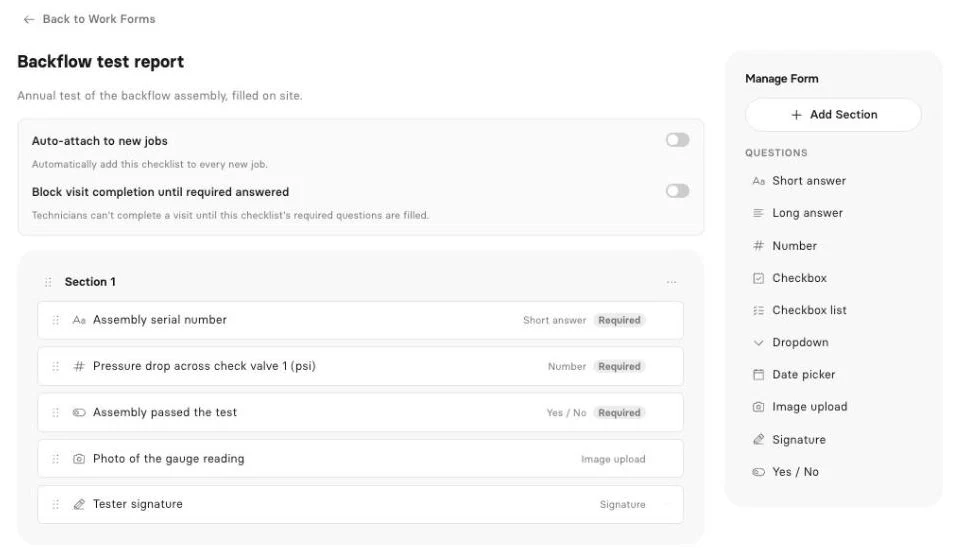
Each of those becomes a work form in Clevra’s on-site checklists (Pro and up). Fields include text, numbers for readings, checkboxes, dropdowns, dates, yes/no, photo upload, signature and required answers. The crew fills it on site, Clevra makes the PDF, and the GC’s PM finds it in the portal with the invoice. Our scanning report template lists the fields most firms start with. One limit today: photo and signature questions are filled from the web app, not yet the Technician app.
Early access: inspection reports. Clevra inspection reports turn what the crew captured on site into a client-ready report draft. It’s in Early access. Book a demo with a GC report you’ve already sent and we’ll run it through.
Early access: AI Receptionist. Superintendents call when they need a scan tomorrow at 7 a.m. Clevra’s AI Receptionist answers your business line, notes who’s calling and what they need, and puts the request in your inbox for the office to book. Also Early access: see the receptionist on a call.
AI that’s live now. On Pro and Business, the AI Business Assistant answers plain-English questions from your data: “Which GCs owe us more than 30 days?” or “What did we bill on locates in Q3?” And through the Clevra MCP connection, Claude, ChatGPT or any MCP assistant can look up jobs, find open slots, draft an estimate or book a visit. It asks before every change.
The office side. Estimates a PM can sign online, with automatic follow-ups on Pro so a bid doesn’t go cold in someone’s inbox. A day, week and month calendar with a map view and drag and drop on desktop. A CRM where one GC can hold every jobsite as a separate property. Invoices generated from the job, Stripe card payments online in USD with no Clevra platform fee, cheques and e-transfers recorded by hand. Job costing shows which GC’s work actually pays, alongside timesheets and crew roles, 23 reports and QuickBooks Online sync.
Pricing. A flat company price, not per seat. Full details on the Clevra plans page.
- Free: $0, 1 user, no time limit
- Pro: $49 a month or $39 billed yearly, up to 5 users
- Business: $99 a month or $79 billed yearly, up to 15 users
- Custom: unlimited users, priced on request
New accounts get 14 days of Pro or Business free, without a card.
Where BuildOps is stronger. Submittals, RFIs and change orders live inside BuildOps, and it connects to Viewpoint, Sage Intacct and NetSuite. Clevra has none of the project tools, doesn’t do progress billing, and only syncs with QuickBooks Online. If you bill large jobs against a schedule of values or your accountant runs an ERP, BuildOps fits and Clevra doesn’t.
For a line-by-line breakdown, see Clevra vs BuildOps.
2. ServiceTrade
ServiceTrade is pure commercial service: fire protection, mechanical, HVAC, electrical, refrigeration and kitchen exhaust. Select, Premium and Enterprise are request pricing, priced by technician count, with no trial mentioned. It includes unlimited office users, deficiency capture, equipment history and QuickBooks, with AI features from Premium up.
If you want BuildOps’ commercial service depth without the project side, it’s the obvious one to demo. See Clevra compared with ServiceTrade.
3. ServiceTitan
ServiceTitan covers residential and commercial HVAC, plumbing, electrical, roofing, septic and construction. Its three packages are request pricing per technician, and no trial is listed. It brings project management with progress billing, purchasing and inventory, payroll, memberships, call recording, financing, Titan Intelligence and an AI Virtual Agent.
It’s the nearest match to BuildOps on project billing, at a similar level of setup. Worth it with dispatchers and a sales team; heavy for a crew of four. Read the ServiceTitan comparison.
4. FieldPulse
FieldPulse is seat-based and priced on a sales call, trial not stated. It offers custom forms, asset management, maintenance agreements, a booking portal, fleet tracking, the Engage phone system and two AI products: Operator AI, which answers calls as a dispatcher, and Maverick AI.
It suits service shops working on commercial equipment more than subs on construction sites. Its AI call answering ships today, which Clevra’s doesn’t yet. See FieldPulse next to Clevra.
5. Service Fusion
Besides Clevra, Service Fusion is the one here with public prices: $208, $325 and $533 a month billed yearly (Starter, Plus, Pro), or $245, $382 and $627 monthly, all with unlimited users. Demo only. It includes progress billing, GPS tracking, service agreements, inventory, eSign, a customer portal and AI phone answering, and lists concrete and roofing among its trades.
For a sub that needs progress billing without an ERP, it’s worth a look. At 3 users, the entry price is steep. Details in Clevra and Service Fusion compared.
6. FieldEdge
FieldEdge’s Select, Premier and Elite plans are request pricing, built from technician count and add-ons. It skips free trials on purpose. All plans include dispatch, a flat-rate pricebook, payments, SMS, lead tracking and QuickBooks Online and Desktop. Elite adds warehouse inventory and Proposal Pro. Mobile licenses run 2, 4 or 6 depending on plan.
It’s a service tool for HVAC, plumbing and electrical, not a construction one. Good if you sell repairs from a pricebook. See how FieldEdge stacks up.
Free BuildOps alternatives for small subs
Commercial contractor software rarely comes with a free way in. BuildOps and ServiceTrade don’t mention a trial, ServiceTitan lists none, FieldEdge declines on purpose, Service Fusion offers a demo and FieldPulse doesn’t say.
Clevra’s Free plan is $0 for one user with no expiry. It covers clients, estimates, jobs, scheduling, invoices, the client portal and online card payments, with Clevra branding on estimates, invoices and the portal. A one-truck locator can run real jobs on it. When you want checklists and PDF reports, start the 14-day Pro trial (no card) and keep going on Pro at $39 a month billed yearly.
Software like BuildOps: what your field crew will notice
Owners buy the software; techs live in it. Hand the app to the person who’ll use it most on a busy site and see whether they can:
- open the day’s visits and get directions to the right gate
- tap On My Way so the super knows they’re close
- fill the scan or locate form without calling the office
- keep logging time in a parking structure with no bars
- collect payment on a residential side job
Clevra, honestly: the Technician app is an iOS beta on TestFlight, not on the App Store, with no Android version. It shows the day, visit details and directions, with Start, On My Way and Complete. It fills checklists, minus photo and signature questions for now. The visit timer and timesheets work offline. Techs can create invoices and record cash, cheque, card or e-transfer payments manually. There’s no GPS tracking or route optimisation.
Picking the right fit
- You manage submittals, RFIs and change orders yourself: BuildOps.
- You bill progress payments: BuildOps, ServiceTitan or Service Fusion. Clevra doesn’t do progress billing.
- You’re a specialty sub whose output is a report: Clevra, built around checklists and PDF delivery.
- Commercial service with device history: ServiceTrade or FieldPulse.
- Under 15 people and you want the price before the call: Clevra publishes it.
- Your books live in Viewpoint, Sage Intacct or NetSuite: BuildOps.
Locators can dig into the paperwork side in our guide to private utility locating. Starting out? Read how to start a concrete scanning business, and for pricing work, the field service estimating guide.
Switching from BuildOps without a gap
- List your GCs and sites. Export customers and jobsites to a spreadsheet.
- Import them. Clevra takes CSV or XLSX up to 5,000 rows; each jobsite becomes a property under its GC.
- Close out project items first. Finish open change orders and progress bills in BuildOps, since Clevra won’t carry them.
- Set up your services and rates. Per-hour scanning, per-locate fees, generator PM visits.
- Build a checklist per deliverable. GPR scan, private locate, panel inspection, generator service.
- Connect Stripe and QuickBooks Online from Clevra integrations.
- Put the request form on your site so PMs can send work without a phone call.
- Book new jobs in Clevra while the last BuildOps invoices get paid, then cancel.
BuildOps alternatives FAQ
Is BuildOps worth it?
For commercial MEP and fire contractors that run service and construction projects together, and keep books in Viewpoint, Sage Intacct or NetSuite, it can be. Submittals, RFIs and change orders sit next to service work. For a specialty sub that mainly estimates, books, reports and invoices, much of that depth will go unused.
How is BuildOps priced?
BuildOps doesn’t publish plan names or prices. As of October 15, 2026, you get a number only after a discovery call and a demo, and it depends on how many users you have, which trades you run and which integrations you need, such as Viewpoint, Sage Intacct, NetSuite or QuickBooks.
Does BuildOps have a free trial?
BuildOps doesn’t mention a free trial or a free plan on its site. Expect a discovery call and demo before you can use it. If you want to run real jobs first, Clevra has a free plan for one user and a 14-day trial of Pro or Business with no card.
Is there a free alternative to BuildOps?
Clevra’s Free plan costs $0 for one user with no time limit and covers clients, estimates, jobs, scheduling, invoices, the client portal and online card payments. It has no project tools like submittals or RFIs. Checklists and PDF reports start on Pro, which new accounts can try for 14 days without a card.
Who are BuildOps’ main competitors?
For commercial service, the names that come up most are ServiceTrade, ServiceTitan, FieldPulse, Service Fusion and FieldEdge. ServiceTitan is closest on project billing; ServiceTrade is closest on commercial service. Clevra competes for specialty subs and small crews in scanning, locating, inspection and maintenance work who don’t need the project side.
Does Clevra handle submittals, RFIs or change orders?
No. Clevra doesn’t have submittals, RFIs, change orders or progress billing. It covers estimates, scheduling, on-site checklists, PDF reports, invoicing and payments for crews of 1 to 15. If your team manages construction project paperwork itself, BuildOps, ServiceTitan or Service Fusion will serve that better.
Does Clevra have an AI receptionist?
Clevra’s AI Receptionist is in Early access. It answers the business line, records who is calling and what they need, and sends the request to your inbox for the office to book. Schedule a short demo to try it. The AI Business Assistant, which answers questions from your live data, is available now on Pro and Business.
Can Clevra work for concrete scanning subs on commercial jobs?
Yes, it’s one of the trades Clevra was built for. Set each GC up as a client with every jobsite as a property, build a scan checklist with slab thickness, findings, a layout photo and a sign-off, and the PDF lands in the GC’s portal with the invoice. Photo and signature questions are filled from the web app for now.
Put your next site visit through Clevra
Take one scan, locate or generator service this week and run it start to finish in Clevra, from estimate to signed report to paid invoice. Free never expires, and Pro or Business are free for 14 days with no card.
Get Started for Free or Book a Demo for a look at inspection reports and the AI Receptionist in Early access.




All-in-one operations platform for trades.
You run a crew, not a tech company. Clevra handles the office stuff so you can stay on the tools.