Table of Contents
ServiceTitan Alternatives for Small Teams (2026)


ServiceTitan was built for a specific kind of company: a residential or commercial HVAC, plumbing or electrical shop with a call center, a dispatch board on a wall-sized screen and a CSR team booking jobs all day. For that shop, it does an enormous amount, and does it well.
A four-person GPR scanning outfit is a different animal. So is a two-truck private locating company or a septic inspector working alone. For them, the cost of ServiceTitan isn’t only the monthly bill (which you can’t see until a sales rep tells you). It’s the calls, the onboarding and the per-technician pricing for a team that might add one person a year.
This guide looks at seven ServiceTitan alternatives for small teams, with prices where vendors publish them and trade-offs where they don’t. We make Clevra, so it’s listed first. We’ll be just as clear about what ServiceTitan and the others do that Clevra doesn’t.
Every price below was checked on the vendor’s own pricing page on October 15, 2026.
ServiceTitan alternatives in one minute
- Clevra: teams of 1 to 15 in concrete scanning, utility locating, electrical inspection and septic, where every visit ends with a report. Free plan, flat monthly price.
- Housecall Pro: home service shops that want mature iOS and Android apps, financing and an AI that books calls.
- Jobber: lawn, cleaning and handyman crews that want self-booking, Tap to Pay and an app marketplace.
- FieldEdge: HVAC and plumbing shops that run on a flat-rate pricebook and QuickBooks.
- Successware: established HVAC and plumbing companies that want accounting built in.
- Service Fusion: growing teams that want unlimited users and published prices.
- BuildOps: commercial mechanical and electrical contractors mixing service with project work.
Why small teams look for a ServiceTitan alternative
When a small crew walks away from ServiceTitan, or never signs, it’s rarely about features. It’s about fit. Here’s what we hear.
1. You can’t see the price. Starter, Essentials and The Works all say “Request pricing,” and pricing is per technician. To get a number you book a call, then another. For an owner who also runs the scanner, that’s time off the job.
2. There’s no trial to poke at. ServiceTitan doesn’t list a free trial. You see it in a guided demo, on someone else’s data, and then commit.
3. It assumes a dispatch room. Call booking and recording, a proposal builder, memberships, payroll, marketing, purchasing and inventory, progress billing, Titan Intelligence and an AI Virtual Agent. If you have a CSR team and a warehouse, that’s value. If the person answering the phone is also driving to a slab pour, most of it sits unused, and every module is something to set up.
4. Per-tech pricing punishes small growth. Adding your third locator should be good news. On per-technician pricing, the bill moves with every hire, and you won’t know by how much until you ask.
5. Your deliverable is a document, not a dispatch. A GPR tech’s client wants slab depth, rebar and post-tension tendon locations, and a marked-up photo of the layout before anyone cores. A septic inspector needs tank condition, sludge and scum levels and a pass or fail. The software has to make that document easy.
ServiceTitan competitors at a glance
Four of the seven don’t publish prices. Where they do, here’s the monthly cost in USD on annual billing, as listed on October 15, 2026.
- ServiceTitan (for reference): request pricing, per technician. No free plan. No trial listed. Best for large residential and commercial shops with dispatchers.
- Clevra: $0 for 1 user; $39/mo for up to 5; $79/mo for up to 15. Free plan. 14-day trial of Pro or Business, no card. Best for scanning, locating and inspection teams of 1 to 15.
- Housecall Pro: $59/mo for 1 user, $149 for 5, $299 for 8, then $35 per user. No free plan. 14-day trial. Best for home service.
- Jobber: $29/mo for 1 user; $149 for 5 on Connect. No free plan. 14-day trial. Best for recurring residential routes.
- FieldEdge: request pricing, by technicians and add-ons. No free plan. No free trial. Best for HVAC and plumbing with flat-rate pricing.
- Successware: not published, demo or phone only. No free plan. No trial mentioned. Best for established HVAC and plumbing shops.
- Service Fusion: $208/mo for unlimited users. No free plan. Demo only. Best for teams of 20 and up.
- BuildOps: priced after discovery and a demo. No free plan. No trial mentioned. Best for commercial service plus projects.
The 7 best ServiceTitan alternatives for small teams
1. Clevra: for scanning, locating and inspection teams of 2 to 10
Clevra is one web app that takes a job from the first call to a paid invoice, with a Technician app for the field (an iOS beta on TestFlight today). It’s priced and designed for crews of 1 to 15, and it’s strongest where the visit produces proof: concrete scanning, private utility locating, electrical inspection and septic work. Standard electrical contractors and HVAC shops use it as well.
Start today, not after implementation. You can sign up, import your client list and send an estimate the same afternoon. No sales call is needed to see a price, and the Free plan never expires.
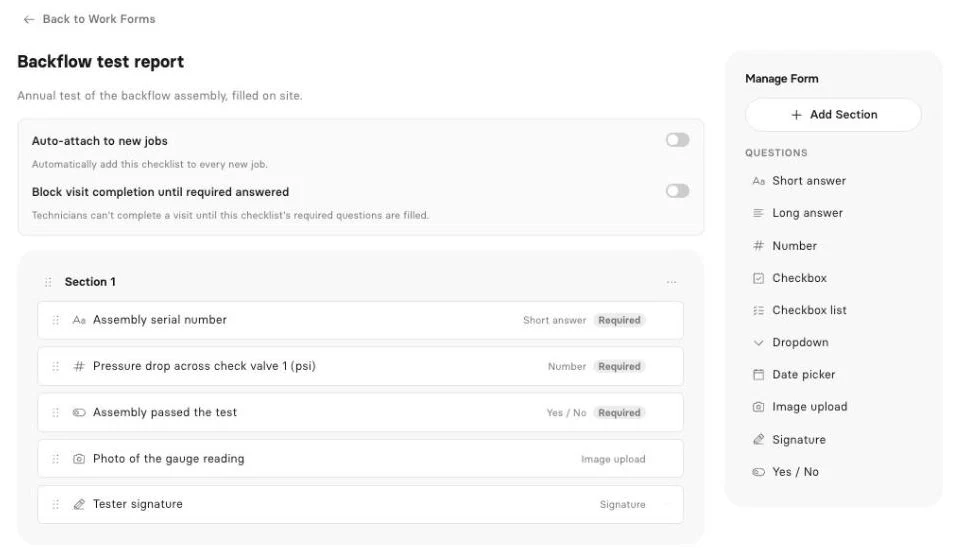
Reports built into the visit. Say your crew is locating ahead of a directional bore on a commercial lot. The GC wants each line found, its approximate depth, the paint color, the equipment used and a photo of the marks. Or your electrician is doing a pre-purchase inspection and needs panel brand, amperage, grounding condition and a list of defects. Clevra’s work forms cover both. On Pro and up, you build a checklist once with text, number, checkbox, dropdown, date, yes/no, photo upload and signature fields, and make the critical ones required. The tech fills it on site, it becomes a PDF, and the client finds it in their client portal beside the invoice. Photo and signature questions are completed from the web app for now.
Starting a scanning company from scratch? Our guide on how to start a concrete scanning business covers equipment, pricing and paperwork.
Early access: inspection reports. Clevra’s AI inspection reports take the readings, notes and photos your crew collected and draft a client-ready report from them. It’s in Early access. Book a demo to see it on your own format.
Early access: AI Receptionist. ServiceTitan has an AI Virtual Agent shipping now. Clevra’s AI Receptionist is earlier: it answers your business line, records who’s calling and what they need, and puts the request in your inbox for someone to book. It’s in Early access; request a slot on a demo call if you’d like to try it.
AI that works today. On Pro and up, the Business Assistant answers plain-English questions from your live data, such as “Which GCs have unpaid invoices over 30 days?” or “How much did we bill on septic inspections this quarter?” The Clevra MCP connection links your account to Claude, ChatGPT or any MCP assistant, where it can look up jobs, find open slots, draft an estimate or book a visit. It asks before each change.
The day-to-day. Estimates clients sign online, with automatic follow-ups on Pro. A calendar with day, week and month views, a map and recurring visits, with drag and drop on desktop. Billing straight from the job, Stripe card payments in USD with no Clevra platform fee, and cash, cheque or e-transfer recorded by hand. Roles, permissions and timesheets for the crew. Job costing, 23 reports, automations and QuickBooks Online sync on Pro and up.
Pricing. One flat monthly price per company, so hiring doesn’t change the bill within a tier:
- Free: $0 for 1 user, no time limit
- Pro: $49 a month, or $39 a month billed yearly, up to 5 users
- Business: $99 a month, or $79 a month billed yearly, up to 15 users
- Custom: unlimited users, pricing on request
Pro and Business both come with a 14-day trial, no card needed.
Where ServiceTitan is stronger. Call booking and recording, a shipped AI Virtual Agent, memberships and service agreements, payroll, purchasing and inventory, progress billing, integrated financing and marketing tools. If you run a dispatch room with CSRs and a warehouse, Clevra doesn’t replace that, and it isn’t trying to.
For a line-by-line breakdown, see Clevra vs ServiceTitan.
2. Housecall Pro
Housecall Pro is the step down in size that still feels complete. Annual pricing: Basic $59 a month for 1 user, Essentials $149 for 5, MAX $299 for 8, then $35 per user. Month to month: $79, $189 and $329. There’s a 14-day trial with no card.
It has iOS and Android apps in English and Spanish, offline mode, GPS tracking, online booking, financing, payroll and CSR AI that answers calls and books jobs. It’s the easiest move for residential HVAC and plumbing shops that don’t need a call center. See Housecall Pro and Clevra compared.
3. Jobber
Jobber publishes everything. On annual billing, Core is $29 a month for 1 user; Connect runs $99 to $299 and Grow $149 to $399 depending on team size, and Plus starts at $399. Extra users are $29 each. The trial lasts 14 days with no card.
It shines on customer convenience: online self-booking, Tap to Pay, ACH payments and a big marketplace of connected apps. It leans residential and recurring rather than technical. See the Jobber comparison.
4. FieldEdge
FieldEdge is the HVAC and plumbing specialist. Select, Premier and Elite all say request pricing, based on technician count and add-ons, and FieldEdge skips the free trial on purpose, saying its onboarding works better than a trial. Every plan includes scheduling, dispatching, a flat-rate pricebook, payments, QuickBooks Online and Desktop, SMS and lead tracking.
Premier and Elite add advanced dispatching, multi-option proposals and service agreements; Elite adds outbound call recording and warehouse inventory. Mobile licenses are capped at 2, 4 and 6 by plan. See FieldEdge next to Clevra.
5. Successware
Successware doesn’t publish prices; you book a demo or call. There’s no trial mentioned. Its pitch is depth for established HVAC, plumbing, electrical, chimney and septic companies: integrated accounting, call booking and CRM, dispatch, invoicing, inventory, marketing, Successware Payments, group purchasing and online learning.
If you want your books inside your field software rather than synced to it, that’s a real reason to look. See how Successware stacks up.
6. Service Fusion
Service Fusion is one of the few in this tier with public prices: $208, $325 or $533 a month on annual billing ($245, $382 or $627 monthly), all with unlimited users. A demo is offered; no trial is mentioned.
You get dispatch, GPS tracking, service agreements, inventory, job costing, eSign, a customer portal, progress billing and an AI phone answering service. For a 25-tech company leaving ServiceTitan, flat pricing with no seat count is appealing. For a team of four, $208 is a lot. See Service Fusion against Clevra.
7. BuildOps
BuildOps targets commercial HVAC, mechanical, electrical, plumbing, fire and life safety and refrigeration contractors. There are no plan names and no price list; you go through discovery and a demo, and price depends on users, trades and integrations.
It pairs service tools with project tools such as submittals, RFIs and change orders, and connects to Viewpoint, Sage Intacct, NetSuite and QuickBooks. That’s the right shape for a commercial contractor running both service and construction. See BuildOps compared.
Free ServiceTitan alternatives
ServiceTitan doesn’t list a trial or a free plan. Neither do FieldEdge, Successware, Service Fusion or BuildOps. If you want to test before you talk to sales, your options narrow quickly.
Clevra’s Free plan costs $0 for one user and has no end date. It covers clients, estimates, jobs, scheduling, invoices, the client portal and online card payments, with Clevra branding on estimates, invoices and the portal. A solo septic inspector or a one-truck locator can run real jobs on it; checklists start on Pro. When you add people, Pro covers up to 5 users at one price.
Housecall Pro and Jobber offer 14-day trials with no card.
Software like ServiceTitan: what to test in the field
A lot of “programs like Service Titan” searches come from owners who loved the demo and then pictured their crew using it. Test the field side before anything else. Give the app to your best tech for a day and check:
- Can they see their route for the day, open directions and mark themselves on the way?
- Can they complete the exact form your client needs, with readings, photos and a signature?
- Does the timer and timesheet keep working in a basement mechanical room or a rural septic field?
- Can they invoice and take payment before they leave?
Clevra’s mobile status, plainly: the Technician app is an iOS beta on TestFlight. It isn’t on the App Store, and there’s no Android app yet. It handles the tech’s day, visit details, directions, Start, On My Way and Complete, checklist filling (without photo or signature questions for now), a visit timer and timesheets that work offline, invoice creation and manual payment recording for cash, cheque, card or e-transfer. Offline beyond timesheets, GPS tracking and Tap to Pay aren’t built.
If your techs need Android or full offline mode on day one, Housecall Pro and Jobber have the more complete apps.
Choosing between companies like ServiceTitan
- You have a dispatch room and a CSR team: stay on ServiceTitan or compare it with FieldEdge and Successware.
- You run commercial service and construction projects: BuildOps.
- You have 20+ techs and hate per-seat bills: Service Fusion.
- Residential home service with 3 to 10 techs: Housecall Pro or Jobber.
- Your crew of 2 to 10 delivers scan reports, locate records or inspection certificates: Clevra. Check our utility locating guide for how other firms document marks.
- You want to sell more on each visit: read up on add-on services for field crews before picking a tool.
Switching from ServiceTitan to a smaller tool
- Export clients and locations. Pull customers and service addresses into a spreadsheet.
- Import into Clevra. Upload CSV or XLSX files of up to 5,000 rows. One client can have many properties, so a GC with six sites stays one record.
- Rebuild your price list. Hourly scanning, per-locate rates, inspection fees. Keep it short at first.
- Create one checklist per service. GPR scan, private locate, septic inspection, electrical inspection.
- Connect Stripe and QuickBooks Online. See the integrations list.
- Embed the request form. Add the online request form to your website so new work lands in one place.
- Run both for a short overlap. Finish open work in ServiceTitan; schedule new jobs in Clevra.
ServiceTitan alternatives FAQ
Is ServiceTitan good for small business?
It can be, if the small business is a residential HVAC or plumbing shop planning to grow into a call center. For crews of 2 to 10 in scanning, locating or inspection work, ServiceTitan for small business often means paying, by technician, for dispatch, payroll and marketing tools you won’t use, after a sales process.
Is ServiceTitan worth it?
For large shops with dispatchers, CSRs, memberships and inventory, many owners say yes. It covers call booking and recording, payroll, progress billing, financing and an AI Virtual Agent. It’s harder to justify for small teams, since pricing is per technician, unpublished, and requires a sales conversation before you see a number.
Does ServiceTitan have a free trial?
ServiceTitan doesn’t list a free trial on its pricing page as of October 15, 2026. Starter, Essentials and The Works all say “Request pricing,” so you see the product through a guided demo. Clevra, by contrast, has a free plan with no time limit and a 14-day trial of paid plans.
Is there a free alternative to ServiceTitan?
Yes. Clevra’s Free plan is $0 for one user with no time limit and includes clients, estimates, jobs, scheduling, invoices, a client portal and online card payments. Teams can move to Pro at $39 a month billed yearly for up to 5 users, priced per company rather than per technician.
Who are ServiceTitan’s main competitors?
The service titan alternative most shops look at first is Housecall Pro or FieldEdge. Others include Successware, Service Fusion, BuildOps and Jobber. Clevra competes for small teams of 1 to 15, especially in concrete scanning, utility locating, electrical inspection and septic, where every visit ends with a report.
Does Clevra have an AI receptionist?
Clevra’s AI Receptionist is in Early access. It answers your business line, takes down the caller and what they need, and adds the request to your inbox for your office to book. Book a demo to get access. The AI Business Assistant, which answers questions from your live data, is available today on Pro and Business.
Can Clevra handle septic and electrical inspections?
Yes. On Pro and up, you build checklists for each inspection type with number fields, dropdowns, yes/no questions, photo upload and signatures, and mark key fields as required. The crew completes them on site, Clevra creates a PDF, and the client sees it in their portal next to the invoice.
Try Clevra before your next scan
No sales call, no implementation project. Run your next scan, locate or inspection in Clevra and see whether it fits. The Free plan has no end date, and Pro or Business include a 14-day trial with no card. Browse every Clevra feature or the comparison pages for more detail.
Get Started for Free or Book a Demo to see inspection reports and the AI Receptionist in Early access.




All-in-one operations platform for trades.
You run a crew, not a tech company. Clevra handles the office stuff so you can stay on the tools.