Table of Contents
RazorSync Alternatives for Field Service (2026)


RazorSync deserves credit for one thing a lot of field service software won’t do: it prints its prices. Solo, Team and Pro each have a number on the page, a user cap next to it and a 14-day trial. You know what you’re buying.
That same price list is why people start hunting for a RazorSync alternative. Solo costs $85 a month on annual billing and covers 2 users. QuickBooks sync doesn’t start until Team, which is $195 a month yearly. Route optimization and inventory sit on Pro at $439. For a two-person stucco or termite inspection outfit, that’s a lot of monthly overhead before the first report goes out.
So this guide does the math. We look at six RazorSync alternatives and what each costs for a crew of 2, 5, 7 and 15. We make Clevra, so it’s listed first, and we flag where RazorSync and the others do things Clevra doesn’t.
Every price below was checked on the vendor’s own pricing page on October 15, 2026.
RazorSync alternatives: the short list
- Clevra: inspection, scanning and locating crews of 1 to 15 (stucco, termite, concrete scanning, utility locating) who send a report with every job. Free plan, flat price per company.
- Kickserv: small shops that want 5 users for $60 a month, Tap to Pay and a 30-day trial.
- Jobber: general home service crews that want online booking, ACH and a big app marketplace.
- Housecall Pro: home service crews that want Spanish-language apps, offline mode and financing.
- Service Fusion: teams of 15 or more that want unlimited users at one price.
- FieldPulse: contractors who track equipment under maintenance agreements and want AI call answering.
Why crews outgrow, or never fit, RazorSync
RazorSync works. These are the specific reasons owners give for looking elsewhere.
1. The entry plan is $85 to $90 a month for two people. Solo covers up to 2 users at $90 month to month or $85 billed yearly. If you’re one inspector with a part-time helper, that’s a real fixed cost while you’re still building a client list.
2. QuickBooks waits for Team. QuickBooks Desktop and Online sync start on Team, at $225 a month or $195 yearly. A two-person crew that wants clean books either pays for seats it doesn’t use or keys invoices in by hand.
3. Route optimization and inventory are Pro only. Pro is $499 a month or $439 yearly. If routing is why you picked RazorSync, check which plan you’re actually on.
4. User caps force plan jumps. Solo stops at 2 users, Team at 7, Pro at 15. Your eighth hire moves you from $195 to $439 a month on yearly billing.
5. Your clients want an inspection report. A stucco inspector’s moisture probe readings, a termite inspector’s findings, a GPR scan layout: these end in a document. Check how far a general job record gets you before you commit.
What RazorSync competitors cost by crew size
Here’s each tool’s published price for common crew sizes, in USD per month, as listed on October 15, 2026. Yearly-billing prices are shown where the vendor lists them. FieldPulse doesn’t publish prices, so it isn’t in the math.
A crew of 2
- RazorSync: Solo, $90 monthly or $85 yearly.
- Clevra: Pro, $49 monthly or $39 yearly (covers up to 5). A solo owner pays $0 on Free.
- Kickserv: Start, $60 monthly for up to 5 users, 20% off yearly.
A crew of 5
- RazorSync: Team, $225 monthly or $195 yearly.
- Clevra: Pro, $49 monthly or $39 yearly.
- Kickserv: Start, $60 monthly.
- Jobber: Connect, $199 monthly or $149 yearly.
- Housecall Pro: Essentials, $189 monthly or $149 yearly.
A crew of 7
- RazorSync: Team, $225 monthly or $195 yearly (the cap).
- Clevra: Business, $99 monthly or $79 yearly (covers up to 15).
- Kickserv: Run, $119 monthly for up to 10.
- Housecall Pro: MAX, $329 monthly or $299 yearly for up to 8.
A crew of 15
- RazorSync: Pro, $499 monthly or $439 yearly.
- Clevra: Business, $99 monthly or $79 yearly.
- Kickserv: Scale, $199 monthly for up to 20.
- Jobber: Connect for 15, $299 yearly.
- Service Fusion: Starter, $245 monthly or $208 yearly, unlimited users.
Price isn’t everything. RazorSync, Kickserv, Jobber and Housecall Pro all ship Android apps, and some include things Clevra doesn’t have, like route optimization or Tap to Pay. More on that below.
RazorSync competitors at a glance
- RazorSync (for reference): from $85/mo yearly for up to 2 users. Free plan: no. 14-day trial. Best for crews that want published prices and, on Pro, route optimization.
- Clevra: $0 for 1 user, $39/mo yearly for up to 5. Free plan: yes. 14-day trial, no card. Best for inspection and scanning crews of 1 to 15.
- Kickserv: $60/mo for 5 users. Free plan: no. 30-day trial. Best for small shops wanting QuickBooks Online or Desktop.
- Jobber: from $29/mo yearly for 1 user. Free plan: no. 14-day trial. Best for lawn care, cleaning and handyman.
- Housecall Pro: from $59/mo yearly for 1 user. Free plan: no. 14-day trial. Best for home service with full mobile apps.
- Service Fusion: from $208/mo yearly, unlimited users. Free plan: no. Demo, no trial mentioned. Best for 15+ person teams.
- FieldPulse: seat-based, priced through sales. Free plan: no. Trial not stated. Best for equipment and maintenance agreement work.
Six RazorSync alternatives, compared
1. Clevra: for inspection and scanning crews on a budget
Clevra is one web app that takes a job from the first call to the paid invoice, with a Technician app for the field (iOS, in beta on TestFlight). It’s built for crews of 1 to 15 in trades where the client is really paying for what you found.
The kind of work it’s built for. A stucco inspector drills test holes below windows, logs moisture probe readings at each one and photographs the sealant around every penetration. A termite inspection covers the foundation, sill plates, attic and crawlspace, then a findings sheet the buyer’s agent can read. A concrete scanning crew runs GPR over a slab before a core drill goes in and marks rebar and conduit on the surface. A private locator paints the lines, records depths and photographs the marks before digging starts.
Every one of those jobs ends in a document. Clevra’s checklists (Pro and up) let you build it once: text, number fields for probe readings or depths, dropdowns, checkboxes, dates, yes/no, photo upload, signature and required fields. Fill it on the visit, Clevra turns it into a PDF, and the client opens it in the client portal beside the invoice. Photo and signature questions are filled from the web app for now, not the Technician app.
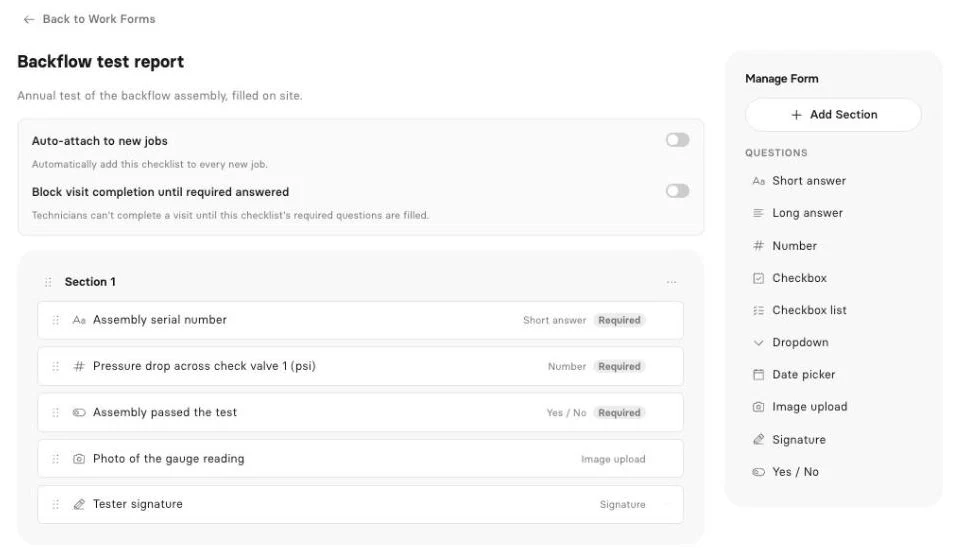
For GPR crews, the concrete scanning report template lays out the usual fields.
Early access: inspection reports. Inspection reports take what the crew captured on site and draft a client-ready report from it. For a stucco inspector with 20 test holes per house, that’s the evening write-up you’d rather skip. It’s Early access. Book a demo to try it with your format.
Early access: AI Receptionist. The AI Receptionist answers your business line while you’re in an attic, takes who’s calling and what they need, and puts the request in your inbox to book. It’s Early access too. Mention it when you set up a walkthrough.
Live AI on Pro and up. The AI Business Assistant answers questions from your live data, like “How many termite inspections did we invoice last month?” The Clevra MCP server connects your account to Claude, ChatGPT or any MCP assistant to look up jobs, find open slots, draft an estimate or book a visit. It asks before every change.
What else is included. Estimates signed online, with automatic follow-ups on Pro. A schedule with day, week and month views, a map and recurring visits. Invoices from the job, Stripe online payments with no Clevra platform fee, and cash, cheque or e-transfer recorded by hand. A CRM with multiple properties per client, which helps when you inspect for realtors and property managers. QuickBooks Online sync, job costing and 23 reports on Pro and up.
Pricing. Flat per company, no seat math (see every plan):
- Free: $0 for 1 user, no time limit
- Pro: $49 a month, or $39 a month billed yearly, up to 5 users
- Business: $99 a month, or $79 a month billed yearly, up to 15 users
- Custom: unlimited users, pricing on request
QuickBooks Online sync comes with Pro, so a two-person crew gets it at $49 a month. New accounts can try Pro or Business for 14 days, no card.
Where RazorSync is stronger. RazorSync has iOS and Android apps, time cards and payroll, an API, QuickBooks Desktop sync, and route optimization and inventory on Pro. Clevra has no Android app, no payroll, no Desktop sync, no route optimization and no inventory. If those matter more than reports, RazorSync is the better fit.
For a line-by-line breakdown, see Clevra vs RazorSync.
2. Kickserv
Kickserv is the other tool here that publishes simple prices. Start is $60 a month for 5 users, Run $119 for 10 and Scale $199 for 20, billed monthly, with 20% off yearly. The trial is 30 days.
It supports QuickBooks Online and Desktop, Tap to Pay, Apple Pay and Google Pay, and has iOS and Android apps with GPS and time tracking. For a 5-person crew it costs far less than RazorSync Team. See Clevra vs Kickserv.
3. Jobber
Jobber’s Core plan is $29 a month for 1 user on yearly billing, Connect $149 for 5 and $299 for 15, with extra users at $29 a month. Month to month, Core is $49. It has a 14-day trial and no free plan.
Online self-booking, Tap to Pay, ACH payments and a large app marketplace are the draws. It’s aimed at lawn care, cleaning and handyman work more than inspection trades. See Clevra vs Jobber.
4. Housecall Pro
Housecall Pro’s yearly prices are $59 for 1 user, $149 for 5 and $299 for 8, then $35 per user beyond that. There’s a 14-day trial with no card.
Apps in English and Spanish, offline mode, vehicle GPS, online booking, financing and CSR AI that answers calls and books jobs are all on offer across its plans. See Clevra vs Housecall Pro.
5. Service Fusion
Service Fusion charges per company with no user cap. Starter is $208 a month billed yearly, Plus $325 and Pro $533. Monthly, $245, $382 and $627. It offers a demo, no trial mentioned.
At 15 people, Starter costs less than RazorSync Pro and has no cap to hit. It includes GPS tracking, service agreements, inventory, eSign and progress billing. See Clevra vs Service Fusion.
6. FieldPulse
FieldPulse is seat-based and priced through a sales call, so it can’t join the crew-size math above. A trial isn’t stated.
It brings custom forms, asset management, maintenance agreements, a booking portal, fleet tracking and Operator AI, an AI dispatcher that answers calls today. See Clevra vs FieldPulse.
Free RazorSync alternatives
RazorSync has a 14-day trial and no free plan. None of the others here lists a free plan except Clevra.
Clevra Free is $0 for one user with no time limit. It covers clients, estimates, jobs, scheduling, invoices, the client portal and online card payments. Estimates, invoices and the portal carry Clevra branding until you upgrade. Checklists, QuickBooks sync and the AI Business Assistant start on Pro.
A new termite inspector can book, invoice and get paid on Free, then move to Pro at $49 a month when a second person joins.
Trials elsewhere: Kickserv 30 days, Jobber and Housecall Pro 14 days. Service Fusion uses a demo, and FieldPulse doesn’t state a trial.
Software like RazorSync: the mobile check
RazorSync ships apps on iOS and Android, so compare like for like. Hand the app to your busiest inspector for a day:
- Can they see the day’s jobs, get directions and tap On My Way?
- Can they fill the full inspection form, photos and signature included, on the phone?
- Does it work in an attic or a crawlspace with no signal?
- Can they log their hours and take payment before leaving?
Clevra’s Technician app shows the day, visit details, directions and Start, On My Way and Complete. It fills checklists, runs a visit timer and timesheets that work offline, creates invoices and records cash, cheque, card or e-transfer payments. It’s an iOS beta on TestFlight, not yet in the App Store. Photo and signature questions are filled from the web app for now, and there’s no Android version yet.
If your crew is on Android or needs full offline mode, RazorSync, Kickserv and Housecall Pro are ahead on mobile today.
Choosing the right RazorSync alternative
- 1 or 2 people, watching every dollar: Clevra Free or Pro, or Kickserv Start.
- Your job ends with an inspection report: Clevra, built around forms, PDFs and the client portal.
- You need route optimization: RazorSync Pro or Workiz. Clevra has a map view but no route optimization.
- Android crew: RazorSync, Kickserv, Jobber or Housecall Pro.
- 15 or more people: Service Fusion’s unlimited users, or Clevra Custom.
- Equipment under contract: FieldPulse.
If you’re adding services to raise each ticket (a moisture check on top of a termite job, say), read our post on add-on services for field crews. Starting from scratch in GPR? See starting a scanning business.
How to switch from RazorSync
- Export customers from RazorSync to a spreadsheet.
- Import into Clevra as CSV or XLSX, up to 5,000 rows, with multiple properties per client.
- Add your services and rates so estimates and invoices fill in.
- Build one checklist per inspection type: stucco, termite, scan, locate.
- Connect Stripe and QuickBooks Online. See what Clevra connects to.
- Add the request form to your website for new work.
- Run both for two weeks, then cancel RazorSync before the next billing date.
RazorSync alternatives FAQ
Is RazorSync worth it?
For crews that want published prices, Android and iOS apps, and on Pro, route optimization and inventory, it can be. It’s a stretch for one or two people, since Solo is $85 a month yearly and QuickBooks sync only starts on Team at $195 a month.
Does RazorSync have a free trial?
Yes, RazorSync offers a 14-day free trial. It has no free plan, so afterward you choose Solo for up to 2 users, Team for up to 7, Pro for up to 15 or Enterprise for unlimited users. Paying yearly lowers each plan’s monthly price.
Is there a free alternative to RazorSync?
Yes. Clevra’s Free plan is $0 for one user with no time limit. It includes clients, estimates, jobs, scheduling, invoices, a client portal and online card payments. Pro adds checklists and QuickBooks Online for up to 5 users at $49 a month.
Who are RazorSync’s main competitors?
The tools most often compared with RazorSync are Kickserv, Jobber, Housecall Pro, Service Fusion and FieldPulse. Clevra competes for crews of 1 to 15, especially stucco and termite inspectors, concrete scanners and utility locators who send a report with each job.
How much does RazorSync cost compared with Clevra?
For 2 users, RazorSync Solo is $85 a month yearly and Clevra Pro is $39. For 5, RazorSync Team is $195 and Clevra Pro is still $39. For 15, RazorSync Pro is $439 and Clevra Business is $79. RazorSync includes Android apps and route optimization on Pro, which Clevra doesn’t.
Does Clevra have an AI receptionist?
Clevra’s AI Receptionist is in Early access. It answers your business line, records who’s calling and what they need, and puts the request in your inbox for you to book. Book a demo to try it. The AI Business Assistant, which answers questions from your own data, is live on Pro and Business.
Can Clevra handle stucco inspection reports?
Yes. Build a checklist with a number field for each probe location, notes on sealant and flashing, yes or no checks, photo uploads and a signature. Fill it during the inspection, and Clevra turns it into a PDF the homeowner or agent opens in the client portal. Checklists are on Pro and up.
See what Clevra costs your crew
Run one stucco, termite, scan or locate job through Clevra and compare the bill and the report. Free has no end date, and Pro or Business are free for 14 days, no card.
Get Started for Free or Book a Demo to see inspection reports and the AI Receptionist in Early access.




All-in-one operations platform for trades.
You run a crew, not a tech company. Clevra handles the office stuff so you can stay on the tools.