Table of Contents
FieldPulse Alternatives for Trade Crews (2026)


FieldPulse does some things very well. Custom forms, asset management and maintenance agreements are all built in, and its Operator AI already answers calls as an AI dispatcher. For an electrical or HVAC contractor servicing the same equipment every quarter, that’s a strong set of tools.
The friction starts before you ever log in. FieldPulse prices by seat and gives you a number through a sales call, and its site doesn’t state a trial. If you’re a four-person crew comparing three tools on a Sunday night, that’s the one you can’t price.
Below are seven FieldPulse alternatives, with what each one costs (where it says), what it’s good at and where it falls short. We make Clevra, so it’s listed first. We’ll also be straight about where FieldPulse is ahead, AI included.
Every price below was checked on the vendor’s own pricing page on October 15, 2026.
The fast answer on FieldPulse alternatives
- Clevra: crews of 1 to 15 in generator service, electrical inspection, concrete scanning and utility locating that need on-site forms turned into client reports. Published prices and a free plan.
- Housecall Pro: home service crews that want iOS and Android apps in English and Spanish, GPS and financing.
- Jobber: lawn care, cleaning and handyman work, with online booking, ACH and a large app marketplace.
- Workiz: phone-first crews that want AI answering and a built-in phone system.
- FieldEdge: residential HVAC and plumbing shops selling from a flat-rate pricebook.
- ServiceTrade: commercial mechanical and fire protection contractors that track deficiencies and asset history.
- Kickserv: small shops that want simple published prices and a 30-day trial.
Why contractors look for a FieldPulse alternative
These are the reasons we hear from owners comparing tools. Not all of them are about FieldPulse falling short.
1. Pricing is behind a sales call. FieldPulse is seat-based and doesn’t publish a price. You book a call, describe your team and get a number. That’s fine if you’re already leaning in. It’s slow if you just want to know whether it’s $50 or $500 a month.
2. No trial is stated. FieldPulse’s pricing page doesn’t mention a free trial. Most of the tools below let you run a week or more of real jobs before you pay.
3. Seats add up. Seat-based pricing means each new tech adds to the bill. A crew that grows from 3 to 7 over a busy summer sees that every month.
4. You need forms, not a full asset platform. FieldPulse tracks equipment and maintenance agreements in depth. A two-person scanning crew or an electrical inspector doesn’t manage a fleet of assets. They need a clean form on site and a PDF at the end.
FieldPulse competitors at a glance
What each vendor lists, in USD, on October 15, 2026. Four of the eight don’t publish a price.
- FieldPulse (for reference): seat-based, priced on a sales call. Free plan: no. Trial: not stated. Best for HVAC, electrical and commercial equipment service with asset tracking.
- Clevra: Free $0 for 1 user; Pro $49/mo for up to 5 ($39 yearly); Business $99/mo for up to 15 ($79 yearly). Free plan: yes. 14-day trial, no card. Best for inspection, scanning and locating crews of 1 to 15.
- Housecall Pro: yearly Basic $59 (1 user), Essentials $149 (5), MAX $299 (8). Free plan: no. 14-day trial. Best for home service with full mobile apps.
- Jobber: yearly Core $29 (1 user), Connect $149 (5). Free plan: no. 14-day trial. Best for general home service.
- Workiz: request pricing. Free plan: no. 7-day trial. Best for phone-driven dispatch.
- FieldEdge: request pricing. Free plan: no. No trial. Best for flat-rate HVAC and plumbing.
- ServiceTrade: request pricing, per technician. Free plan: no. No trial mentioned. Best for commercial fire and mechanical service.
- Kickserv: $60/mo for 5 users, billed monthly. Free plan: no. 30-day trial. Best for small shops wanting simple pricing.
Seven FieldPulse alternatives, compared in detail
1. Clevra: for crews whose work ends with a report
Clevra is one web app that runs a job from the first call to the paid invoice, plus a Technician app for the field (iOS, in beta on TestFlight). It’s built for crews of 1 to 15, and its home turf is work where the client pays for documented findings.
Four trades, four kinds of paperwork. A generator maintenance visit means oil level, coolant, battery voltage, a load bank reading and the transfer switch test, logged every quarter. An electrical inspection means panel condition, breaker labels, GFCI tests and a list of deficiencies the owner has to fix. A GPR scan before coring means slab thickness, rebar and conduit depth, and a photo of the layout marked on the deck. A utility locate means every line found, its depth, the paint color and photos of the marks before excavation.
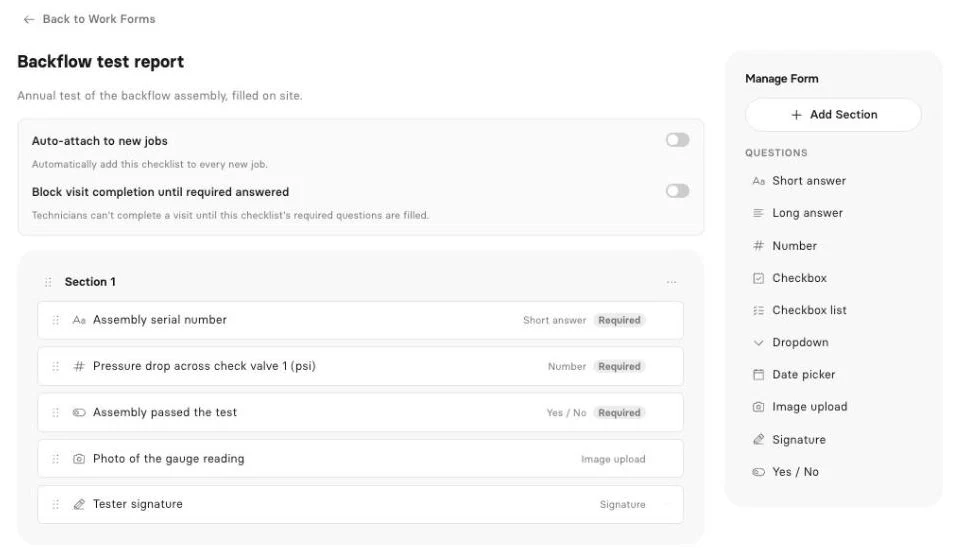
FieldPulse handles this with custom forms too, so here’s how Clevra does it. Checklists on Pro and up let you build a form once with text, number fields, dropdowns, checkboxes, dates, yes/no, photo upload, signature and required fields. Attach it to the visit, fill it on site, and Clevra turns it into a PDF your client opens in the client portal. Photo and signature questions are filled from the web app for now, not the Technician app.
Our post on field service reports and job costing shows how the form data ties back to what each job actually earned.
Early access: inspection reports. Inspection reports take what the crew captured on site and turn it into a client-ready report draft. It’s Early access right now. Book a demo to see it with your own report layout.
Early access: AI Receptionist. This is where we’ll be plain. FieldPulse’s Operator AI answers calls today. Clevra’s AI Receptionist, which answers your business line, takes who’s calling and what they need and puts the request in your inbox, is Early access, not live. If you want in, schedule a short call.
AI that’s live on Clevra. On Pro and up, the AI Business Assistant answers plain questions from your live data, such as “Which generator clients are due this month?” or “Who owes us over 30 days?” The MCP connection links your account to Claude, ChatGPT or any MCP assistant to look up jobs, find open slots, draft an estimate or book a visit. It asks before every change.
The rest of the workflow. Estimates signed online with automatic follow-ups on Pro. Scheduling with day, week and month views, a map and recurring visits for quarterly generator routes. Invoices generated from the job, Stripe card payments with no Clevra platform fee, and manual cash, cheque or e-transfer. Roles, permissions and timesheets, job costing, 23 reports and QuickBooks Online sync on Pro and up.
Pricing. One price per company, no per-seat billing (plan breakdown):
- Free: $0 for 1 user, no time limit
- Pro: $49 a month, or $39 a month billed yearly, up to 5 users
- Business: $99 a month, or $79 a month billed yearly, up to 15 users
- Custom: unlimited users, pricing on request
Going from 3 people to 5 on Pro doesn’t change the bill. Try Pro or Business free for 14 days, no card.
Where FieldPulse is stronger. FieldPulse has asset management, maintenance agreements, a customer booking portal, fleet tracking, its Engage phone system and Operator AI answering calls now. Clevra has no per-device asset history, no GPS tracking, no online self-booking and no membership billing module. If you service the same units under contract and track each one’s history, FieldPulse fits that better.
For a line-by-line breakdown, see Clevra vs FieldPulse.
2. Housecall Pro
Housecall Pro lists its prices: yearly, Basic is $59 a month for 1 user, Essentials $149 for 5 and MAX $299 for 8, with $35 per user after that. Month to month, $79, $189 and $329. There’s a 14-day trial.
Its iOS and Android apps run in English and Spanish and work offline. It adds GPS, online booking, financing, payroll and CSR AI that answers calls and books jobs. Reports lean toward photos and notes. See Clevra vs Housecall Pro.
3. Jobber
Jobber’s annual pricing starts with Core at $29 a month for 1 user. Connect for 5 is $149 and each extra user is $29 a month. It has a 14-day trial with Grow features and no free plan.
Online self-booking, Tap to Pay, ACH and a large app marketplace are its strengths. It’s built for residential home service more than commercial equipment work. See Clevra vs Jobber.
4. Workiz
Workiz shows “Request pricing” for Standard, Pro and Ultimate and offers a 7-day trial with no card. Like FieldPulse, it has shipped AI on the phone: Genius AI Answering plus the Genius Phone system.
It also has online booking, route planning, inventory and service plans. If your work starts with a ringing phone more than a scheduled PM, it’s a close match. See Clevra vs Workiz.
5. FieldEdge
FieldEdge sells Select, Premier and Elite on request, priced by technician count and add-ons. It has no trial. Mobile licenses are capped at 2, 4 and 6 depending on plan.
Every plan includes a flat-rate pricebook, dispatch, payments and QuickBooks Online and Desktop. Service agreements come on Premier and up. It suits residential HVAC and plumbing more than commercial equipment. See Clevra vs FieldEdge.
6. ServiceTrade
ServiceTrade targets commercial mechanical, fire protection, HVAC, electrical, refrigeration and kitchen exhaust. Select, Premium and Enterprise are all request pricing, per technician, and no trial is mentioned.
It overlaps with FieldPulse on equipment: deficiency capture and asset history are core, office users are unlimited, and AI features come on Premium and up. A good fit for commercial contractors with long service histories. See Clevra vs ServiceTrade.
7. Kickserv
Kickserv keeps it simple: Start is $60 a month for 5 users, Run $119 for 10, Scale $199 for 20, billed monthly, with 20% off yearly. The 30-day trial is the longest here.
It has iOS and Android apps with GPS and time tracking, Tap to Pay and QuickBooks Online and Desktop. It doesn’t go as deep on assets or forms as FieldPulse. See Clevra vs Kickserv.
Free FieldPulse alternatives and trials
FieldPulse doesn’t state a trial or list a free plan. Here’s what you can actually try without a sales call.
Clevra’s Free plan is $0 for one user with no time limit. It includes clients, estimates, jobs, scheduling, invoices, the client portal and online card payments, with Clevra branding on estimates, invoices and the portal. Checklists and AI start on Pro, which you can trial for 14 days with no card.
For a solo electrical inspector or a one-truck locator, that means real jobs, real invoices and real payments before any money changes hands.
Trials elsewhere: Kickserv 30 days, Housecall Pro and Jobber 14 days, Workiz 7 days. FieldEdge and ServiceTrade work through demos.
Alternatives to FieldPulse: check the mobile app
FieldPulse’s fleet tracking and forms make the phone central, so test any replacement there. Give the app to a tech for a full day and ask:
- Can they see the route, open directions and tap On My Way?
- Can they fill the generator or panel form, with photos and a signature, on the phone?
- Does it work in a basement electrical room with no signal?
- Can they take payment on site?
Clevra’s honest status: the Technician app shows the day, visit details, directions and Start, On My Way and Complete. It fills checklists, runs a visit timer and timesheets that work offline, creates invoices and records cash, cheque, card or e-transfer payments. It’s an iOS beta on TestFlight. There’s no Android version yet, and photo and signature questions are filled from the web app for now.
If your techs need Android, fleet tracking or full offline mode today, FieldPulse, Housecall Pro or Kickserv are ahead on mobile.
How to choose a FieldPulse alternative
- You track the same equipment for years: FieldPulse or ServiceTrade. Asset history is what they’re built for.
- Your job ends in a findings report (generator log, electrical inspection, scan, locate): Clevra’s forms and PDF output.
- You want a price before a sales call: Clevra, Housecall Pro, Jobber and Kickserv all publish one.
- AI answering the phone today: FieldPulse, Workiz and Housecall Pro ship it. Clevra’s AI Receptionist is Early access.
- Flat-rate residential HVAC: FieldEdge.
- Quarterly maintenance routes: any tool with recurring visits works. Our guide to building recurring service revenue covers pricing them.
Locating crews should also read the private locating playbook. For the full list of trades, see Clevra industries.
Moving from FieldPulse to Clevra
- Export clients and properties from FieldPulse as a spreadsheet.
- Import into Clevra as CSV or XLSX, up to 5,000 rows, with multiple properties per client for multi-site commercial accounts.
- Rebuild your custom forms as checklists. Start with your two most common jobs, like a generator PM and a panel inspection.
- Set recurring visits for maintenance clients so the schedule fills itself.
- Connect Stripe and QuickBooks Online. See Clevra integrations.
- Add the request form to your site so new jobs land in one place.
- Overlap for two weeks, then close out the old account once the last open job is invoiced.
FieldPulse alternatives FAQ
Is FieldPulse worth it?
For HVAC, electrical and commercial equipment contractors who manage assets under maintenance agreements and want AI answering their calls, it can be. Its forms and asset tools are strong. It’s harder to judge if you want a published price or a trial first, since pricing comes from a sales call.
Does FieldPulse have a free trial?
FieldPulse doesn’t state a free trial on its pricing page, and it doesn’t list a free plan. Pricing is seat-based and you get it through a sales call. Ask about a trial or a pilot when you speak with their team.
Is there a free alternative to FieldPulse?
Yes. Clevra’s Free plan costs $0 for one user with no time limit and includes estimates, scheduling, invoicing, a client portal and online card payments. Checklists start on Pro at $49 a month for up to 5 users, and you can try Pro free for 14 days.
Who are FieldPulse’s main competitors?
Owners usually compare FieldPulse with Housecall Pro, Jobber, Workiz, FieldEdge, ServiceTrade and Kickserv. Clevra competes for crews of 1 to 15 whose work ends in a documented report the client keeps, such as generator maintenance, electrical inspection, concrete scanning and utility locating.
Does Clevra have an AI receptionist?
Clevra’s AI Receptionist is in Early access, not live. It answers your business line, notes who’s calling and what they need, and puts the request in your inbox to book. You can book a demo to try it. FieldPulse’s Operator AI is already shipping. Clevra’s AI Business Assistant is live on Pro and Business.
Can Clevra track equipment like FieldPulse?
Not per device. Clevra stores multiple properties per client and keeps each job’s checklist results, but it doesn’t have an equipment or asset history module. If you need each unit’s full service record across years of visits, FieldPulse or ServiceTrade fit better.
Can I log generator maintenance in Clevra?
Yes. Build a checklist with number fields for battery voltage, run hours and load test readings, yes or no checks for coolant and oil, and a signature. Set the visit to recur every 90 days. Each completed form becomes a PDF in the client portal. Checklists are on Pro and up.
Put your next inspection through Clevra
Pick one generator PM, panel inspection, scan or locate and run it in Clevra from estimate to paid invoice. Free never expires, and Pro or Business are free for 14 days, no card.
Get Started for Free or Book a Demo to see inspection reports and the AI Receptionist in Early access.




All-in-one operations platform for trades.
You run a crew, not a tech company. Clevra handles the office stuff so you can stay on the tools.