The short answer
Clevra is the CrewOS alternative with no cap on clients, built for testers who invoice every test
CrewOS is a Canadian field service app with a sharp backflow page: build your own test report, require a certified tester before the job starts, and keep the record on file. It counts clients and sites against your plan, though. Clevra doesn't. Every Clevra plan has unlimited clients, invoicing and online card payments, and the test report forms start on Pro.
Choose Clevra if
- You test hundreds of assemblies a year and don't want a client limit
- You want to invoice and take card payments on the same plan as your test reports
- You want a sales pipeline for failed tests that turn into repairs and replacements
- You want an AI assistant that answers "who still owes us for spring tests?" from your own data
- You want an AI Receptionist and AI-written inspection reports in the same app
Choose CrewOS if
- You invoice in Canadian dollars and sync a CAD QuickBooks company
- You want the app to block a tester from starting a test without a current certification
- You want a public booking page and route optimization today
- You also run general contracting work with permits, draws and change orders
Billed monthly, in US dollars. Clevra Pro is $39 and Business $79 a month billed yearly.
What makes Clevra different
The test, the report, the repair and the invoice in one visit
A backflow test isn't done when the gauge needles settle. The customer wants the report, the water supplier wants its copy, and somebody has to bill for it. Clevra keeps all of it on one job.
- 1ArriveThe job, the address and the assembly notes ("RPZ, 1 in., mechanical room, key at the front desk") are on the visit before you leave the shop.
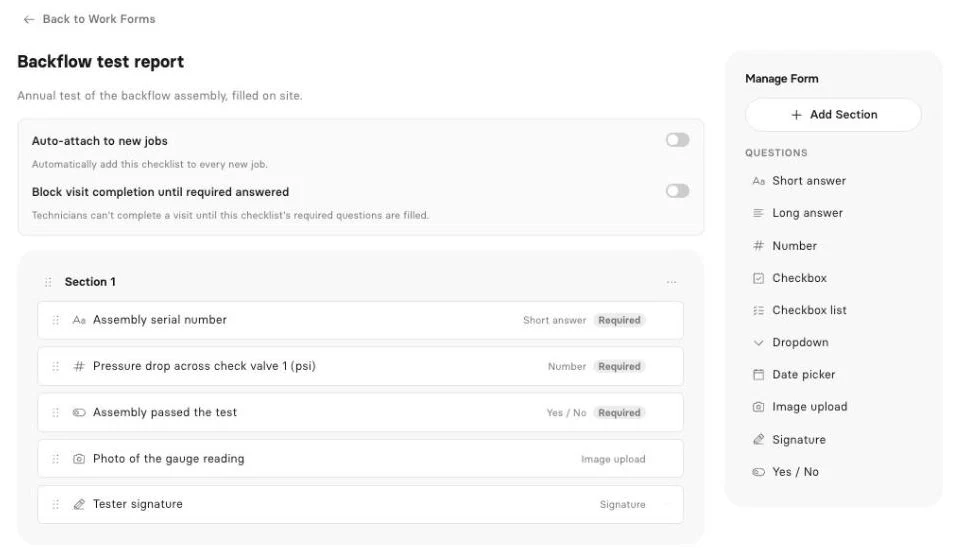
- 2TestOpen the test cocks and fill your backflow test form: readings for each check in psid, the relief valve opening point, pass or fail.
- 3CaptureAdd photos of the assembly, the tag and the gauge, and get the signature.
- 4ReportClevra turns the form into a PDF the customer gets by email and can open in their portal.
- 5InvoiceTap Generate Invoice on the job. The customer pays by card from the link.
Backflow test report forms
Number fields for readings, dropdowns for assembly type, yes/no, dates, photos, signature and required fields. One form per water supplier if their layouts differ. Pro and up.
Unlimited clients and properties
Every plan, including Free. A property manager with 30 buildings is one client with 30 properties, not 30 slots on a plan.
Repair estimates
The number 2 check is leaking. Price the rebuild kit and the retest, send the estimate, and the customer approves online. Every plan.
AI-written inspection reports
Clevra drafts the report from what you recorded on site, ready for a quick read and send.
AI Receptionist
Answers the phone while you're in a meter box and puts the request in your inbox.
AI that works where the job happens
Clevra's AI works from what your team records and what your customers ask. CrewOS lists an AI back-office assistant on its Pro plan.
AI Business Assistant
Ask in plain English: "How many tests did we invoice in April?" or "Which irrigation clients haven't paid?" Answers come from your live Clevra data. Pro and up.
Clevra MCP server
Connect Clevra to Claude, ChatGPT or any MCP assistant to look up jobs, find open slots, draft an estimate or book a visit. It asks before every change. Pro and up.
AI Receptionist
Answers calls, notes who's calling and why, and drops the request into your inbox.
AI-written inspection reports
A draft report from your readings, photos and notes, ready to read over and send.
Clevra vs CrewOS pricing
What a backflow testing company pays, billed monthly in US dollars. Both companies bill their subscriptions in USD.
| What you get | Clevra | CrewOS |
|---|---|---|
| Free plan | Yes, 1 user, unlimited clients | Yes, 3 crew, 3 sites, 3 clients |
| Entry paid plan | Pro $49/mo, 5 users, unlimited clients | Starter $49/mo, 10 crew, 20 clients |
| Mid plan | Business $99/mo, 15 users, unlimited clients | Pro $99/mo, 50 crew, 100 clients |
| More than that | Custom, unlimited users | Enterprise, custom |
| Yearly billing | Pro $39/mo, Business $79/mo | Not shown on the pricing page |
| Free trial | 14 days of Pro or Business, no card | 1 month of Pro, no card |
| Test report forms | Pro and up | Every plan (forms), certification gate on Pro |
| Invoicing | Every plan | Listed on Pro |
| Online card payments | Every plan (USD) | Starter and up |
| Two-way texting | Pro and up | Pro |
| QuickBooks Online | Pro and up, USD companies | One way, CAD companies |
CrewOS prices from crewos.ca/pricing on October 20, 2026. Clevra Pro is $39 and Business $79 a month billed yearly.
Clevra vs CrewOS features
Only features we could confirm on each company's own website.
| Feature | Clevra | CrewOS |
|---|---|---|
| Backflow work | ||
| Custom backflow test report form | Pro and up | |
| Readings per check, relief valve, pass or fail | Yes, as form fields | |
| Photos and signature on the report | Not listed | |
| PDF report emailed to the customer | Not listed | |
| Require a current tester certification to start | ||
| Separate register of every assembly | No, assembly details go in job notes | Assembly recorded on the service location |
| Files the report with the water authority | ||
| Office | ||
| Scheduling with a map view | ||
| Route optimization | ||
| Public booking page | No (online request form instead) | |
| Repair estimates signed online | Every plan | Starter and up |
| Sales pipeline | Every plan | Leads and follow-ups |
| Invoices and card payments | Every plan, USD | Invoicing on Pro, payments Starter and up |
| Canadian dollars | No, USD only today | |
| AI | ||
| AI assistant on your data | AI Business Assistant, Pro and up | AI back-office assistant, Pro |
| Connector for Claude and ChatGPT | Yes, Pro and up | Not listed |
| AI Receptionist | Not listed | |
| AI-written inspection reports | Not listed | |
“Not listed” means we did not find it on CrewOS's site on October 20, 2026, not that CrewOS can't do it.
Where each one is stronger
Clevra is stronger on
- Unlimited clients on every plan, so a route of 400 annual tests costs $49 a month
- Invoicing and online card payments on every plan
- Photos and a signature on the PDF test report
- A sales pipeline for failed tests that become repair work
- A Claude and ChatGPT connector, an AI Receptionist and AI-written inspection reports
CrewOS is stronger on
- Canadian dollars throughout, and a CAD QuickBooks Online sync
- A certification gate: no current backflow certificate, no clock-in
- Route optimization and a public booking page
- A month-long Pro trial
- Construction tools (permits, draws, change orders) if you also run contracting jobs
Switching from CrewOS to Clevra
Moving your client list takes minutes. Keep CrewOS until you no longer need your old job history.
- 1
Export your clients
Download your client list from CrewOS as a CSV file.
- 2
Import into Clevra
CSV or XLSX, up to 5,000 rows, with more than one property per client.
- 3
Rebuild your test report
Build it as a Clevra checklist: one form per water supplier if their layouts differ.
- 4
Book next year's tests
Put them on their due dates, so the day-before reminders go out on their own.
Clevra vs CrewOS FAQ
Is Clevra cheaper than CrewOS for a backflow tester?
For most testers, yes, because CrewOS limits clients by plan and Clevra doesn't. A solo tester with 80 clients needs CrewOS Pro at $99 a month, since Starter stops at 20 clients. On Clevra, Pro is $49 a month for up to 5 users and unlimited clients, or $39 billed yearly.
Does CrewOS file backflow reports with the water authority?
No. CrewOS says it builds and stores the report, and filing it is up to you. Clevra works the same way: you download the PDF and submit it by email, upload or the water supplier's own system.
Can Clevra record backflow test readings?
Yes. Build a checklist with number fields for each check in psid, the relief valve opening point, pass or fail, the test kit's calibration date, photos and a signature. Clevra turns it into a PDF report. Checklists are on Pro and Business.
Does Clevra work in Canadian dollars?
Not yet. Clevra invoices and takes card payments in US dollars today, though tax settings handle GST, HST and PST. CrewOS works in Canadian dollars, which matters if your customers expect CAD invoices.
Does Clevra keep a register of every backflow assembly?
Not as a separate device list. Put each assembly's type, size, serial number and location in the job notes, and record them on every test report. Past tests stay on the client's record.
Which one has a free plan?
Both. Clevra Free is one user with unlimited clients, but test report forms start on Pro. CrewOS Free covers 3 crew, 3 sites and 3 clients.
Can I switch from CrewOS to Clevra?
Yes. Export your clients as a CSV and import them into Clevra. Job history doesn't import, so keep your CrewOS account until you no longer need it.
CrewOS details checked on crewos.ca on October 20, 2026. Plans change, so confirm with CrewOS before you buy. See all comparisons.

All-in-one operations platform for trades.
You run a crew, not a tech company. Clevra handles the office stuff so you can stay on the tools.