The short answer
You don't pick between them. If your city uses BSI Online, you file there. Clevra runs everything else.
BSI Online is a cross connection control system that water utilities hire Backflow Solutions, Inc. to run. When your water supplier signs up, every test report in that city goes in through BSI, with a filing fee set by the city. That's not a choice a tester gets to make. What BSI doesn't do is run your business: book the test, send the customer their report, bill them and get paid. That's Clevra's job.
Use Clevra for
- Booking the test, with a confirmation and a day-before reminder to the customer
- Filling your own test report on site, with photos and a signature, and emailing the PDF to the customer
- Estimates for repairs when the assembly fails
- Invoices, card payments and next year's booking
Use BSI Online for
- Filing test reports in cities that contract BSI (it's mandatory there)
- Keeping your tester licences and gauge calibrations on file with the utility
- Courtesy emails from BSI when a device you tested last is coming due
What a test costs you in each
| Item | Clevra | BSI Online |
|---|---|---|
| Who pays | You, flat per company | You, per test report filed |
| Price | Free $0 (1 user); Pro $49/mo (5 users); Business $99/mo (15 users) | Set by each city, for example $14.95 in Broomfield, CO, $15.95 in Salisbury, NC, $35.95 in Plantation, FL, $20 to $21 in the City of Vancouver |
| Can you opt out | No, where your city requires it |
BSI filing fees from city notices published by Broomfield, Salisbury, Plantation and the City of Vancouver, checked October 20, 2026. You can pass the filing fee on as its own line on the Clevra invoice.
Using both
How a test day works with both
Clevra holds the customer, the visit and the invoice. BSI holds the city's official record. Here's one way to run the day.
- 1Book in ClevraThe test goes on the calendar with the assembly notes and the customer's BSI customer confirmation number (CCN) in the job notes.
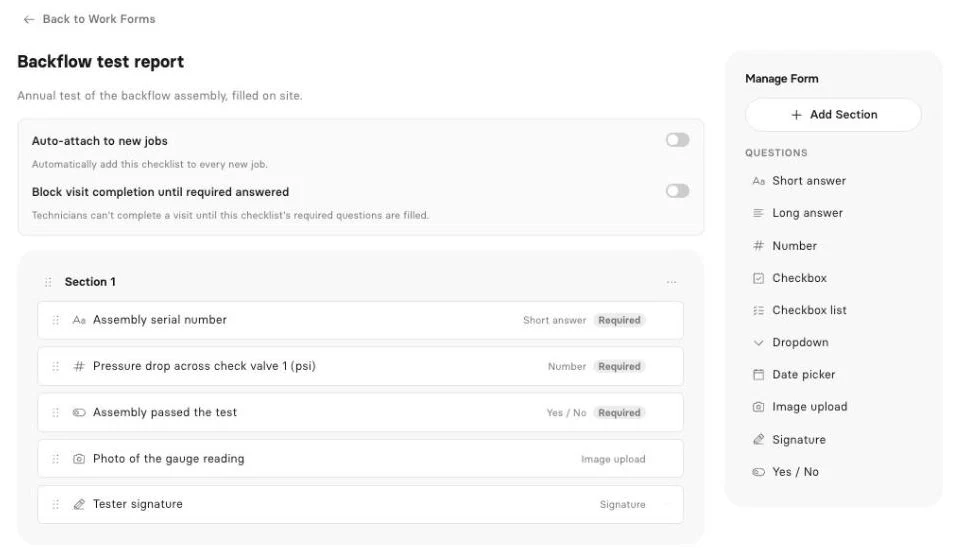
- 2TestFill your Clevra backflow form at the assembly: readings for each check, relief valve opening point, pass or fail, photos, signature.
- 3Customer copyClevra emails the PDF report to the customer and puts it in their portal.
- 4File in BSIEnter the test in BSI Online with the CCN and pay the city's filing fee. Today that means typing the readings a second time; Clevra doesn't connect to BSI.
- 5Invoice in ClevraGenerate Invoice on the job, add the city's filing fee as a line, and the customer pays by card from the link.
- 6Book next yearPut next year's test on the calendar on its due date before you close the job.
Backflow test report forms
Number fields for readings, dropdowns for assembly type, yes/no, dates, photos, signature and required fields. One form per water supplier if their layouts differ. Pro and up.
Invoices and card payments
Every plan. Add the BSI filing fee as its own line item.
AI Receptionist
Picks up when you can't, and puts the request in your inbox.
AI-written inspection reports
A draft report from your readings and photos, ready to read over and send.
AI Business Assistant
Ask "Which customers still owe us for spring tests?" and get the answer from your own data. Pro and up.
Side by side
What each one is built to do for a tester.
| Clevra | BSI Online | |
|---|---|---|
| Built for | Testing companies | Water utilities and their cross connection programs |
| Who chooses it | You | Your water supplier |
| Official filing with the utility | Yes, in cities that use BSI | |
| Pass or fail computed for you | No, you record it | Yes, per state or provincial standard |
| Checks your licence and gauge calibration | ||
| Your own customer list and properties | Yes, unlimited | Devices on file for the utility |
| Scheduling and dispatch | Not listed for testers | |
| PDF report to the customer, with photos | Yes, Pro and up | Not listed for testers |
| Repair estimates | Not listed for testers | |
| Invoices and card payments | Yes, USD | Not listed for testers |
| Timesheets and team roles | Not listed for testers | |
| Regions | US and Canada | US and Canada |
“Not listed” means we did not find it on backflow.com or in the city notices on October 20, 2026.
Where each one is stronger
Clevra is stronger on
- Everything between the customer's call and the payment
- A customer-ready PDF with photos and a signature
- Repair estimates, invoices and card payments
- Running a crew: schedule, roles, timesheets
- An AI Receptionist and AI-written inspection reports
BSI Online is stronger on
- It's the official record in cities that use it, and Clevra isn't
- Automatic pass or fail calculation and credential checks
- Utility-side history for each device, kept by BSI
- 75+ onshore support staff for testers and utilities
Clevra and BSI Online FAQ
Can I use Clevra instead of BSI Online?
Not where your water supplier requires BSI. In those cities every test report has to go through BSI Online. Use Clevra for booking, the customer's report, estimates and invoicing, and file the test in BSI.
Does Clevra send test reports to BSI Online?
No. Clevra doesn't connect to BSI, so you enter the test in BSI yourself after filling your Clevra form. Clevra doesn't file into any water district portal today.
How much does BSI Online cost a tester?
BSI charges a filing fee per test report, and the city sets it. City notices list $14.95 in Broomfield, CO, $15.95 in Salisbury, NC, $35.95 in Plantation, FL and $20 to $21 in the City of Vancouver.
Can I bill the customer for the BSI filing fee?
Yes. Add it as a line item on the Clevra invoice next to the test.
Does Clevra work for testers in Canada?
Yes, with one limit: Clevra invoices and takes card payments in US dollars today. Tax settings handle GST, HST and PST.
What does Clevra cost?
Free is $0 for one user. Pro is $49 a month for up to 5 users, or $39 billed yearly, and includes test report forms. Business is $99 a month for up to 15 users, or $79 billed yearly.
BSI Online details checked on backflow.com and city notices on October 20, 2026. Filing fees change, so confirm with your water supplier. See all comparisons.

All-in-one operations platform for trades.
You run a crew, not a tech company. Clevra handles the office stuff so you can stay on the tools.