Table of Contents
JobNimbus Alternatives for Contractors (2026)


JobNimbus earns its place with roofing and exterior contractors. Its CRM boards let a sales team move a homeowner from first knock to signed contract, and measurements, eSign and reports come on every plan. If you sell full roof replacements, siding jobs or gutter packages, it was built with you in mind.
The people searching for a JobNimbus alternative usually do different work. They inspect roofs rather than replace them. They write up stucco moisture probes, document water damage for a property manager, or scan slabs before a plumber cores through. For them a sales pipeline is the wrong shape, and request-only pricing makes it hard to know what they’d pay.
So this guide is upfront about the split. If your money comes from selling and producing big exterior jobs, stay with a roofing CRM. If your money comes from inspections, service calls and repair visits, the six tools below are worth a look. We make Clevra, so it’s listed first, and we point out where the others win.
Every price below was checked on the vendor’s own pricing page on October 15, 2026.
The answer in one list
- Clevra: roof inspection, stucco inspection, water damage, concrete scanning and utility locating crews of 1 to 15 whose jobs end in a client-ready report. Free plan, flat published pricing.
- AccuLynx: roofing companies that sell and produce replacements and want production management, financing and a customer portal in one place.
- Jobber: general home service crews (handyman, gutter cleaning, lawn care) that want online booking and a big app marketplace.
- Housecall Pro: home service companies that want polished iOS and Android apps, GPS tracking and consumer financing.
- ServiceTitan: large residential and commercial contractors, including roofers, with call centers and per-technician budgets.
- Service Fusion: roofing, gutter and multi-trade shops that want unlimited users at one company price.
Why contractors look for JobNimbus alternatives
JobNimbus does what it says. People leave over fit.
1. Your work isn’t a sales pipeline. CRM boards shine when every lead is a possible $18,000 re-roof that moves through stages. An inspection firm has a different rhythm: a request comes in, someone goes out, takes 40 photos of the slopes, flashing and penetrations, and a report goes back within a day. You need a schedule and a form more than a board.
2. You can’t see the price. JobNimbus lists four plans by team size (Essentials up to 3 users, Pro up to 10, Premium up to 19, Enterprise for 20 or more), and every one says “Request pricing”. To get a number you talk to sales.
3. You don’t need measurements or supplier orders. Aerial measurements and supplier integrations are real value when you’re ordering shingles by the square. If you never order materials, you’re paying for a workflow you skip.
4. Your trades go beyond the roof. Plenty of inspection outfits also do stucco moisture testing, post-leak documentation or GPR scanning for remodelers. A roofing-first tool tends to treat everything that isn’t exterior sales as an afterthought.
If you sell replacements every week, JobNimbus (or AccuLynx) is probably still the better fit. If you mostly inspect, diagnose and repair, keep reading.
JobNimbus competitors at a glance
AccuLynx and ServiceTitan don’t publish prices, and neither does JobNimbus. Where prices are listed, these are monthly USD figures for a 5-person crew on annual billing, checked October 15, 2026.
- JobNimbus (for reference): request pricing, plans by team size (3, 10, 19, 20+ users). No free plan. 14-day trial, no card. Best for roofing, siding, gutters, fencing, restoration and solar sales teams.
- Clevra: $0 for 1 user. 5-person crew: $39/mo (Pro). Free plan. 14-day trial, no card. Best for inspection, restoration, scanning and locating crews of 1 to 15.
- AccuLynx: pricing on request, no plans listed. No free plan. No trial mentioned. Best for roofing companies that run production crews.
- Jobber: from $29/mo for 1 user. 5-person crew: $149/mo (Connect). No free plan. 14-day trial. Best for general home service.
- Housecall Pro: from $59/mo for 1 user. 5-person crew: $149/mo (Essentials). No free plan. 14-day trial. Best for home service crews that want mature mobile apps.
- ServiceTitan: request pricing, per technician. No free plan. No trial listed. Best for large shops with dispatch rooms.
- Service Fusion: $208/mo with unlimited users (Starter). No free plan. Demo, no trial mentioned. Best for bigger multi-trade teams.
6 JobNimbus alternatives compared, trade by trade
1. Clevra: for roof inspection and restoration work that ends in a report
Clevra is a single web app that runs the job from the first call to the paid invoice, plus a mobile Technician app for the field (iOS, in beta on TestFlight). It’s sized for crews of 1 to 15 and built around trades where the customer pays for findings: roof inspection, stucco inspection, water damage restoration, concrete scanning and utility locating.
A day in an inspection crew’s week. Monday morning, a realtor needs a roof inspection before Thursday’s closing. The inspector logs roof age, layers, decking softness at the valleys, three lifted shingles on the north slope and a cracked pipe boot, with a photo for each. Monday afternoon, a stucco tech drills probe holes under two windows and records moisture readings by location. Tuesday, a restoration tech maps a burst supply line in a condo, logs readings on the drywall and baseboards, and gets the owner’s sign-off. None of that is a sales stage. All of it is a report.
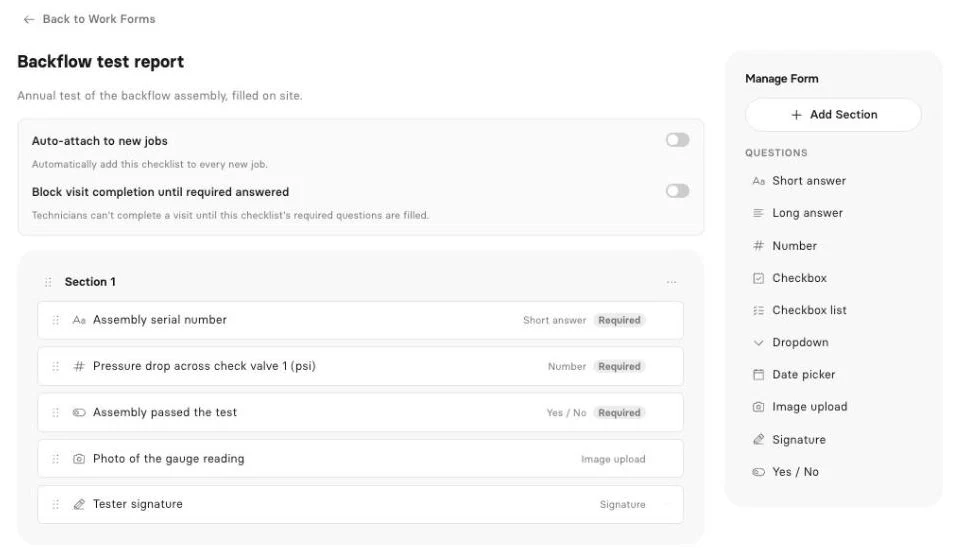
Clevra’s on-site checklists (Pro and up) give each of those jobs a proper form. Fields include text, numbers for readings, checkboxes, dropdowns, dates, yes/no, photo upload, signature and required fields. The form is filled during the visit, Clevra builds a PDF, and the customer sees it in their client portal with the invoice. For now, photo and signature questions are filled from the web app rather than the Technician app. Our post on documenting water damage jobs shows what restoration customers and adjusters usually expect to see.
Early access: inspection reports. Clevra’s inspection report drafts take what the crew captured on the roof or in the crawlspace and turn it into a client-ready report draft. That’s the part that usually eats an inspector’s evening. It’s in Early access, and you can book a demo to see it with your own template.
Early access: AI Receptionist. You can’t take a call on a 10/12 pitch. The AI Receptionist answers your business line, notes who’s calling and what they need, and puts the request in the office inbox for booking. It’s in Early access as well; grab a demo slot to get on the list.
AI that works today. The Business Assistant (Pro and up) answers plain-English questions from your live numbers: “How many roof inspections did we do in September?” or “Which property managers owe us more than 30 days?” Clevra’s MCP connection links your account to Claude, ChatGPT or any MCP assistant, which can look up jobs, find open slots, draft an estimate or book a visit, and it asks before every change.
The core workflow. Online estimates customers approve and sign, with automatic follow-ups on Pro. A crew schedule with day, week and month views, a map and recurring visits. Generate Invoice from a finished job, take cards through Stripe with no Clevra platform fee, and record cash, cheque or e-transfer by hand. A client CRM with multiple properties per client, handy for property managers with 30 units. Two-way texting, automations, job costing, 23 reports and QuickBooks Online sync on Pro and up.
Pricing. A flat company price, not per user (compare Clevra plans):
- Free: $0 for 1 user, no time limit
- Pro: $49 a month, or $39 a month billed yearly, for up to 5 users
- Business: $99 a month, or $79 a month billed yearly, for up to 15 users
- Custom: unlimited users, pricing on request
New accounts get 14 days of Pro or Business free, with no card.
Where JobNimbus is stronger. JobNimbus includes roof measurements on every plan, connects to suppliers for material orders, offers homeowner financing and has sales-focused CRM boards. Clevra has none of those: no measurements, no supplier ordering, no financing. If you sell replacements, that gap matters.
For a line-by-line breakdown, see Clevra vs JobNimbus.
2. AccuLynx
AccuLynx calls itself all-in-one roofing software. It covers sales and CRM, production management, document automation, text messaging, a customer portal, payments, crew management, financing and custom reporting. Pricing is on request with no plans listed, and no trial is mentioned.
If you’re a roofing company leaving JobNimbus because you want deeper production control, AccuLynx is the most direct swap on this list. It’s still a roofing replacement tool at heart. See Clevra next to AccuLynx.
3. Jobber
Jobber is general home service software. On annual billing, Core is $29 a month for 1 user, Connect for 5 users is $149 and Grow for 5 is $229, with extra users at $29 a month. There’s a 14-day trial with Grow features and no card.
It handles gutter cleaning, handyman and small repair work well, with online self-booking, Tap to Pay, ACH and a large app marketplace. It doesn’t do roof measurements or sales boards, and its forms aren’t built around inspection reports. See our Jobber comparison.
4. Housecall Pro
Housecall Pro’s annual prices are $59 a month for Basic (1 user), $149 for Essentials (5) and $299 for MAX (8), plus $35 per user after that. There’s a 14-day trial and no free plan.
The appeal is mobile polish: iOS and Android apps in English and Spanish, offline mode, vehicle GPS tracking, online booking, consumer financing and CSR AI that answers calls and books jobs. It’s built for home service in general rather than exterior sales. See Clevra and Housecall Pro compared.
5. ServiceTitan
ServiceTitan lists roofing among its trades, alongside HVAC, plumbing, electrical and more. Starter, Essentials and The Works are all “Request pricing”, priced per technician, with no trial listed. It brings call booking and recording, a proposal builder, project management with progress billing, financing and an AI Virtual Agent.
A big roofing company with a call center uses all of that. A two-person inspection firm would spend more time configuring than inspecting. See how Clevra stacks up against ServiceTitan.
6. Service Fusion
Service Fusion names roofing and gutters among its trades and charges per company with unlimited users. Annual billing: Starter $208 a month, Plus $325, Pro $533 ($245, $382 and $627 month to month). It offers a demo, not a trial.
You get GPS tracking, a technician app, eSign, a customer portal, progress billing and an AI phone answering service. It’s a strong fit once you pass 15 or 20 people. For a small inspection crew, the entry price is the hurdle. See our Service Fusion breakdown.
Free JobNimbus alternatives (and what free really covers)
JobNimbus gives you 14 days with no card, which is generous. After that, you’re on a paid plan. A free plan is different: it keeps running while you decide.
Clevra’s Free plan is $0 for one user, with no end date. It includes clients, estimates, jobs, scheduling, invoices, the client portal and online card payments, with Clevra branding on estimates, invoices and the portal. Checklists and reports start on Pro.
For a solo roof inspector or a new stucco testing business, that’s enough to book jobs, invoice and take card payments before spending a dollar. When you add a second inspector, Pro covers up to 5 users at one price.
The others: Jobber and Housecall Pro offer 14-day trials. AccuLynx and ServiceTitan list none, and Service Fusion offers a demo.
Software like JobNimbus: testing the mobile side
Inspectors and restoration techs spend most of the day away from a desk, so the phone app decides whether a tool sticks. Before you commit, put it in your best tech’s hands for a full day and ask:
- Can they open the day’s jobs, get directions and send On My Way from the truck?
- Can they complete the inspection form on site, including photos and a signature?
- Does it hold up in an attic or a basement with weak signal?
- Can they collect payment before leaving?
Clevra’s honest status: the Technician app shows the tech’s schedule, visit details, directions, and Start, On My Way and Complete. It fills checklists, runs a visit timer and timesheets that work offline, creates invoices and records cash, cheque, card or e-transfer payments by hand. It’s an iOS beta on TestFlight and not on the App Store yet. Android isn’t available, and photo and signature questions are filled from the web app for now.
If your crew needs Android or full offline mode today, Housecall Pro and Jobber have more complete mobile apps.
Choosing between roofing CRMs and service tools
Ask one question first: do you make most of your money selling jobs, or doing inspections and service visits?
- You sell full replacements with measurements, supplier orders and financing: stay with JobNimbus or look at AccuLynx. That’s what they’re for.
- You inspect roofs, stucco or water damage and deliver a report: look for strong on-site forms and PDF output. That’s Clevra’s focus, with jobs and visits built around the form.
- You’re a mixed crew doing gutters, handyman and small repairs: Jobber or Housecall Pro.
- You’re 1 to 5 people and want a number today: Clevra Pro is $39 a month billed yearly for up to 5 users, and it’s published.
- You run 20+ people across several trades: Service Fusion or ServiceTitan.
- You want AI answering calls right now: Housecall Pro and Service Fusion ship it today. Clevra’s AI Receptionist is in Early access.
Inspection crews often add work on the same visit, like gutter guards or a moisture check. Our post on upsells that fit a service visit has ideas, and the guide to reports and job costing shows how to see which job types actually pay.
Moving from JobNimbus to Clevra
An order that keeps the phones answered while you switch:
- Export contacts. Pull your contacts and job addresses out of JobNimbus into a spreadsheet.
- Import them. Clevra accepts CSV or XLSX files up to 5,000 rows, and one client can hold several properties.
- Skip the board, keep the stages you need. Instead of sales columns, use requests, estimates, jobs and invoices. Most inspection firms find that covers it.
- Set up one form per inspection type. Roof, stucco, water damage, each with the fields your clients actually read.
- Add your price list. Inspection fees by home size, re-inspection fees, repair line items.
- Hook up Stripe and QuickBooks Online. Cards through Stripe on every plan, QuickBooks on Pro and up. See what Clevra connects to.
- Add the request form to your website. New inspection requests land in one inbox via the website request form.
- Close out old jobs in JobNimbus. Book new work in Clevra and cancel once open jobs are paid.
JobNimbus alternatives FAQ
Is JobNimbus worth it?
For roofing, siding, gutter and solar companies that sell large exterior jobs, it often is. Measurements, eSign, supplier integrations and sales boards save real time. It’s harder to justify if your business is roof inspections, service calls or restoration documentation, where a schedule and a strong report matter more than a pipeline.
Does JobNimbus have a free trial?
Yes. As of October 15, 2026, JobNimbus offers a 14-day free trial with no credit card. It doesn’t list a free plan, and every paid plan says request pricing, so you’ll talk to sales to get a number once the trial ends.
Is there a free alternative to JobNimbus?
Clevra has a Free plan at $0 for one user with no time limit. It covers clients, estimates, jobs, scheduling, invoices, a client portal and online card payments. It isn’t a roofing sales CRM, so it suits inspectors and service crews rather than replacement sales teams.
Who are JobNimbus’s main competitors?
For roofing sales and production, AccuLynx is the closest competitor. Broader field service tools like Jobber, Housecall Pro, ServiceTitan and Service Fusion also come up. Clevra competes for inspection and service crews in roof inspection, stucco, water damage, concrete scanning and utility locating.
Can Clevra measure roofs or order materials?
No. Clevra doesn’t offer roof measurements, supplier ordering or homeowner financing. It’s built for jobs that end with an inspection or service report and an invoice. If you sell and build full replacements, a roofing CRM like JobNimbus or AccuLynx is the better fit for that part of the business.
Does Clevra have an AI receptionist?
The AI Receptionist is in Early access. It answers the business line, records who’s calling and what they need, and puts the request in the office inbox for booking. Book a demo to join. The AI Business Assistant, which answers questions about your own data, is live today on Pro and Business.
Does Clevra work for roof inspection companies?
Yes. On Pro and up, you build a roof inspection checklist with condition dropdowns, measurements as numbers, photo uploads and a signature. It becomes a PDF in the client portal next to the invoice. Photo and signature questions are filled from the web app for now. AI report drafts are in Early access.
More trades are listed on our industries overview, and the comparison page covers 15 tools.
Put your next roof inspection in Clevra
Book your next roof, stucco or water damage inspection in Clevra and send the report before you’re back at the shop. The Free plan doesn’t expire, and Pro or Business include a 14-day trial with no card.
Get Started for Free or Book a Demo to see inspection reports and the AI Receptionist in Early access.




All-in-one operations platform for trades.
You run a crew, not a tech company. Clevra handles the office stuff so you can stay on the tools.