Table of Contents
AccuLynx Alternatives for Contractors (2026)


AccuLynx is serious software for roofing companies that build things. It tracks a job from the sale through production: material orders, crew assignments, document packets, the customer portal, payments and financing. When you have four install crews and a production manager juggling tear-offs, that structure keeps the wheels on.
Not every roofing-adjacent business runs production, though. Some never order a bundle of shingles. They inspect roofs for buyers and insurers, test for mold, dry out flooded basements or inspect chimneys, and the thing they sell is careful documentation. For those outfits, an AccuLynx alternative with published prices and a lighter setup often makes more sense.
This guide compares six options, including two built for roofing production and four that aren’t. We make Clevra, so it’s listed first. We’re also clear about which tools beat it, because the wrong software is expensive in hours, not just dollars.
Every price below was checked on the vendor’s own pricing page on October 15, 2026.
Fast answer: AccuLynx alternatives by business type
- Clevra: inspection and remediation crews of 1 to 15 (roof inspection, mold, water damage, chimney, concrete scanning, utility locating) that sell findings and need report-ready forms. Free plan, flat pricing.
- JobNimbus: roofing and exterior contractors that want sales-focused CRM boards, measurements on every plan and a 14-day trial.
- Jobber: small home service crews that want simple scheduling, online self-booking and Tap to Pay.
- Housecall Pro: home service companies that want iOS and Android apps with offline mode and GPS tracking.
- ServiceTitan: large contractors (roofing included) with dispatchers, project management and progress billing.
- Service Fusion: multi-trade shops of 15 or more that want unlimited users at a company price.
Why owners search for alternatives to AccuLynx
AccuLynx is good at what it was designed for. The search for something else usually starts when the business doesn’t look like a roofing production company. Here’s what we hear most.
1. There’s no number on the website. AccuLynx doesn’t list plans or prices. You go through a sales conversation to learn the cost, and no trial is mentioned. For a small inspection firm comparing tools on a Saturday morning, that’s a dead end.
2. You don’t run production. Production management, material ordering and crew scheduling across install teams are the heart of AccuLynx. If your crew is one inspector with a ladder and a moisture meter, those screens sit empty.
3. Your paperwork is the product. A mold assessment needs moisture readings by room, air sample IDs, photos of visible growth and a signed scope. A water damage job needs a dated photo log, meter readings day by day and the owner’s sign-off. A chimney inspection needs flue photos and a condition rating. That’s documentation an adjuster or property manager reads line by line, and it has to come from a structured form.
4. You do more than roofs. Many inspection businesses also scan slabs, locate private lines for site work or remediate mold. A roofing-only system rarely handles those jobs gracefully.
5. You want to try it on real jobs first. Owners of small crews want to book five actual visits before committing, not sit through onboarding sessions.
If you run install crews and production is where you lose money, AccuLynx may be exactly right. If your bottlenecks are reports and follow-up, read on.
AccuLynx competitors at a glance
Here’s what each option costs a 5-person crew per month on annual billing, in USD, where prices are published. Checked October 15, 2026.
- AccuLynx (for reference): pricing on request, no plans listed. No free plan. No trial mentioned. Best for roofing companies that manage production crews.
- Clevra: $0 for 1 user. 5-person crew: $39/mo (Pro). Free plan. 14-day trial, no card. Best for inspection and remediation crews of 1 to 15.
- JobNimbus: request pricing, plans by team size (up to 3, 10, 19 or 20+ users). No free plan. 14-day trial, no card. Best for roofing and exterior sales teams.
- Jobber: from $29/mo for 1 user. 5-person crew: $149/mo (Connect). No free plan. 14-day trial. Best for general home service.
- Housecall Pro: from $59/mo for 1 user. 5-person crew: $149/mo (Essentials). No free plan. 14-day trial. Best for crews that want mature mobile apps.
- ServiceTitan: request pricing, per technician. No free plan. No trial listed. Best for large contractors with call centers.
- Service Fusion: $208/mo with unlimited users (Starter). No free plan. Demo only. Best for teams past 15 people.
The 6 best AccuLynx alternatives for inspection and roofing crews
1. Clevra: for inspection and remediation crews that sell documentation
Clevra is one web app that carries a job from the first call to the paid invoice, with an iOS field app for technicians that’s currently a beta on TestFlight. It’s built for crews of 1 to 15 in trades where the deliverable is a record of what was found: roof inspections, mold remediation, water damage restoration, chimney inspection, plus slab scanning and utility locates.
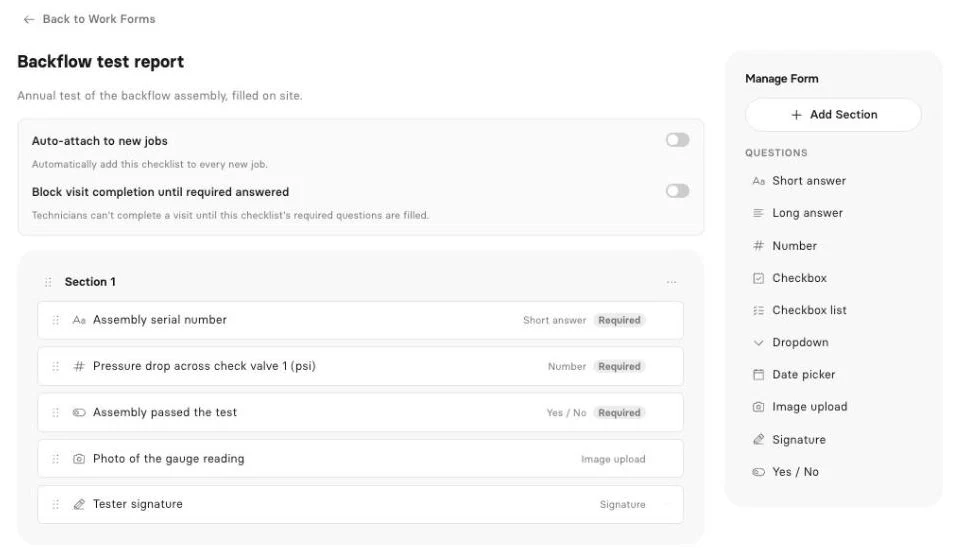
Documentation built into the visit. Picture a mold job in a finished basement. The tech records relative humidity, moisture readings on four walls, the location of each air sample, photos of growth behind the baseboard and the containment set up before demo. Two days later, a different tech is on a hail-damage roof inspection for a homeowner filing a claim, logging hits per test square, damaged vents and soft spots, with photos. Clevra keeps those as structured answers rather than loose notes, so the record is consistent from one tech to the next.
That’s what Clevra checklists do on Pro and up. You build a form with text, number readings, checkboxes, dropdowns, dates, yes/no, photo uploads, signatures and required fields, and attach it to the visit type. The tech fills it on site, Clevra generates a PDF, and the client opens it in the online client portal next to the invoice. Photo and signature questions are filled from the web app for now. For restoration specifics, see our guide to water damage paperwork that holds up.
Early access: inspection reports. Clevra inspection reports take the readings and photos captured on site and turn them into a client-ready report draft. For a mold or roof inspector, that’s the hour of write-up after the visit. It’s in Early access; book a demo and bring a sample of your current report.
Early access: AI Receptionist. Remediation calls come in at bad times, often while you’re in a respirator. Clevra’s AI Receptionist answers your business line, notes who’s calling and what’s wrong, and leaves the request in your inbox for the office to book. It’s in Early access, so set up a demo to get access.
Live AI on Pro and up. The AI assistant for your business data answers questions in plain English, such as “Which water damage jobs are still unpaid?” or “How much did we invoice for mold work in August?” The Clevra MCP server connects your account to Claude, ChatGPT or other MCP assistants. They can look up jobs, find open slots, draft an estimate or book a visit, and every change needs your approval first.
The everyday tools. Estimates with online approval and signature and automatic follow-ups on Pro. A schedule with day, week and month views, map view and recurring visits for annual chimney inspections. Invoices generated from the job, card payments through Stripe with no Clevra platform fee, and cash, cheque or e-transfer recorded by hand. Crew roles and permissions, timesheets, 23 reports, automations, two-way texting and QuickBooks Online sync on Pro and up.
Pricing. Flat per company, with no per-user charge (see what each plan includes):
- Free: $0 for 1 user, no time limit
- Pro: $49 a month, or $39 a month billed yearly, up to 5 users
- Business: $99 a month, or $79 a month billed yearly, up to 15 users
- Custom: unlimited users, pricing on request
New accounts can try Pro or Business free for 14 days. No card required.
Where AccuLynx is stronger. AccuLynx runs roofing production: crew management across install teams, document automation, financing, payments and custom reporting built for roofing. Clevra has no roof measurements, no supplier ordering, no financing and no progress billing. If you build roofs, AccuLynx covers ground Clevra doesn’t.
For a line-by-line breakdown, see Clevra vs AccuLynx.
2. JobNimbus
JobNimbus is the most common name next to AccuLynx. Its four plans are sized by team (Essentials up to 3 users, Pro 10, Premium 19, Enterprise 20+), all marked “Request pricing”, with a 14-day trial and no card. Measurements, eSign and reports are on every plan, along with payments, financing, QuickBooks and supplier integrations.
It leans more toward the sales side, with CRM boards for moving leads to signed contracts. If you want a roofing platform you can actually try before talking to sales, start here. See Clevra compared with JobNimbus.
3. Jobber
Jobber publishes its prices. On annual billing, Core is $29 a month for 1 user and Connect for 5 is $149. Month to month, Core is $49 and Connect for 5 is $199. Extra users run $29 a month, and the 14-day trial needs no card.
It’s a sensible pick for small repair and maintenance crews who want online self-booking, Tap to Pay and ACH payments. It isn’t a roofing production tool and doesn’t center on structured inspection forms. See the Clevra and Jobber page.
4. Housecall Pro
Housecall Pro’s annual pricing starts at $59 a month for 1 user (Basic), $149 for 5 (Essentials) and $299 for 8 (MAX), then $35 per additional user. It has a 14-day trial and no free plan.
The mobile apps are its edge: iOS and Android, English and Spanish, offline mode and vehicle GPS tracking. Add online booking, consumer financing, payroll and CSR AI for answering calls. It suits home service companies more than roofing production. See Housecall Pro against Clevra.
5. ServiceTitan
ServiceTitan serves roofing alongside HVAC, plumbing, electrical and other trades. All three plans say “Request pricing”, priced per technician, with no trial listed. It includes project management with progress billing, purchasing and inventory, financing, payroll, call recording and an AI Virtual Agent.
For a large roofing and mechanical contractor, that’s real breadth. For a small mold or inspection outfit, it’s a long setup for features you won’t use. See our ServiceTitan comparison page.
6. Service Fusion
Service Fusion’s flat company pricing includes unlimited users. Annual billing: Starter $208 a month, Plus $325, Pro $533. Month to month: $245, $382 and $627. There’s a demo, and no trial is mentioned.
Roofing and gutters are on its trade list, with GPS tracking, inventory, job costing, eSign, a customer portal, progress billing and AI phone answering. It’s good value for 20 people. For 3, the starting price is high. See Service Fusion next to Clevra.
Free and low-cost AccuLynx alternatives
Since AccuLynx doesn’t mention a trial, the first question many owners ask is what they can try without a sales call. There are two kinds of free: a trial that ends, and a plan that doesn’t.
Clevra’s Free plan is $0 for one user with no time limit. It includes clients, estimates, jobs, scheduling, invoices, the client portal and online card payments. Estimates, invoices and the portal show Clevra branding until you upgrade. Checklists start on Pro, which you can trial for 14 days without a card.
For a one-person chimney or roof inspection business, that’s a real way to run jobs for free. Need checklists and a second tech? Pro is $39 a month billed yearly for up to 5 users.
Trials elsewhere: JobNimbus, Jobber and Housecall Pro each give 14 days. ServiceTitan lists no trial, and Service Fusion offers a demo.
Apps like AccuLynx: what your crew should test
A roofing production app and an inspection app do different jobs. Before you switch, hand the app to the person who’ll use it most and check:
- Can they see today’s visits, get directions and mark On My Way?
- Can they fill the inspection or remediation form on site, with readings, photos and a signature?
- Does it keep working in a crawlspace or a flooded basement with no signal?
- Can they take payment at the door?
Clevra, honestly: the Technician app shows the day’s schedule, visit details, directions and Start, On My Way and Complete. It fills checklists, runs a visit timer and timesheets that work offline, creates invoices and records cash, cheque, card or e-transfer payments by hand. It’s an iOS beta on TestFlight, not yet on the App Store. There’s no Android app yet, and photo and signature questions are filled from the web app for now.
If your crew is on Android or needs full offline mode today, Housecall Pro and Jobber are ahead on mobile.
How to decide if you need a roofing platform at all
Count how many of last month’s jobs involved a material order. That number tells you a lot.
- Most jobs had a material order and an install crew: you need roofing production software. Compare AccuLynx and JobNimbus.
- Most jobs ended with a report (roof condition, mold assessment, drying log, chimney rating, scan or locate): pick the tool with the best on-site forms and PDFs. That’s where Clevra fits.
- You’re 1 to 5 people and want published pricing: Clevra Pro is $39 a month billed yearly. Jobber Connect and Housecall Pro Essentials for 5 are $149.
- Your techs need Android or full offline mode: Housecall Pro or Jobber.
- You want AI answering the phone today: Housecall Pro, Service Fusion and ServiceTitan ship it now. Clevra’s AI Receptionist is in Early access.
- You have 20+ people across trades: Service Fusion or ServiceTitan.
Writing estimates for remediation scopes? Our estimating guide for field service walks through line items and options. Annual chimney or roof checkups can become steady work, as covered in building recurring maintenance revenue.
How to switch from AccuLynx in a weekend
- Export your contacts. Get customers and job addresses out of AccuLynx as a spreadsheet.
- Import into Clevra. Upload CSV or XLSX files of up to 5,000 rows. Add several properties per client for landlords and property managers.
- Write your service list. Inspection fees, mold assessments, drying days, chimney sweeps. Estimates and invoices pull from it.
- Build your documentation forms. One each for roof inspection, mold assessment, water damage drying and chimney inspection. Mark the must-have fields as required.
- Set up your team. Add techs and office staff with the right roles and permissions.
- Connect Stripe and QuickBooks Online. Card payments on every plan, QuickBooks sync on Pro and up. Details on the Clevra integrations list.
- Add a request form to your site. The web request form sends new calls for service straight to your inbox.
- Run both for two weeks. Finish open production jobs where they started and book new inspections in Clevra.
AccuLynx alternatives FAQ
Is AccuLynx worth it?
For roofing companies that sell and install replacements with several crews, AccuLynx can pay for itself through production tracking, document automation and financing. For inspection, mold or water damage businesses that never order materials, much of that goes unused, and the lack of published pricing makes it hard to compare.
Does AccuLynx have a free trial?
AccuLynx doesn’t mention a free trial on its website as of October 15, 2026, and it lists no plans or prices. You’ll need to talk to its sales team. If you want to test with real jobs first, Clevra has a free plan and a 14-day trial of its paid plans with no card.
Is there a free alternative to AccuLynx?
Yes, for inspection and service work. Clevra’s Free plan costs $0 for one user with no time limit and includes estimates, jobs, scheduling, invoices, a client portal and online card payments. It isn’t a roofing production system, so install-focused roofers should compare JobNimbus instead.
Who are AccuLynx’s main competitors?
JobNimbus is AccuLynx’s closest competitor in roofing. ServiceTitan and Service Fusion also list roofing as a trade, and Jobber and Housecall Pro come up for smaller service crews. Clevra competes for inspection and remediation outfits in roof inspection, mold, water damage, chimney, scanning and locating work.
Does Clevra have an AI receptionist?
Clevra’s AI Receptionist is in Early access. It answers your business line, takes down the caller’s details and what they need, and puts the request in your inbox so the office can book it. Book a demo to try it. The AI Business Assistant is already live on Pro and Business plans.
Does Clevra work for mold remediation and water damage jobs?
Yes. On Pro and up, you can build forms for moisture readings by room, air sample locations, containment checks, photos and a customer signature. Each one becomes a PDF in the client portal next to the invoice. Photo and signature questions are filled from the web app for now, and AI report drafts are in Early access.
See every Clevra feature or browse all tool comparisons.
Try Clevra on your next inspection
Take your next roof, mold or water damage job through Clevra, from the call to the signed report and the paid invoice. The Free plan has no end date, and Pro or Business come with 14 days free, no card.
Get Started for Free or Book a Demo to see inspection reports and the AI Receptionist in Early access.



All-in-one operations platform for trades.
You run a crew, not a tech company. Clevra handles the office stuff so you can stay on the tools.